Welcome to our community

Be a part of something great, join today!

  • Hey all, just changed over the backend after 15 years I figured time to give it a bit of an update, its probably gonna be a bit weird for most of you and i am sure there is a few bugs to work out but it should kinda work the same as before... hopefully :)

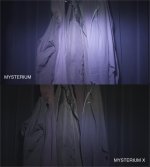
MX IR TEST...

I have to second Roberto's question. It looks like your IR filter is doing next to nothing in both photos. In theory, the top 1/4 of the first still should look green. Right?

The top part of the Mysterium frame should look "black" (or light grey because we overexposed a bit).

It appears to still have a little magenta/purple - but most of it is gone. Perhaps because we were handholding the filter. Maybe some of the IR was able to creep in.

But as I said - this isn't a test of how IR filters work on the Mysterium sensor - there are plenty of better tests on this site that show that.

The top part of the MX looks no different because the new sensor does such a good job of filtering out the IR - as I think this test illustrates?
 
Dear Dylan,

Great test! Thanks! We really appreciate it.

Can you possibly do another test with ND1.5, ND1.8 and ND2.1? Just quickly stack ND filters if you don't have just one strength. This will make the test more relevant (especially now with such a sensitive sensor).

Thanks!
George
 
Dear Dylan,

Great test! Thanks! We really appreciate it.

Can you possibly do another test with ND1.5, ND1.8 and ND2.1? Just quickly stack ND filters if you don't have just one strength. This will make the test more relevant (especially now with such a sensitive sensor).

Thanks!
George

I only had access to the camera for one day, so I can't. Sorry.

Also - our brightest light at the camera rental house was a 2K, so we couldn't use higher than the 1.2 (although we had a 1.5).
 
Dylan, last question. If the top 1/4 of the M still is more or less how the image is supposed to look, why does the M-X sensor make the jacket green?

Not sure.

MX looks a little more "warm" and yellow to me. Not so much green.

Like I said I don't think the IR filter cut out all the IR in the M - but most.

I looked at the files again in REDALERT and if I choose REC709 (instead of REDSPACE) - the image becomes more neutral black in the MX and the filtered part of the M.

Color space aside - I think we can still see the vast improvement in IR cut of the MX sensor, no?
 
Try processing the MX clip in redcinex. Redalert doesn't understand the MX native colorspace and will look off by quite a bit.
 
I see Dylan, thank you for posting. There is a vast difference from M to M-X and your post shows that clearly. If you have the clips and don't mind please do post them using Cine-X, but there is no doubt about the improvement being a big one.

Thank you for taking the time to post the comparison.
 
I see Dylan, thank you for posting. There is a vast difference from M to M-X and your post shows that clearly. If you have the clips and don't mind please do post them using Cine-X, but there is no doubt about the improvement being a big one.

Thank you for taking the time to post the comparison.

Okay. I can't procrastinate any longer. Must check out REDCINE-X!
 
Thanks for encouraging me to look at this through REDCINE-X. I didn't think it would have much bearing, but it definitely does! I put both files through REDCINE-X (RedColor and RedGamma). You can see from the image below, that there is a little IR noticable in the MX sensor. I didn't see it in the other version I did.

And in fact the IR filter is working on the MX as well - so don't cancel those filter orders!

Now to tackle the 150 exposures I have from the dynamic range comparison test...
 

Attachments

  • MX vs M IR test_cine_x.jpg
    MX vs M IR test_cine_x.jpg
    74.2 KB · Views: 0
That makes it much easier for me to judge. Thank you! How did you make sure you where using matching ISO/exposure? I wouldn't know how to eliminate that factor.

Now to tackle the 150 exposures I have from the dynamic range comparison test...

Ohhhh... are you going to post a review on that too? :biggrin:
 
That makes it much easier for me to judge. Thank you! How did you make sure you where using matching ISO/exposure? I wouldn't know how to eliminate that factor.


Ohhhh... are you going to post a review on that too? :biggrin:

I don't think I am going to post that here - it would likely be a full time job responding to queries and criticism! :-)

As far as exposure goes, I think we did it the same way as the "base exposure" for the dynamic range test.

Basically put the cameras in to RAW/False color mode. Put a gray card in front of the jackets and set the apertures until the gray card was green. But I also recall that we then opened up a little because it was black fabric and we wanted to see a little more detail.

Still not sure why the Mysterium is so much brighter. I guess once i delve in to my DR tests I'll have a better idea of the sensitivity differences in the cameras.
 
The Mysterium only looks brighter on the bottom 3/4 of the image, which makes sense, considering it is picking up more IR than the M-X sensor. If you just compare the top filtered 1/4, there is actually more shadow detail in the M-X version.
 
Thanks for doing this test and posting the results- but I am having trouble interpreting the image- why is the jacket white in one shot and brown in the other? I thought these were taken at the same time under the same conditions ...
 
Back
Top