Welcome to our community

Be a part of something great, join today!

  • Hey all, just changed over the backend after 15 years I figured time to give it a bit of an update, its probably gonna be a bit weird for most of you and i am sure there is a few bugs to work out but it should kinda work the same as before... hopefully :)

Motion blur the X-track in HDRx

Where you got that from? Any source?

They are not photographed at the same time. It is TWO separate exposures - at the interval of your timebase. The first exposure (aka the "X Frame) is shot with a FASTER exposure time (aka shutter speed) so it is darker, and protects your highlights. Your data rate / compression is limited to 2X your timebase.
 
They are not photographed at the same time. It is TWO separate exposures - at the interval of your timebase. The first exposure (aka the "X Frame) is shot with a FASTER exposure time (aka shutter speed) so it is darker, and protects your highlights. Your data rate / compression is limited to 2X your timebase.

Correct me if I'm wrong, but the explanation of the Magic Motion is that we normally follow a motion with our eyes and have a sharp impression from that area, nevertheless, it is motion-blur in the picture as well. If your statement is correct, then the sharp version would move consequently outside the motion blur. Sounds wrong, right?

My assumption so far was, that the sensor is read out twice, and the charges of the sensor during the first readout are lower, based on the shorter time. But the second read out is combined with the first. Anything else would not be meaningful to me. In other words, two read outs "one" and "two". The X-Track uses read-out "one", and the A track adds "one" and "two" together.

I understood that this is the reason why the Motion Mount isn't working with HDRX, as the X track would be in the opening phase of the MM.

If the time readout is different, and the definition in the manual allows for both interpretation, while reading "there is no time gap" (Page 8 manual), then it should be more clear in the next version. I can see it as after the X readout, follows instantly readout A (vice versa, I don't know) or track X sits on track A. Both versions follow the definition, no time gap.

If the time read out is different as Tom (isn't he my DOP prof from FXPHD? :o) and you see it, the tip in the manual to use the X track for motion tracking is quite wrong, ... to say the least.
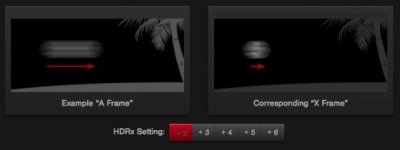
Don't get me wrong, but I'm not certain what is correct at the moment. Thanks though for bringing it up, perhaps it is time to get a more clear definition in the manual, which is for me first hand inforamtion.I would have to change my Motion Mount to do tests, but that and time for it is not possible right now.

P.S.: I checked the http://www.red.com/learn/red-101/hdrx-high-dynamic-range-video

"Keying
. The sharper edges in the X frame can improve mask or keying quality, especially for situations with a moving subject against a backdrop." I imagine that a half frame offset, as you say, will give a good key, you would have always a little green rim on one side of the key. This sounds as wrong as the motion tracking tip, if the X Track is a half frame off-set.


If you take the examples there, they express more my point of view, check the soccer ball example (yes, it is an illustration, so there can be an misunderstood from the designer) or look at the woman with the stick, which sits not outside of the blur. But perhaps it is all based on interpolation ... (as mentioned that The Foundry had some input.)
 

Attachments

  • Screen Shot 2014-07-17 at 7.18.18 PM.jpg
    Screen Shot 2014-07-17 at 7.18.18 PM.jpg
    11.5 KB · Views: 0
Last edited:
Correct me if I'm wrong, but the explanation of the Magic Motion is that we normally follow a motion with our eyes and have a sharp impression from that area, nevertheless, it is motion-blur in the picture as well. If your statement is correct, then the sharp version would move consequently outside the motion blur. Sounds wrong, right?

My assumption so far was, that the sensor is read out twice, and the charges of the sensor during the first readout are lower, based on the shorter time. But the second read out is combined with the first. Anything else would not be meaningful to me. In other words, two read outs "one" and "two". The X-Track uses read-out "one", and the A track adds "one" and "two" together.

I understood that this is the reason why the Motion Mount isn't working with HDRX, as the X track would be in the opening phase of the MM.

If the time readout is different, and the definition in the manual allows for both interpretation, while reading "there is no time gap" (Page 8 manual), then it should be more clear in the next version. I can see it as after the X readout, follows instantly readout A (vice versa, I don't know) or track X sits on track A. Both versions follow the definition, no time gap.

If the time read out is different as Tom (isn't he my DOP prof from FXPHD? :o) and you see it, the tip in the manual to use the X track for motion tracking is quite wrong, ... to say the least.

Don't get me wrong, but I'm not certain what is correct at the moment. Thanks though for bringing it up, perhaps it is time to get a more clear definition in the manual, which is for me first hand inforamtion.

I would have to change my Motion Mount to do tests, but that and time for it is not possible right now

Motion blur is a result of exposure time (aka shutter speed).

HDRx takes two exposures - one based on your exposure time - and one extra (X) exposure as close as possible to your other exposure - FIRST - with a FASTER exposure time (AKA shutter speed) - how much faster that exposure times is based on a calculation of light vs. exposure time. 1 stop of HDRx = 1 stop less light in the X frame. This does happen at your project timebase - so ... 23.98fps in HDRx is NOT the same as 48fps - but rather - 2X exposures every 23.98th of a second.
 
Last edited:
Motion blur is a result of exposure time (aka shutter speed).

HDRx takes two exposures - one based on your exposure time - and one extra (X) exposure as close as possible to your other exposure - FIRST - with a FASTER exposure time (AKA shutter speed) - how much faster that exposure times is based on a calculation of light vs. exposure time. 1 stop of HDRx = 1 stop less light in the X frame. This does happen at your project timebase - so ... 23.98fps in HDRx is NOT the same as 48fps - but rather - 2X exposure every 23.98th of a second.


This is what I learned in the early '90s doing videos at the University of the Arts, Berlin, how motion blur is created. Thanks for the refresher ;o), but it is not a fact at all that would explain how the HDRX is set up. Sorry.

I added a P.S. to my post, even the illustration on the 101 site of Red.com illustrates it in the way I see it.

Any source is welcome.
 
This is what I learned in the early '90s doing videos at the University of the Arts, Berlin. Thanks for the refresher ;o), but it is not a fact at all that would explain it how the HDRX is set up. Sorry.

I added a P.S to my post

okay - sorry - just trying to help. Clearly I'm not sure of what your question is ..?
 
This sounds as wrong as the motion tracking tip, if the X Track is a half frame off-set.
[/FONT][/COLOR]

It's a slippery slope to say "half a frame offset" when in fact, the whole way HDRx works is increasing the differences of the "fame off-set". I've worked on many projects that shot HDRx to get a "track" that was easier to motion track for VFX. And sure - technically each frame on the HDRx X frame does NOT happen at the exact time as the "A" frame exposure - it does give you a high resolution image without the same amount of detail loss via motion blur as your base exposure ("A" frame) - and ... again .... the two exposures / frame captures of HDRx mode happen as close to each other as technically possible based on your project timebase. HDRx at 23.98 is two exposures every 23.98 fps - not the same as 48 fps. Close ... but not the same animal.
 
This is how the manual presents it on Page 9:

During acquisition and recording, the two tracks are “motion-conjoined”, meaning there is no gap in time be-tween the two exposures. This is very important to note because if these were traditional alternating exposures,there would be a time gap between the two tracks that would show up as an undesirable motion artifact. Bothtracks (A and X) are stored in a single .R3D® file.


Mark explains it as Alternating exposures, as he tells me that would be the reason for the 180º max. The manual states "
traditional alternating exposures" are not used. One of my 1,200 published tutorials discusses in a 6.5 hour series -- HDRI and the use of a RED. So if I have a mistake in my material, please -- anyone from RED has some input? Thanks.

Any first hand information would be nice to have.
 
This is how the manual presents it on Page 9:

During acquisition and recording, the two tracks are “motion-conjoined”, meaning there is no gap in time be-tween the two exposures. This is very important to note because if these were traditional alternating exposures,there would be a time gap between the two tracks that would show up as an undesirable motion artifact. Bothtracks (A and X) are stored in a single .R3D® file.


Mark explains it as Alternating exposures, as he tells me that would be the reason for the 180º max. The manual states "
traditional alternating exposures" are not used. One of my 1,200 published tutorials discusses in a 6.5 hour series -- HDRI and the use of a RED. So if I have a mistake in my material, please -- anyone from RED has some input? Thanks.

Any first hand information would be nice to have.

Just shoot it and you can see for yourself - it's rather obvious. There is not a "gap" BETWEEN exposures/frame capture ... but ... the exposures/captures are not happening at the same exact time. They happen next to each other and the GAP between each SET of X+A frames is based on your timebase.
 
I took that from your explanation, and yes, English is not my first language, so I search first and foremost on my side if something goes weird in a discussion.

Yes, that is one way, as I understand the manual, no gap, one exposure after the other A and X with no gap. I also have an understanding that there was a different method. Both start at the same time then readout X then A, let skip how it is internally (added or parallel, perhaps RED might not say how it is done, patent etc). I try only to get a first hand information, as I feel -- I can agree with you, but I don't feel wrong in my way of seeing it. I hope to be soon in Irvine again, perhaps someone there might give me a hint, if it is not possible in public. I'm happy to go with any of the two, but I need really first hand facts, to avoid longer discussions in the future. Does this sound agreeable? If you are correct, the the 101 stuff is misleading in the graphics, and the manual is due for an update.

Thanks for your patience

It's a slippery slope to say "half a frame offset" when in fact, the whole way HDRx works is increasing the differences of the "fame off-set". I've worked on many projects that shot HDRx to get a "track" that was easier to motion track for VFX. And sure - technically each frame on the HDRx X frame does NOT happen at the exact time as the "A" frame exposure - it does give you a high resolution image without the same amount of detail loss via motion blur as your base exposure ("A" frame) - and ... again .... the two exposures / frame captures of HDRx mode happen as close to each other as technically possible based on your project timebase. HDRx at 23.98 is two exposures every 23.98 fps - not the same as 48 fps. Close ... but not the same animal.
 
I will do it on the weekend, certainly. I have obviously no arguments that will convince you ;o) So -- I might be wrong, but if so I want to know it for sure. Or have the fun to find a way to re-ingineer how it is done. It is just tech and with three engineer degrees under the belt, I think I'm able to get this figured out. Again thanks for your time.

Just shoot it and you can see for yourself - it's rather obvious. There is not a "gap" BETWEEN exposures/frame capture ... but ... the exposures/captures are not happening at the same exact time. They happen next to each other and the GAP between each SET of X+A frames is based on your timebase.
 
If you are correct, the the 101 stuff is misleading in the graphics, and the manual is due for an update.

Thanks for your patience

The manual gets better all the time. I'm amazed how good it is now - and still .... so very few read it. When I started my RED journey .... there was no manual at all. But yeah ... HDRx could be explained better IMO - since so many people find it scary and confusing - and people don't use tools that scare them.

HDRx is a powerful tool that is very often underrated and underused due to failure to comprehend due to failure to define and explain.
 
I have the fear that doing tutorials has changed how people take new information in. Reading seems since a few years not an option anymore to a majority.

I agree with you that manuals get better, if there is feedback, or the company is really interested in it.

The main software I teach online, since ten years by now, had a manual of 3,000 pages, before we released it online inside of the app only. Since then it has grown, and many people work on it constantly. It is very hard to find a "One Size Fits All" language for this. Besides that, everyone has a different background and with that it is too cryptic or too boring to read.

I would love to have a clear technical description only as well, just numbers and facts, but the artist in me likes short ones and images/graphics. It never is the right mix for me, but I know it is me, not the manual.

Most discussions here could be short-cut with a more detailed manual thought.

==

Yes, HDRX is Powerful and certainly one of the many motivations to have a RED in the first place.

==

Again thanks for the time, really appreciated.


The manual gets better all the time. I'm amazed how good it is now - and still .... so very few read it. When I started my RED journey .... there was no manual at all. But yeah ... HDRx could be explained better IMO - since so many people find it scary and confusing - and people don't use tools that scare them.

HDRx is a powerful tool that is very often underrated and underused due to failure to comprehend due to failure to define and explain.
 
Using 24fps as the example, 180° shutter, 1/48th for A track with a two stop darker X-track at 1/192nd.

AFAIK the A track goes first, then 6-12ms for read-reset, then the X track, then the remaining fraction of 1/24th of a second with the shutter closed (probably around 1/144th minus 2 read-reset cycles). Repeat.

I am also under the impression that when composting using Magic Motion or MNMB in RCX-P, there is built in correction for the slight time offset. If the material is particularly demanding you may want to put the two tracks in a tool that allows nudging as well as auditioning various levels of motion blur on the X track.

FWIW, we were often surprised that the "technically correct" adjustments we worked out mathematically were not always the most natural looking. Shooting an entire feature using HDRx is not something I would recommend unless you are 100% positive it's worth it for your project (and, with any luck, you have a lot of lock offs).

Cheers - #19
 
The frames are slightly off. They cannot be read at the same time. For this reason, very few use this feature for fast movement, be it action in camera or camera movement.

Very few understand how easy it is to a hit a button on Mamba FX and have extremely powerful optical flow technology add motion blur to the X frame so that is matches the A frame.

Frame averaging does not yield the same results as good optical flow. Kinda night and day actually.
 
The frames are slightly off. They cannot be read at the same time. For this reason, very few use this feature for fast movement, be it action in camera or camera movement.


Thanks Bob, always nice to read your posts in RU. I wish there would be a "Like/Plus" option for posts, as I do not like to noise a thread with applause. (I hope I don't do it here right now. I feel already bad enough to have taken so much space for the discussion above)
 
Haven't tried Mamba FX. When we were experimenting it occurred to me that someone could make a tool that did image analysis on both tracks then intelligently composited them. Ideally it would do the time realignment first and offer an "on time" X track for VFX work that was "centered" within the blurred A track. Obviously not all motion could be solved cleanly, but I would expect AI to handle most footage well enough to be unnoticeable. Based on Mark's notes, perhaps Mamba FX has this well enough sorted to make HDRx much less of a PITA - which would rock.

Cheers - #19
 
Hi Mark,


im extremely eager to see an example of your HDRx blend in mamba. Moreover I would LOVE to see a short tutorial on how to do this inside Mamba and would be willing to pay you for it. Hell, I'm sure many people would! I'm anxious to see what your work flow is as I have some major projects on the horizon starting next month and would like to know my options with HDRx. Thanks!
 
Back
Top