ThatCanadianGuy
New member
- Joined
- Apr 3, 2026
- Messages
- 2
- Reaction score
- 1
- Points
- 1
Hello REDUSER Forum.
I am having an issue with my RED Epic-X Dragon 6k. When I plug the RED 5" Touch monitor into the front LCD Port the image shows up yellow. This is including the menu text. The entire display, not just the sensor image. Also, it doesn't seem to happen when plugged into the +1 Monitor Adapter port on the rear of the camera. Can't seem to find anything about this online, so I figured I would ask here and see if anyone has experienced this. I have tried reinstalling firmware, hard-resetting the camera, Different LEMO cables, running with all modules on or off. Re-flashing with the handle removed and anything else I can think of. Cleaning the port, etc. Nothing seems to fix it. Ill include some photos below. Curious if anyone has a fix or any ideas. Also wondering if anyone has taken apart the original DSMC Mini Mag Module and if it is something I could potentially repair as they are pricey and rare to replace.
My fingers are crossed one of you find folks has an idea.
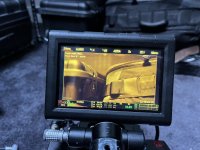
I am having an issue with my RED Epic-X Dragon 6k. When I plug the RED 5" Touch monitor into the front LCD Port the image shows up yellow. This is including the menu text. The entire display, not just the sensor image. Also, it doesn't seem to happen when plugged into the +1 Monitor Adapter port on the rear of the camera. Can't seem to find anything about this online, so I figured I would ask here and see if anyone has experienced this. I have tried reinstalling firmware, hard-resetting the camera, Different LEMO cables, running with all modules on or off. Re-flashing with the handle removed and anything else I can think of. Cleaning the port, etc. Nothing seems to fix it. Ill include some photos below. Curious if anyone has a fix or any ideas. Also wondering if anyone has taken apart the original DSMC Mini Mag Module and if it is something I could potentially repair as they are pricey and rare to replace.
My fingers are crossed one of you find folks has an idea.