Welcome to our community

Be a part of something great, join today!

  • Hey all, just changed over the backend after 15 years I figured time to give it a bit of an update, its probably gonna be a bit weird for most of you and i am sure there is a few bugs to work out but it should kinda work the same as before... hopefully :)

Module adapter

Leroy Jackson

Well-known member
Joined
Aug 9, 2013
Messages
617
Reaction score
2
Points
18
Location
Michigan
Seeming how I'm gonna stick with the "regular" Dragon. And u guys can't give me proRes because I hear it's impossible to include it in a firmware update (I'm not mad haha ... If u can't do it u can't do it). Can we at least get a updated Module adapter/Redlink IN ONE? This I know is 100% doable. So yeah That's a wish of mines. Heck even a Module adapter, +1 module, AND RedLink all in one would be killer for us folks that are gonna stick with the Regular Dragon :)
 
If red does not make it, you can make your own...

https://vimeo.com/112315766

https://serialio.com/products/wifi/...isnap-embedded-rs-232-serial-module-xv-w-wire
http://www.red.com/store/products/4-pin-00-lemo-to-flying-lead

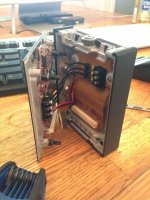
This is probably not something to fiddle with while your camera is on warranty... but as I remembered we stole power by the connector for the lemo power (the red and black cable on attatched photo). And then drilled a little hole in the bottom of the +1 and let just enough of the lemo CTR cable hang out there to reach straight into the CTR port of the camera (just the same way as the +1 steals the HDMI port) Then we shrinked wrapped the wisnap 322 board and left it inside the +1, it's a tight fit, But if you do it right it should fit suggly right next to those black cables.

The shit part to get it working was to configure the wisnap board. You have to have a PC with a RS232 connector, Those you can by as a little dev kit and cost only a couple of bucks. But I think if somebody would make a group buy for the wisnapboards then they can possibly do a "red/foolcontrol" configuration at the factory. We used a little configurator from serialo but it was quite a mess. some of the settings did not work etc. There is a Marshall Langford <marshall at serialio dot com> He helped us quite a bit I think he would be the guy to ask, but not sure mentioning my name would be any help because I think he got pretty tired of me asking a million and one questions about this little card that I paid pennies for and had no knowledge what so ever how to configure :)

Also I did not test but to up the Wifi reach another card might be better: https://serialio.com/products/wifi/...wisnap-embedded-rs-232-serial-module-xv-u-ufl
as it can be used with an external antenna. It would be quite simple to drill a hole in the top, or on the side, of the +1 and attach a little SMA connector and then something like these:

http://www.digikey.com/product-detail/en/ANT-2.4-CW-RAH-SMA/ANT-2.4-CW-RAH-SMA-ND/1793607
https://serialio.com/products/wifi/...al-antenna-cable-ufl-reverse-polarity-sma-pin

But then again it's possible to simply just make a very small hole and let the antenna cable of the embeded version (below link) stick out a little, that gives you plenty of reach.

https://serialio.com/products/wifi/...isnap-embedded-rs-232-serial-module-xv-w-wire


And it has to be said, the above worked great on our camera, but I give no warranty the above will work or not harm your camera, and I'm pretty sure as soon as you open the +1 it voids all your RED warranties.

So if you want to play, but want to play safe then you leave the wisnap out of the +1 module and power it with a Dtap or lemo just like the hotlink.
Looking something like this: https://www.facebook.com/photo.php?...523042.-2207520000.1431471196.&type=3&theater

Or just order the weapon upgrade,:ihih:

edit ups attached wrong picture, here is link to the picture. http://www.reduser.net/forum/showthread.php?131912-Module-adapter&p=1509729&highlight=#post1509729
 

Attachments

  • bild.jpg
    bild.jpg
    93.6 KB · Views: 0
Back
Top