Welcome to our community

Be a part of something great, join today!

  • Hey all, just changed over the backend after 15 years I figured time to give it a bit of an update, its probably gonna be a bit weird for most of you and i am sure there is a few bugs to work out but it should kinda work the same as before... hopefully :)

Mic levels extremely low in my Scarlet

Chris Chitaroni

Active member
Joined
Apr 29, 2013
Messages
33
Reaction score
0
Points
6
So I record audio on board all the time, usually using a shotgun mic with a mini jack to XLR adaptor - no problem.

Yesterday I tried to hook up an Audio Technica W88-830 wireless microphone and I can hear it, but the levels are really low and there is a strange hum as well. I'm confused because this same wireless mic works/sounds great when attached to my 7D and to my H4N.

Any ideas why this may be happening?
 
How are you connecting it? It's probably because you're using an output designed for an unbalanced mic input, whereas the Scarlet's input is balanced. It should work a lot better if you make up a cable which will lift the ring (or short it on the camera side), as in, connect the tip and sleeve only. The Scarlet subtracts the top from the ring, so if the receiver is sending the same signal twice expecting the input to be looking for a stereo, unbalanced mic, the signal would cancel itself out and that would explain the low levels. Also, make sure that Phantom power is switched off.
 
+1 on checking your cables and connections.
Improperly grounded cables, or a mic that isn't properly wired for ground will cause a hum or noise as well.
 
The biggest issue with your volume is most likely due to the unbalanced signal coming in a -10dbu vs pro levels of +4dbu. The 7D and H4n are designed for -10 inputs to handle it better. Also to Andrew's point having phantom power enabled with an unbalanced source can add quite a bit of noise so check that first before messing with your cables.
 
The Audio Technica wireless receivers are not great, period. But dig into the menus and I'm sure there's a way to raise the output levels to overcome the preamp levels in the Red. Note that the Red Epic is expecting to see a mic-level input anyway, not a line-level input. I find they're very, very prone to overload if you're not careful.
 
Note that the Red Epic is expecting to see a mic-level input anyway, not a line-level input. I find they're very, very prone to overload if you're not careful.

Very true, and I've been using this Hosa attenuator to bring line level into my Scarlet and it has been working a treat. I use it whenever I record with a channel coming from a mixing desk and it's not let me down.

http://www.bhphotovideo.com/c/product/431383-REG/Hosa_Technology_ATT_448_ATT_448_In_Line_Attenuator.html
 
You're right +4 is too hot for the mic inputs. If the same receiver settings work on the H4n it is probably a menu setting in cam.
 
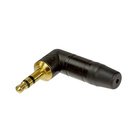
Ok, so I played with it a bit and if I hold the jack in half way it sounds perfect, its only once I push it in all the way that I have an issue - which seems to make sense after reading Andrew's first response. So what are my options here - obviously I can't just let the jack hang halfway in, is there an adaptor or something I can get, or a different cable? The cable I have right now has two rings on it, should I be looking for a cable with only one? I'll admit that I know very little about audio, so any help would be appreciated.
 
That´s, what is written in their FAQ:

The connection is not balanced. It is a dual mono wiring. The same audio signal is sent to both the tip and ring with sleeve being ground. This allow audio to be recorded on both left and right channels on video cameras which usually have a stereo input.

As already advised your camera subtracts one signal from the other, EPIC / SCARLET unfortunately does this also in unbalanced setting. To get proper results you will need an adapter that transfers this signal to a mono jack. Try to get one that splits a stereo signal into two mono plugs. You will find your signal at one end with this mic but will be able to also use a standard stereo mic with both channels. Be sure to set your input to "unbalanced". HTH :-)

Cheers, Ulf
 

Attachments

  • ntp3rc.jpg
    ntp3rc.jpg
    17.9 KB · Views: 0
  • ntp3rc-b.jpg
    ntp3rc-b.jpg
    3.5 KB · Views: 0
Last edited:
Ah, yes, that is a very annoying feature some manufacturers use. It's also the reason some stereo video mics that terminate with only one stereo plug do not work without modification or a splitter. A stereo to mono splitter might work, or maybe one of these: http://www.amazon.com/Stereo-Female-Mono-Male-Adaptor/dp/B000I97G0A

In a pinch I've used a 3.5mm to 1/4 adapter plugged into a 1/4 to RCA splitter and then two RCA to 1/4 mono adapters and finally 1/4 to 3.5mm mono adapters LOL! Amazingly it sounded alright, but physically it was a bit shaky. That was direct into a mix desk. I might try with my Scarlet just for fun.
 
Back
Top