Welcome to our community

Be a part of something great, join today!

  • Hey all, just changed over the backend after 15 years I figured time to give it a bit of an update, its probably gonna be a bit weird for most of you and i am sure there is a few bugs to work out but it should kinda work the same as before... hopefully :)

Menus via the SDI out?

Troy Bakewell

Well-known member
Joined
Nov 6, 2011
Messages
883
Reaction score
0
Points
16
Is there no way to enable menus and the histogram via the SDI out?

How about the HDMI feed?

Thanks in advance.
 
Thanks Bob

BTW I think I solved my problem with the mount. I didn't fully seat the inner ring. :)
 
I have the same issue. I have the Red EVF and LCD, but I'd actually prefer to use my Cineroid EVF4RVW through SDI due to it's lighter weight and larger/brighter image. I can get menu's up, or a waveform, but not the histogram, traffic lights, battery levels etc. For that I need to use the Red monitoring solutions. Have tried SDI, HDMI, with and without the Red EVF and/or LCD connected, and what I think is all options of menu settings. If someone can shed some light on this I'd appreciate it!
 
Menus out HDMI via "Menus (DVI)" does work great but kills the SDI, like you said Mikko. Is there a way to disable the LCD or EVF port to allow the SDI to work when menus are enabled via HDMI.

Anyone?

Before I owned a R1 I could have sworn I've seen menus out SDI on shoots I've been on with R1's. What are we missing here?
 
My hdmi monitor is not showing the audio levles, and all the other data that I've seen on third party HDMI monitors (with Red One) elsewhere.
I'm gonna figure this out... contacting Red.
 
Please keep us informed. I'd love to get this sorted out and get histogram/traffic lights etc. into my Cineroid EVF, either through SDI or HDMI. All I can get right now is shutter angle, ISO etc. Whatever is shown at the top on the Red LCD/EVF. What is meant by "menus"? Is that just for setup menus?
 
I heard back from Red on how to enable all the info on the HDMI monitor, but I haven't had a chance to try it on my Red One.

From Red employee:

1) Double check to make sure your feed is set to Menu.

System > Setup > Program > Feed > Menu

2) Apply this menu setting:

SYSTEM > MONITOR > PREVIEW > TURN THE JOYSTICK UNTIL PVW OUTPUT says MENUS > (DVI)

3) If still not working, Re-Load firmware.
"Try re-loading the current release or BETA firmware onto the camera and then try to hook up the HDMI monitor again. You can get firmware on our downloads page https://www.red.com/downloads. Yes, you should be able to see the audio levels in the bottom right side of the hdmi monitor, the levels bar should just show up."
 
Good work Scott.

So no way to get menus via SDI then?
 
My understanding is that the sdi will show all the info too, I was asking red about HDMI though cause that's what I've got. The manual is not clear about this stuff.
 
I can't find any info on menus via SDI. Are you sure? If so how?

Thanks
 
Menus, HDMI and HD-SDI are all detailed on pages 135-137 of the operators manual, available for download at Red.com.

What is unclear to me is what is meant by "menus". What I want to see is the histogram, traffic lights etc..preferably on SDI (which doesn't appear to be possible based on the manual) or on HDMI (which may or may not be possible but I still haven't got it to work.
 
As mentioned you can get menues and stop lights / histogram data via hdmi by selecting menus dvi.

I really wish someone from RED would chime in here and set the record straight.
 
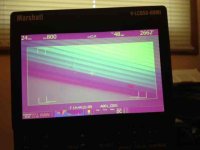
I got the histogram, audio levels, and other info to show up on my Marshall HDMI monitor by following the instructions from Red (posted earlier in this thread).
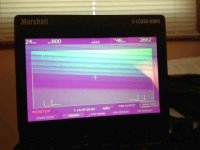
Unfortunately my Marshall HDMI monitor goes pink when in this mode. This has been noted by others who have Marshall HDMI monitors too, so I will stick with the regular 720 output option when using this monitor. The Red footage will not be pink, it's a monitor thing. FYI, there's another recent thread about HDMI monitors that work well with Red One.

More details:
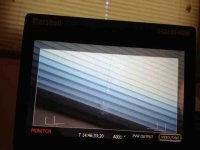
So I started with this on my HDMI monitor... but I wanted more info to show up.
attachment.php


Then I changed my menu settings (detailed earlier in this thread) and got this. I wanted the histogram and audio levels though, and I thought I was stuck with this.
attachment.php


But then I simply exited out of the menus and all the info showed up like you see in this picture.
Again, others with Marshalls (this is the cheapest HDMI Marshall you can buy) have had their image go pink.
attachment.php


I'm very happy I got all the info to show up (thanks for the instructions RED!), but now I'm in the market for a monitor that won't go pink :-)
 

Attachments

  • photosmall.jpg
    photosmall.jpg
    18.1 KB · Views: 0
  • photo(1)small.jpg
    photo(1)small.jpg
    17.7 KB · Views: 0
  • photo(2)small.jpg
    photo(2)small.jpg
    17.9 KB · Views: 0
Stephen

As far as I know the only way to get menus is via HDMI or RED EVF or lcd.

No way to get them via SDI unfortunately.
 
I got the histogram, audio levels, and other info to show up on my Marshall HDMI monitor by following the instructions from Red (posted earlier in this thread).
Unfortunately my Marshall HDMI monitor goes pink when in this mode. This has been noted by others who have Marshall HDMI monitors too, so I will stick with the regular 720 output option when using this monitor. The Red footage will not be pink, it's a monitor thing. FYI, there's another recent thread about HDMI monitors that work well with Red One.

More details:
So I started with this on my HDMI monitor... but I wanted more info to show up.
attachment.php


Then I changed my menu settings (detailed earlier in this thread) and got this. I wanted the histogram and audio levels though, and I thought I was stuck with this.
attachment.php


But then I simply exited out of the menus and all the info showed up like you see in this picture.
Again, others with Marshalls (this is the cheapest HDMI Marshall you can buy) have had their image go pink.
attachment.php


I'm very happy I got all the info to show up (thanks for the instructions RED!), but now I'm in the market for a monitor that won't go pink :-)

Sorry to revive an old thread. I've confirmed that I get the same results with my inexpensive Marshall 5" HDMI monitor. I'm trying to use my Cineroid EVF4RVW through the HDMI to get the same results, but I'm missing all the info on the bottom. I get the top display and the shooting area but am missing all the traffic lights, meters etc. The Cineroid has higher resolution than the Marshall if that counts for anything. Anyone have any thoughts on the subject?? Would really like to use the Cineroid in a light weight configuration for handheld work.
 
I was having same issue last month with a RED ONE. Unfortunately, Troy is right. There´s no way to get menus via SDI on the RED ONE.
I have a SmallHD AC7 HDMI+SDI. I was trying to get the signal via HDMI, but just worked once. After I disconnected the monitor and tried to reconnected again, the signal did not show up ever again. Re-installed the firmware and worked again again, but same issue when disconnected. Rolled back to an old firmaware, same problem.
Finally, I tried another monitor with HDMI and chequed that signal from camera was working correctly, so I picked up a HDMI splitter to see if that could work. To my surprise, it worked perfectly. Tried two different splitters, both worked perfectly.
I needed this monitor working because I wanted to see the menu on an external monitor, besides the RED EVF.

Don´t know if that answer some questions, Troy, Ron, but as I been reading a long time know, the RED ONE has always have problems with external signals/monitors.

Saludos!


Stephen

As far as I know the only way to get menus is via HDMI or RED EVF or lcd.

No way to get them via SDI unfortunately.
 
I believe that I have discovered the problem when using the Cineroid EVF with the Red One. The Red One in DVI/Menus mode outputs a non-compliant HDMI resolution, 1280 x 848. The Cineroid EVF is a true broadcast monitor and will only operate with standard HDMI resolutions of 1920 x1280, 1280 x 720 etc. When plugged into the Red One, it simply crops off the bottom portion of the signal, that is from line 721 to 848. That is where all the meters are located. I am getting good colour on the Cineroid, but the same pink hue on my Marshall 5". The pink colour may again be due to the non-compliant signal, but I'm not sure. I have read that when using the Red Bomb EVF with the Red One you have to choose between seeing the upper or lower portion of the image, but not the whole image at one time. I believe that this is because the R1 has a very "tall" DVI image.

Christian, the HDMI splitter that you used was passive or active? I'm wondering if the splitter somehow recodes the DVI stream into an HDMI compliant one. I sure wish someone from Red would chime in here!!
 
Back
Top