Michael Gregory
Well-known member
- Joined
- Jan 30, 2014
- Messages
- 70
- Reaction score
- 0
- Points
- 0
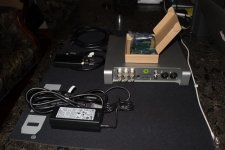
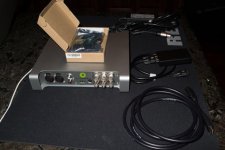
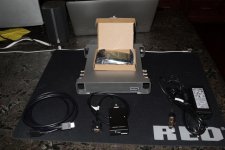
BRAND NEW.... NEVER USED. Includes both Thunderbolt-2 adapter as well as PCIe Adapter Card for use in either Windows or Mac Machines. Max version includes Hardware h.264 encoding and real time capture..... Read more below....
Price: $800 includes PCIe and Thunderbolt adapters
http://www.matrox.com/video/en/products/mxo2_le/
[h=1]SDI/HDMI/analog HD/SD video and professional audio I/O[/h] Matrox MXO2 LE gives you broadcast-quality input and output for your favorite editing app plus a variety of productivity tools in a convenient, portable breakout box.
[h=3]Get the most from your favorite apps[/h] Matrox MXO2 LE amplifies your productivity with all the industry’s leading editing and content creation software for Mac and PC, as well as a wide variety of streaming, live production, and broadcast applications. Explore all the apps

 [h=3]All the I/Os you need[/h] Matrox MXO2 LE gives you a full range of professional audio and video inputs and outputs, genlock, RS-422 machine control, and 5.1/7.1 surround sound monitoring on the HDMI output. No additional breakout cable is required.
See all the connections
 [h=3]Realtime 10-bit hardware scaling[/h] Deliver projects in all the formats your clients demand. Matrox MXO2 LE provides high-quality up/down/cross conversion on capture and output. Read more
 [h=3]Inexpensive HD monitoring[/h] The unique Matrox HDMI Calibration Utility lets an HDMI monitor perform like a broadcast HD/SD monitor with 10-bit 4:2:2 color precision. Read more
 [h=3]Free Matrox productivity apps[/h] Free productivity tools including Matrox MAX H.264 Capture, let you capture directly to H.264 files for the web, mobile devices, and Blu-ray. The new Matrox USB Webcam Emulator utility makes it easy to use professional and consumer cameras with web conferencing software like GoToMeeting™, GoToTraining™, Adobe® Connect™ and Skype™. Read more

 [h=3]Built to last[/h] Engineered without the need for a failure-prone cooling fan, the rugged aluminum chassis acts as a heat sink to dissipate internal heat for a long reliable life and noise-free operation. Only the highest quality components go into Matrox I/O devices.
 [h=3]Edit anywhere[/h] Matrox MXO2 devices are the only I/O products that go wherever you need them – Mac and PC; laptop and desktop; in the studio, in an OB van, and on set. Matrox MXO2 LE can even run off of standard field batteries. For maximum versatility, they connect to your computer via a PCI Express adapter card, an ExpressCard/34 adapter, or a Thunderbolt adapter. Read more

 [h=3]Closed captioning[/h] Matrox SDI I/O products provide acquisition, monitoring, and delivery of closed captions with Final Cut Pro, Adobe Premiere Pro, and Avid Media Composer on the Mac. In addition, They can also let you use standard (non-closed captioning enabled) monitors to preview HD timelines with closed captioning data by overlaying decoded closed captioning text over the previewed video. This is the ideal cost-effective way to see your closed captions, even when you’re using an inexpensive HDMI display as your program monitor with Adobe Premiere Pro. Read more
 [h=3]Stream or webcast from any camera, anywhere[/h] Matrox I/O products are ideal for streaming using Adobe Flash Media Live Encoder, Livestream, Microsoft Expression or QuickTime Broadcaster. Webcast with popular software such as Adobe Connect, Microsoft Skype or Citrix GoToMeeting. Connect to any HD or SD video source via SDI, HDMI or analog. Stream from any internet connection. Read more
[TABLE="width: 100%"]
[TR]
[TD]
 [/TD]
[/TD]
[TD] [/TD]
[/TR]
[TR]
[TD][h=3]Add one-cable convenience with Matrox MXO2 Dock[/h] Save time everyday—come and go without disconnecting and re-connecting all your devices. One Thunderbolt connection does it all. Tame the cables cluttering your desk and save wear-and-tear on your laptop.
 [/TD]
[/TD]
[/TR]
[/TABLE]
Price: $800 includes PCIe and Thunderbolt adapters
http://www.matrox.com/video/en/products/mxo2_le/
[h=1]SDI/HDMI/analog HD/SD video and professional audio I/O[/h] Matrox MXO2 LE gives you broadcast-quality input and output for your favorite editing app plus a variety of productivity tools in a convenient, portable breakout box.
[h=3]Get the most from your favorite apps[/h] Matrox MXO2 LE amplifies your productivity with all the industry’s leading editing and content creation software for Mac and PC, as well as a wide variety of streaming, live production, and broadcast applications. Explore all the apps
See all the connections
[TABLE="width: 100%"]
[TR]
[TD]
[TD] [/TD]
[/TR]
[TR]
[TD][h=3]Add one-cable convenience with Matrox MXO2 Dock[/h] Save time everyday—come and go without disconnecting and re-connecting all your devices. One Thunderbolt connection does it all. Tame the cables cluttering your desk and save wear-and-tear on your laptop.
[/TR]
[/TABLE]