


Brendan H. Banks
Well-known member
Hey Everyone,
Been a while since I posted, but I am having a little trouble here.
I am an assistant editor on a feature that shot using multiple RED Ones. We are prepping to output for a test audience and I was asked to do a quick Color Correct to make some shots/scenes match. Most of it is easy, except for a few particular scenes. I was unable to get the exact information in regard to all camera settings (not the best camera notes), but after going to the RAW I discovered what seems to be the problem: A-CAM was shooting MX and using the latest build, shot in REDColor2 and REDGamma2 (and transcoded to QT Proxies in this color space/gamma) --- the B-CAM was shooting with either the old sensor or an old build and was shooting in REDColor and REDGamma (and transcoded to QT Proxies in this color space/gamma). The usual answer would be to simply re-transcoding using either all RC2/RG2 or RG/RC...however we don't have the luxury of time to do this.
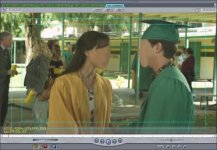
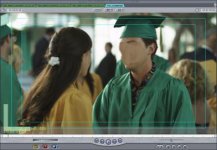
EDIT: I have uploaded two photos as an example (with our actor's faces blurred). Take a look at the brightness/contrast and skin tones.
Does anyone have any suggestions for simple FCP filters that I can just toss onto all of the B-CAM or all of the A-CAM to have it preliminarily match? We simply want a CC that will help the cameras match (not perfectly) so that our test audience isn't distracted by the cuts in regard to color. Does anyone have any ideas?
Thanks!
-Brendan
Been a while since I posted, but I am having a little trouble here.
I am an assistant editor on a feature that shot using multiple RED Ones. We are prepping to output for a test audience and I was asked to do a quick Color Correct to make some shots/scenes match. Most of it is easy, except for a few particular scenes. I was unable to get the exact information in regard to all camera settings (not the best camera notes), but after going to the RAW I discovered what seems to be the problem: A-CAM was shooting MX and using the latest build, shot in REDColor2 and REDGamma2 (and transcoded to QT Proxies in this color space/gamma) --- the B-CAM was shooting with either the old sensor or an old build and was shooting in REDColor and REDGamma (and transcoded to QT Proxies in this color space/gamma). The usual answer would be to simply re-transcoding using either all RC2/RG2 or RG/RC...however we don't have the luxury of time to do this.
EDIT: I have uploaded two photos as an example (with our actor's faces blurred). Take a look at the brightness/contrast and skin tones.
Does anyone have any suggestions for simple FCP filters that I can just toss onto all of the B-CAM or all of the A-CAM to have it preliminarily match? We simply want a CC that will help the cameras match (not perfectly) so that our test audience isn't distracted by the cuts in regard to color. Does anyone have any ideas?
Thanks!
-Brendan
Attachments
Last edited: