Welcome to our community

Be a part of something great, join today!

  • Hey all, just changed over the backend after 15 years I figured time to give it a bit of an update, its probably gonna be a bit weird for most of you and i am sure there is a few bugs to work out but it should kinda work the same as before... hopefully :)

Matching 5D footage to RED look

James Hogarth

Well-known member
Joined
Nov 18, 2013
Messages
119
Reaction score
0
Points
0
Location
Glasgow
Hi all,

We have a 2nd camera shooting with us tomorrow on 5D.

We have already got a look we use for our EPIC and I was wandering if there is a way to match it to the 5D footage?

Like is there a process for bringing a RED look into Da Vinci and applying it to the 5D footage and will that work?

Al advice no matter how small is always greatly appreciated and i really appreciate folk taking time out their day to help.
 
The quickest way is to shittivise your red footage to match the 5D but if that's not an option, and you absolutely must get them to match instead of making the 5D funked up on purpose for a different texture, then I apply the following guidelines:


Shoot the 5D in as flat a profile as possible.
Give the 5D as much light as possible to avoid higher isos - I know it's a great low light performer but side by side to a downsampled Red 4k hd image it looks like mush.
Use a colour chart or chip chart or something to let you white balance later. Do the same for each setup with the red.
Create your master look and hopefully one of the many 5D luts out there will then adjust stuff for you just enough that your master look on top will serve you okay, minus a bit of tweaking here and there.

Currently in an edit trying to match Af100, 5D, 6D, 60D and Red footage. It's horrible. I keep finding excuses to dump the other material because it's way too contrasty and the skies are blown out to shit and it's impossible for some of it to replicate the look on the red - this stuff has to be done in-camera long before you reach the edit.
 
Hi James

Ben is right, try to shoot flat as possible, the best way to do this is to load up a flat profile for the 5D, do some research on this. It's been ages since I've filmed anything with a 5D but I remember we loaded up custom flat profiles.

Do a search for Canon 5D flat picture styles.

http://marvelsfilm.wordpress.com/marvels-cine-canon/

In your editing software try crushing your blacks a wee bit on the Red, the tricky thing here is you're trying to match 2 very different things.

Another option is to make B camera a much tighter crop, so there is less stuff to match. Also when the composition changes significantly many other things will change, so in a way it's more acceptable. Does that make sense?

Additionally because you have less resolution on the 5D, close up shots will work better as there is less info/detail to render.

Once you've played around with both cameras, try and view them both on the same monitor? Unless you have 2x identical calibrated monitors things can vary.

Good luck
 
Thanks guys maybe I'm best just to offload and transcode it and let the edit deal with it then. I'll make sure the op films as flat as poss
 
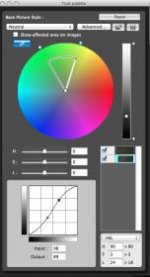
If the look is already agreed, I would try to match it closely (not to 100%) in the camera. In the Canon "PictureStyle-Editor" you can adjust an image (best case: an image from the set itself!) and get with the created curves the most values where you need them. Load this curve and test it in a match grading if it works better than other profiles.I wouldn't use too much in the blacks, as the 5Dm2 works internally on the noise, and using all the space there fully might crash the values. (FXPHD: Mike Seymour)The Technicolor solution with all its suggestions for the camera settings is a great profile, if you like to have freedom later on. But the image is only 8bit/c, and it is gamma based, so its use needs to be considered -- if at all -- if the look is already "set in stone"I got this idea from Shane Hurlbut, reading along articles from his Terminator shooting with the 5dm2 years ago.

I added an image, the little area is one of many possible "fields" that can be adjusted. So a certain control is possible.
 

Attachments

  • Screen Shot 2014-03-02 at 10.01.32 AM.jpg
    Screen Shot 2014-03-02 at 10.01.32 AM.jpg
    8.7 KB · Views: 0
Last edited:
thanks very much everyone. I downloaded the solution and it's a 'pf2' file. Do I just saves that on an SD card and load it onto the 5d?
 
Thanks everyone especially Sassi I will let you know how it goes
 
Im not a fan of dslr at all but if you only use it for closups its ok. Would never use it for wideshots.
 
Thanks everyone especially Sassi I will let you know how it goes
You're welcome.
Im not a fan of dslr at all but if you only use it for closups its ok. Would never use it for wideshots.
Same here, being spoiled with RED, "who" likes to have anything else ;o) (but yes, sometimes the budget dictates ...) DSLRs have another huge problem: when they run too long, they get hot and noisy.
 
Like is there a process for bringing a RED look into Da Vinci and applying it to the 5D footage and will that work?
No. You hire a great colorist with a lot of patience and have them match the cameras together as best he or she can. When I've been confronted with having to match 5D footage with Red, I've generally had to degrade the Red footage in order to make it look as bad as the 5D. It's even worse when the 5D is badly exposed (as it was in some of my cases).

The worst-case scenario is when the cameras are set to different color temperatures and ISO values so they wind up being wildly mis-matched. Mine wasn't that bad, but it was close. Once you have a general look for each camera, you can use that as a preset and pop back and forth, but it's a compromise at best.
 
this job I am currently cutting with footage from 8 wildly mismatched cameras is getting me down. Everything not from the Red or from a dslr timelapse looks like mush. GoPro2 and GoPro3 in car footage is in turns blown out or totally crushed and washed out or oversaturated. moire on the 6d stuff, crazy softness on the 5dmk3, and pretty much 100% of all skies shot on the AF101 completely blown out with nothing recoverable.... sigh...
 
Back
Top