Welcome to our community

Be a part of something great, join today!

  • Hey all, just changed over the backend after 15 years I figured time to give it a bit of an update, its probably gonna be a bit weird for most of you and i am sure there is a few bugs to work out but it should kinda work the same as before... hopefully :)

Major noise issues at slow fps and open shutter. Rainbow dust...

Jarek Zabczynski

Well-known member
Joined
Apr 3, 2007
Messages
2,410
Reaction score
4
Points
38
Location
Los Angeles
Website
www.jarek.com
I'm doing tests for timelapse shooting and and seeing big problems. I've never seen this before.

When shooting at 5k, 1fps with my shutter at 360 I get horrible noise or artifacts.

They are all static and move with the image as if it was dust on a lens.

Did a quick snap shot so you can see it. Anyone know what's going on here?

Also, full rez.

http://www.jesterpictures.com/red/A009_C003_0526CU.00000085k.jpg
 

Attachments

  • A009_C003_0526CU.0000008.jpg
    A009_C003_0526CU.0000008.jpg
    51.5 KB · Views: 0
Might be blue channel noise, no blue in low light situations can cause noise. Balance for 5000, low light tungsten will starve the blue channel.
 
Might be blue channel noise, no blue in low light situations can cause noise. Balance for 5000, low light tungsten will starve the blue channel.

It looks like there are just as many red and green pixels as well as blue ones (although the blue might be exacerbated because their being amplified more at the lower Kelvin settings.)

At regular motion frame rates is this noticeable? As in, does a single frame at 24fps with 360deg shutter exhibit the same behaviour?

It looks very much like high-ISO noise, even though it isn't. The reason it doesn't move (looks like dust on a lens) is because those pixels aren't moving (presumably for an entire second at 1fps); in other words, there isn't enough motion to mask those momentarily hot pixels. If it isn't noticeable on individual frames for regular speed footage then I bet this is a blackshade issue that isn't resolving because the camera isn't allowing you to do it at 1fps.
 
Last edited:
Yes. I've tried blackshading. Though I don't think it allowed me to at 1fps. Had to bump up to 8 or 12fps and did it from there. Will look again.

Set your frame-rate to 1 fps, and shutter speed to 1s. Then run black shading (at current FPS/exposure). You'll need to be on build 3.0.7 or later.

The noise you are seeing is due to the calibration not matching the longer exposure time.

If you switch back to a shorter exposure time, you'll want to re-black shade or switch back to the factory default calibration.
 
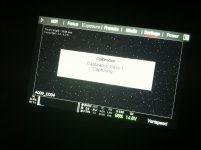
Yeah, I've never seen this at normal framerates. Managed to start a blackshade at these settings somehow. Will see what happens. Screen is super noisy in the process. Here's a pic from my iphone.
 

Attachments

  • calnoise.jpg
    calnoise.jpg
    88.5 KB · Views: 0
Set your frame-rate to 1 fps, and shutter speed to 1s. Then run black shading (at current FPS/exposure). You'll need to be on build 3.0.7 or later.

The noise you are seeing is due to the calibration not matching the longer exposure time.

If you switch back to a shorter exposure time, you'll want to re-black shade or switch back to the factory default calibration.

Ah ok. I haven't upgraded my firmware since I got the cam in Jan. It's been working so well I was afraid. Will have to give that a go. Do I need to upgrade builds one at a time or can I just go with the latest one?

Thanks!
 
Ah ok. I haven't upgraded my firmware since I got the cam in Jan. It's been working so well I was afraid. Will have to give that a go. Do I need to upgrade builds one at a time or can I just go with the latest one?

Thanks!

There was an issue fixed after 3.0.0 which prevented the camera from calibrating at many non-default exposure times. 3.0.7 is the current release version, and 3.2.13 is the current beta version. You can upgrade to either version directly, but the smaller more incremental upgrade is to use 3.0.7.
 
What's the proper way to blackshade if you plan to shoot at different frame rates/shutter speeds/resolution settings throughout the day? Is a default blackshade before the shoot day starts the best way to go?
 
Back
Top