Dima Gryaznov
Active member
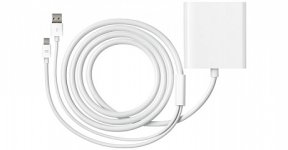
Hi guys ! I am very tired of the problems with the MAC PRO (TOP CONFIGURATION) ! Somebody tell me how to win ? After upgrading to OS X Yosemite I started having problems connecting monitors. I have two monitor DELL U3014, Display 30, (2560x1600) Ultra Sharp, 16:10, IPS, 1000:1, 178, 6 ms, VGA, DVI with HDCP, HDMI, Display Port, Mini Display Port. The monitors are connected via an adapter apple mini displayport to dual-link dvi.
 When I load the computer and two monitors are connected I there is no signal, only a black screen and the mouse cursor!!!!!! I coped with this problem. I loaded the computer with one connected to the monitor, and after loading the inserted second. And like everything was "normal". Today I put the new updates from apple in the hope that they have fixed this problem. BUT IT IS NOT !!! Everything just got worse 10 times!!! Now I have no signal, only a black screen and the mouse cursor.What would I not connected (other connectors and models of monitors) everywhere a black screen and a cursor.
 I don't know if this is the problem with AMD FirePro D700 why Mavericks worked perfectly, no problems with the video signal 6K video worked perfectly and everything was cool ! What happened..... to change monitors...... video card........ ???????????? support for apple bellows in the tube as a cow.