Welcome to our community

Be a part of something great, join today!

  • Hey all, just changed over the backend after 15 years I figured time to give it a bit of an update, its probably gonna be a bit weird for most of you and i am sure there is a few bugs to work out but it should kinda work the same as before... hopefully :)

Loudspeakers don't work on Weapon?

Rui Guerra

Well-known member
Joined
Jan 30, 2016
Messages
274
Reaction score
4
Points
18
Location
Portugal
Website
www.photoguerra.pt
Hi all,


I need some help here...
I received my Weapon Mag not long ago and I'm still in the learning curve.
I've done some test shots at home, and although the audio recorded was there in the playback, I can only hear it using headphones connected to the Base I/O V-Lock Expander. If I remove the headphones, I can't hear any sound at all (but I can see the VU-meter bars moving during playback).

Am I missing some configuration somewhere in the menus? Can the brain loudspeakers be turned off?

Thanks for the help!

All the best,
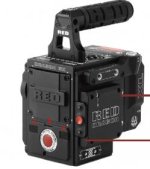
 
From the Red Weapon product page, at http://www.red.com/products/weapon-dragon

"INTELLIGENT DESIGN.
INTUITIVE CONTROL.


The powerful simplicity of WEAPON allows for easily customizable rigs complete with streamlined peripheral integration. Built–in stereo microphones and a speaker allow for even easier audio capture and playback, while an integrated Start/Stop button on the DSMC2 Top Handle and DSMC2 Outrigger Handle put recording at your fingertips. New intelligent OLPFs with integrated circuitry communicate the necessary colorimetry information to the BRAIN. A cam-action lock makes swapping your OLPFs to customize footage more convenient than ever."

So there is, in fact, a speaker.
 
From the Red Weapon product page, at http://www.red.com/products/weapon-dragon

"INTELLIGENT DESIGN.
INTUITIVE CONTROL.


The powerful simplicity of WEAPON allows for easily customizable rigs complete with streamlined peripheral integration. Built–in stereo microphones and a speaker allow for even easier audio capture and playback, while an integrated Start/Stop button on the DSMC2 Top Handle and DSMC2 Outrigger Handle put recording at your fingertips. New intelligent OLPFs with integrated circuitry communicate the necessary colorimetry information to the BRAIN. A cam-action lock makes swapping your OLPFs to customize footage more convenient than ever."

So there is, in fact, a speaker.

In this picture, I've market three openings at the front of the RED Weapon, from left to right (1, 2 and 3). Are 1 & 3 microphones or speakers? And what is 2?

Assuming that there is at least one speaker, how can I control it to make it work during playback?
 

Attachments

  • Captura de ecrã 2016-05-10, às 22.32.26.jpg
    Captura de ecrã 2016-05-10, às 22.32.26.jpg
    11 KB · Views: 0
There is no speaker for playback. Connect some headphones if you have the base IO module.

On page 138 of the operation manual, one can read:

"AUDIO OUTPUT OPTIONS
DSMC BRAIN: One (1) 2-channel headphones output. For maximum quality, use high impedance headphones.
The camera also has built-in speakers."
 
On page 138 of the operation manual, one can read:

"AUDIO OUTPUT OPTIONS
DSMC BRAIN: One (1) 2-channel headphones output. For maximum quality, use high impedance headphones.
The camera also has built-in speakers."

In the operation manual on page 3 you can also read: "RED reserves the right to revise this document and make changes from time to time in the content hereof without obligation to notify any person of such revisions or changes."

On the technical specs page you can also read: "Tech specs reflect both current and projected information. Everything is subject to change."

​
All I'm saying is - just because that's what it says doesn't necessarily make it true.
 
On page 138 of the operation manual, one can read:

"AUDIO OUTPUT OPTIONS
DSMC BRAIN: One (1) 2-channel headphones output. For maximum quality, use high impedance headphones.
The camera also has built-in speakers."

I have personally sent RED several inconsistancies in the documentation that was false. It may have been true at one point in development. Trust me on this, there is no speaker.
 
There is a speaker on the camera, but it is only used for record indicators. That is, you can configure a sound for: record start, record stop, and mark frame. We are updating the documentation.
 
There is a speaker on the camera, but it is only used for record indicators. That is, you can configure a sound for: record start, record stop, and mark frame. We are updating the documentation.

Thanks Trent.
 
There is a speaker on the camera, but it is only used for record indicators. That is, you can configure a sound for: record start, record stop, and mark frame. We are updating the documentation.


Although I'm a little bit disappointed that the statements in the RED website and user operation manual are false, at least I've got a straight answer.
Thanks Trent!


Back
Top