sander kamp
Well-known member
- Joined
- Dec 28, 2006
- Messages
- 1,094
- Reaction score
- 3
- Points
- 38
- Age
- 57
I am having lots of problems with the RED Rocket card.
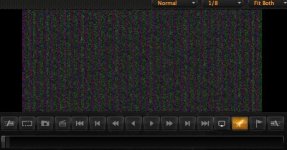
- When I first start up the computer the card doesn't work. It gives a garbled image (attached) and nothing happens. When closing the software RocketCine or RedCine-X and starting up again the image changes to black and nothing happens. When I restart the computer it might or might not work. Once the card works it mostly stays working until the next time I start up the computer.
- RocketCine-X crashes randomly. In a large batch it just stops working somewhere in the middle and I have to find out by hand where it was when it crashed. Not sure if this is related to the garbled image thing.
- When connected to a external HP Dreamcolor (I guess other screens as well but haven't tried) screen over DVI, a certain black level in the image flickers. I can confirm this by making the image darker or lighter with the exposure. When it reaches the black level that part of the image starts to flicker, when I make it lighter the flicker goes away. This is with a still standing image, so no playing timeline.
I have filed a support ticket with RED and got the advice to install drivers and firmware which I did but it didn't help. I am on the set and need to make dailies for editing. We have two MX cameras so the only way is with the RED Rocket.
Could it have to do with being on generator power? The computer works fine otherwise though.
Early 2009 MacPro 8-core 2.26 Ghz 12GB .
- When I first start up the computer the card doesn't work. It gives a garbled image (attached) and nothing happens. When closing the software RocketCine or RedCine-X and starting up again the image changes to black and nothing happens. When I restart the computer it might or might not work. Once the card works it mostly stays working until the next time I start up the computer.
- RocketCine-X crashes randomly. In a large batch it just stops working somewhere in the middle and I have to find out by hand where it was when it crashed. Not sure if this is related to the garbled image thing.
- When connected to a external HP Dreamcolor (I guess other screens as well but haven't tried) screen over DVI, a certain black level in the image flickers. I can confirm this by making the image darker or lighter with the exposure. When it reaches the black level that part of the image starts to flicker, when I make it lighter the flicker goes away. This is with a still standing image, so no playing timeline.
I have filed a support ticket with RED and got the advice to install drivers and firmware which I did but it didn't help. I am on the set and need to make dailies for editing. We have two MX cameras so the only way is with the RED Rocket.
Could it have to do with being on generator power? The computer works fine otherwise though.
Early 2009 MacPro 8-core 2.26 Ghz 12GB .