Welcome to our community

Be a part of something great, join today!

  • Hey all, just changed over the backend after 15 years I figured time to give it a bit of an update, its probably gonna be a bit weird for most of you and i am sure there is a few bugs to work out but it should kinda work the same as before... hopefully :)

LightPeak & Red Station

So seeing that MacRumors has just posted some information about ThunderBolt, the speeds seem pretty impressive. They quote that they saw a 5GB file transferred in just a few seconds.

If I remember correctly, didn't someone say that about a minutes worth of footage 5K 5:1 Redcode 2:1 aspect ration was about 5GB for one minutes worth of footage?

If that's true, then it would only take a few seconds to transfer a minute of footage - impressive. Now if we can get a Red Station to work using SSD through Thunderbolt, off loading footage would be great.

Here's a link to the article
http://www.macrumors.com/2011/02/24/thunderbolt-details-emerge-bus-power-mini-displayport-and-more/

Steve
 
It seems that you cNnot upgrade your exisiting machines to Thunderbolt. You will need a new machine or a new motherboard. No Thunderbolt PCIe adapters!

Source: http://news.cnet.com/8301-11386_3-20035571-76.html

So if you want to use Thunderbolt in a DIT setup, guess you'll have to get a new MacBookPro.

Steve
 
It's also 10Gbps IN and 10Gbps OUT... at the same time.
thunderbolt_speed.png
 
It seems that you cNnot upgrade your exisiting machines to Thunderbolt. You will need a new machine or a new motherboard. No Thunderbolt PCIe adapters!

Source: http://news.cnet.com/8301-11386_3-20035571-76.html

So if you want to use Thunderbolt in a DIT setup, guess you'll have to get a new MacBookPro.

Steve

That's really weird - surely it would be dead easy to make a PCI-E Thunderbolt card (as it's main data transport *is* PCI-E)... You wouldn't get DisplayPort through it but you'd be able to carry data...
 
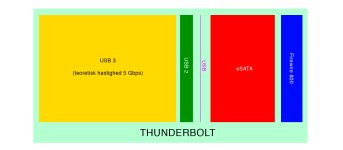
I made this simple illustration to show the comparison between most used interfaces...
 

Attachments

  • thunderbolt.jpg
    thunderbolt.jpg
    34.4 KB · Views: 0
That's really weird - surely it would be dead easy to make a PCI-E Thunderbolt card (as it's main data transport *is* PCI-E)... You wouldn't get DisplayPort through it but you'd be able to carry data...

Already answered in another thread, as there seems to be some confusion from that demo, but there's nothing stopping anyone from making Thunderbolt PCIe cards. They will happen.

@dean: This is only the first day and there are already more products announced for Thunderbolt than there were for USB3 on its first day. But yeah, it's going to take a bit of time for it to really get rolling.
 
It would have been great if apple released a few new Cinema Displays for daisy chaining peripherals. The first use that would be cool for me is to have dual 27" displays running off a MacBook Pro 17". this will be a beauty... minimal cabling.

I am glad that the port supports future optical cabling.
 
Does Thunderbolt mean you could realistically back-up Red footage quickly & efficiently with something as "low spec" as a 13" MacBook Pro? The old Core 2 Duo 13" only had one Firewire 800, no Express card and two USB2, so not particularly fast or practical for backing up Red footage. The new 13" seems to have a Thunderbolt port AND a Firewire 800 port (so the RedDrive plugs into the FW800 and the back-up drive plugs into the Thunderbolt port)...sounds like it should be pretty fast to back up!
 
Does Thunderbolt mean you could realistically back-up Red footage quickly & efficiently with something as "low spec" as a 13" MacBook Pro? The old Core 2 Duo 13" only had one Firewire 800, no Express card and two USB2, so not particularly fast or practical for backing up Red footage. The new 13" seems to have a Thunderbolt port AND a Firewire 800 port (so the RedDrive plugs into the FW800 and the back-up drive plugs into the Thunderbolt port)...sounds like it should be pretty fast to back up!

Of course. Look at video here http://www.engadget.com/2011/02/24/intel-thunderbolt-a-closer-look/
 
Does Thunderbolt mean you could realistically back-up Red footage quickly & efficiently with something as "low spec" as a 13" MacBook Pro? The old Core 2 Duo 13" only had one Firewire 800, no Express card and two USB2, so not particularly fast or practical for backing up Red footage. The new 13" seems to have a Thunderbolt port AND a Firewire 800 port (so the RedDrive plugs into the FW800 and the back-up drive plugs into the Thunderbolt port)...sounds like it should be pretty fast to back up!

If I'm understanding correctly you would be able to--and want to--back up using only the Thunderbolt cable -- way, way, way faster than introducing the firewire 800 bottleneck. The Thunderbolt I/O allows for daisy chaining, so you wouldn't need the firewire 800 port.
 
Does Thunderbolt mean you could realistically back-up Red footage quickly & efficiently with something as "low spec" as a 13" MacBook Pro? The old Core 2 Duo 13" only had one Firewire 800, no Express card and two USB2, so not particularly fast or practical for backing up Red footage. The new 13" seems to have a Thunderbolt port AND a Firewire 800 port (so the RedDrive plugs into the FW800 and the back-up drive plugs into the Thunderbolt port)...sounds like it should be pretty fast to back up!

David

In theory, yes. You should be able to do a back up from 13" MacBookPro to Red Station. The Thunderbolt is going to really open the DIT station for low budget features who maybe don't have the resources for a full blown MacPro station. It will also open to the likes of Gibby who does ENG and natural footage etc. IMO.

Personally, I like the 17" cause I like the real estate of the screen but each of the new MacBookPros should be capable.

If Red introduces a Thunderbolt Red Station - the speeds will be amazing!

Steve
 
If I'm understanding correctly you would be able to--and want to--back up using only the Thunderbolt cable -- way, way, way faster than introducing the firewire 800 bottleneck. The Thunderbolt I/O allows for daisy chaining, so you wouldn't need the firewire 800 port.

Guess we're thinking the same answer at the same time Paul :)
 
Yup :)
 
If I'm understanding correctly you would be able to--and want to--back up using only the Thunderbolt cable -- way, way, way faster than introducing the firewire 800 bottleneck. The Thunderbolt I/O allows for daisy chaining, so you wouldn't need the firewire 800 port.

That sounds great for the future (even more so when it goes fibre optic!) - but I guess that would require the Red Station to implement Thunderbolt and you'd ultimately be limited by the speed of the RedDrive/RedMag...in the meantime I imagine right now you could get a pretty good back-up speed using Firewire 800 from a RedDrive and Thunderbolt into a back-up drive on something as little & portable as a 13" MBP (that's pretty cool for those, as Steve says, like Gibby et al traipsing up mountains etc!).

I wonder how this transfer speed on a 13" MBP compares to the old 17" MBP using Express card, Firewire 800 etc...faster, I'd imagine!!
 
I hope Thunderbolt catches on quick so the next Macbooks will scrap the FW800 port for another Thunderbolt port. It seems strange to plug your drives into the thunderbolt then have a display daisy chained through your drives??? Right? That's the only way it would work right now correct?
 
Back
Top