Welcome to our community

Be a part of something great, join today!

  • Hey all, just changed over the backend after 15 years I figured time to give it a bit of an update, its probably gonna be a bit weird for most of you and i am sure there is a few bugs to work out but it should kinda work the same as before... hopefully :)

Light Iron's iPad Dailies System joins Red#0031 on Set

LiVEPLAY Speed & Quality

LiVEPLAY Speed & Quality

An average-cost WiFi base station is capable of doing over 100Mb/s (megabits per second). This is ample for stable, high fidelity pictures to stream to multiple iPads (you may have seen me stream to over 20 iPads) with enough headroom to capture more clips and send/receive the LiVEPLAY meta data tags.

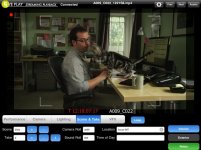
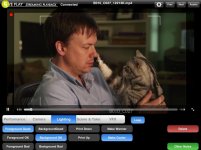
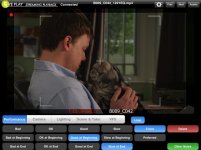
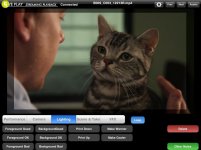
The pictures LiVEPLAY delivers in conjunction with any number of capture devices (such as the Teradek CUBE), are not only good enough to judge critical focus, but basic color choices, sync, and detail in the set dressing. The files we capture and stream with stable, reliable dependency over around 2-3Mb/s (2-3 megabits per second). Attached are frame-grabs from the actual iPad from Dino's shoot that demonstrate the quality of the playback at 2.5Mb/s. The JPGs are adding compression as well, but you get the idea.
If it was a concern, you can always increase the bit rate to to 4 or 5Mbs and see more image improvements, but we have had no complaints from users regarding image quality at 2.5Mbs and we can easily stream to a dozen devices at this bitrate if we needed to.

m
 

Attachments

  • IMG_0019.jpg
    IMG_0019.jpg
    84.3 KB · Views: 0
  • IMG_0018.jpg
    IMG_0018.jpg
    78.2 KB · Views: 0
  • IMG_0013.jpg
    IMG_0013.jpg
    73.5 KB · Views: 0
  • IMG_0008.jpg
    IMG_0008.jpg
    69.4 KB · Views: 0
That's pretty amazing! I wanted to know if Michael had any plans of licensing and selling liveplay as a system?

At the demo Michael gave at RED Studios he mentioned a number of interesting options.

I look forward to seeing a LIVEPLAY demo/tutorial that goes over the features, which are very well thought out.
 
An average-cost WiFi base station is capable of doing over 100Mb/s (megabits per second). This is ample for stable, high fidelity pictures to stream to multiple iPads (you may have seen me stream to over 20 iPads) with enough headroom to capture more clips and send/receive the LiVEPLAY meta data tags.

The pictures LiVEPLAY delivers in conjunction with any number of capture devices (such as the Teradek CUBE), are not only good enough to judge critical focus, but basic color choices, sync, and detail in the set dressing. The files we capture and stream with stable, reliable dependency over around 2-3Mb/s (2-3 megabits per second). Attached are frame-grabs from the actual iPad from Dino's shoot that demonstrate the quality of the playback at 2.5Mb/s. The JPGs are adding compression as well, but you get the idea.
If it was a concern, you can always increase the bit rate to to 4 or 5Mbs and see more image improvements, but we have had no complaints from users regarding image quality at 2.5Mbs and we can easily stream to a dozen devices at this bitrate if we needed to.

m

So Michael,
what we need to buy from you to use Liveplay?? ;)
 
Really interesting system.

The pictures LiVEPLAY delivers in conjunction with any number of capture devices (such as the Teradek CUBE)…

I take it then that so long as the server is provided with files in a suitable iPad compatible format via either Teradek, a video assist system, or even post transcoded files from REDcineX it will happily serve them and allow users to tag them.
 
Impressive Michael, I know the question has been asked before, are you licensing the LIVEPLAY. Lim

An average-cost WiFi base station is capable of doing over 100Mb/s (megabits per second). This is ample for stable, high fidelity pictures to stream to multiple iPads (you may have seen me stream to over 20 iPads) with enough headroom to capture more clips and send/receive the LiVEPLAY meta data tags.

The pictures LiVEPLAY delivers in conjunction with any number of capture devices (such as the Teradek CUBE), are not only good enough to judge critical focus, but basic color choices, sync, and detail in the set dressing. The files we capture and stream with stable, reliable dependency over around 2-3Mb/s (2-3 megabits per second). Attached are frame-grabs from the actual iPad from Dino's shoot that demonstrate the quality of the playback at 2.5Mb/s. The JPGs are adding compression as well, but you get the idea.
If it was a concern, you can always increase the bit rate to to 4 or 5Mbs and see more image improvements, but we have had no complaints from users regarding image quality at 2.5Mbs and we can easily stream to a dozen devices at this bitrate if we needed to.

m
 
All the details on LiVEPLAY will be released in January. However, the basic information is that LiVEPLAY:
1. will be available on the iTunes App store for iPad
2. will be available on the iTunes App store for iPhone
3. users will be able to purchase licenses customized for their shooting schedules (ie: day, week, month, year)
4. it is compatible with all Apple iPad-approved video files as well as still files (Tiff, JPEG, etc) and can be used for real-time playback as well as pre-rendered files from RC-X, Compressor, etc.
5. LiVEPLAY Server will be a companion application that manages all metadata tagging, security, permissions, customized exporting and serving of media

This product is designed to work well with short commercial shoots, medium feature shoots, and long-term television series shoots. It is a scaleable app that can serve as a simple automatic playback review tool, or can be used as an advanced production tool that is compatible with Scripty tools and editorial import organization. By having licenses based around different timelines, users will not only get an affordable tool with virtually unlimited access, but they can easily control permissions and security even when numerous iPads are online.

m
 
All the details on LiVEPLAY will be released in January. However, the basic information is that LiVEPLAY:
1. will be available on the iTunes App store for iPad
2. will be available on the iTunes App store for iPhone
3. users will be able to purchase licenses customized for their shooting schedules (ie: day, week, month, year)
4. it is compatible with all Apple iPad-approved video files as well as still files (Tiff, JPEG, etc) and can be used for real-time playback as well as pre-rendered files from RC-X, Compressor, etc.
5. LiVEPLAY Server will be a companion application that manages all metadata tagging, security, permissions, customized exporting and serving of media

This product is designed to work well with short commercial shoots, medium feature shoots, and long-term television series shoots. It is a scaleable app that can serve as a simple automatic playback review tool, or can be used as an advanced production tool that is compatible with Scripty tools and editorial import organization. By having licenses based around different timelines, users will not only get an affordable tool with virtually unlimited access, but they can easily control permissions and security even when numerous iPads are online.

m

Sounds like a great release plan. Just curious, and sorry if I have over read something that already covers this. But what is actually doing the transcoding? The laptop? Other hardware?
 
Might be worth pointing out, and nothing against the LivePlay software:
Liveplay isn't necessary to get the live streaming and transcoding from the teradek, H264 MOV file generation with naming based on the R3D originals, or streaming to multiple iPads.

I've been doing it with the Teradek by using VLC, and AirVideo on the client devices, with pretty good reliability. Streaming to multiple iPads (and iPod touches).
Offhollywood outlined this approach in early November.
All this is detailed, I think, on the Teradek forums.

What Liveplay offers extra, primarily, is tagging of clips, and it should offer a nicer, robust integration of software components.
 
Can anyone tell me what kind of security precautions are there with iPad dailies?
 
All the details on LiVEPLAY will be released in January. However, the basic information is that LiVEPLAY:
1. will be available on the iTunes App store for iPad
2. will be available on the iTunes App store for iPhone
3. users will be able to purchase licenses customized for their shooting schedules (ie: day, week, month, year)
4. it is compatible with all Apple iPad-approved video files as well as still files (Tiff, JPEG, etc) and can be used for real-time playback as well as pre-rendered files from RC-X, Compressor, etc.
5. LiVEPLAY Server will be a companion application that manages all metadata tagging, security, permissions, customized exporting and serving of media

This product is designed to work well with short commercial shoots, medium feature shoots, and long-term television series shoots. It is a scaleable app that can serve as a simple automatic playback review tool, or can be used as an advanced production tool that is compatible with Scripty tools and editorial import organization. By having licenses based around different timelines, users will not only get an affordable tool with virtually unlimited access, but they can easily control permissions and security even when numerous iPads are online.

m

Dang I didn't see this thread last month. We have also been developing an iPad app for our Teredek Cube ipad dailies... but this Liveplay is far more comprehensive

Any updates on WHEN it will be available in the store Michael? And how much it will cost (est range)

thanks!
 
Seriously, not being rude, but this is a Liveplay thread, why do people keep jacking it about BIGFOOT carts?

Maybe Ketch can start a separate BIGFOOT group buy thread? Much appreciated!

Hi Michael, would love any updates on Liveplay. thanks!
 
Yeah. Sorry. I know the bigfoot carts. I'm working on getting mine soon. That's all I'll say for now.

The Liveplay stuff is great. I missed this thread before and it was just yesterday that I re-watched the video Michael posted a while back.

http://www.lightirondigital.com/LightIRON_Digital/LIGHTIRON_OUTPOST_2.html

I hadn't realized it requires the Teredeck and that makes more sense now...
 
Back
Top