Welcome to our community

Be a part of something great, join today!

  • Hey all, just changed over the backend after 15 years I figured time to give it a bit of an update, its probably gonna be a bit weird for most of you and i am sure there is a few bugs to work out but it should kinda work the same as before... hopefully :)

LCD Issue

Rob Moog

Well-known member
Joined
Jan 27, 2008
Messages
197
Reaction score
0
Points
0
Location
Portland, OR
Website
www.nine-fifteen.com
Anybody ever experienced this:

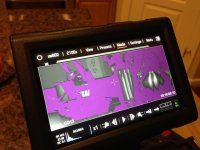
My LCD is unresponsive to touch and continues to short out/freeze on an image. Side handle and Redmote are working fine scrolling through the menu when the screen isn't frozen. Any thoughts? Could this be the cable?

Any help greatly appreciated.
 

Attachments

  • photo.jpg
    photo.jpg
    90.6 KB · Views: 0
  • image.jpg
    image.jpg
    11.5 KB · Views: 0
Hi Rob,

You look like your stuck in a 'look'. The purple is showing you where the shadows are (that's losing detail and is under expose). Your screen also looks like it's locked. There is a way to unlock the screen but I cant remember it off the top of my head.
 
Hey Wil,

Appreciate the quick reply. In the wider imager of the LCD you can see that I'm actually in playback mode and the look is still on the image. That's my concern. Also, knowing how to unlock the screen would be wonderful. Digging through the manual as I'm writing this.
 
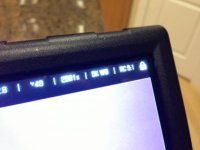
The Second picture is showing that the LCD is locked ( the LOCK Icon in the upper Right Corner)

Press and hold the lock icon to unlock the LCD
 
Are you on the latest firmware 4.0? Is this what the file looks like on the computer when you download it onto the hard drive and play with Redcine X?
 
Unlocked the LCD. Seems to be working fine now.

Not sure why I was getting that frozen screen. Maybe a product of the screen being locked and me getting into playback mode using the side handle.
 
The LCD will lock if you touch and hold the menu icon too long. (Same location)
 
It looks like you have already resolved the locked LCD problem.

FYI, you can apply the different false color modes (Exposure, focus, video, etc) even in playbackl. You can access them by clicking on the histogram or Settings->Display->Tools

Can you describe the "Frozen" screen a bit more? That part doesn't sound normal.
 
Back
Top