

Navigation
Install the app
How to install the app on iOS
Follow along with the video below to see how to install our site as a web app on your home screen.

Note: this_feature_currently_requires_accessing_site_using_safari
More options
Welcome to our community
Be a part of something great, join today!
You are using an out of date browser. It may not display this or other websites correctly.
You should upgrade or use an alternative browser.
You should upgrade or use an alternative browser.
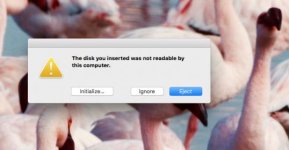
LACIE ISSUES "THE DISK YOU INSERTED WAS NOT READABLE BY THIS COMPUTER"
- Thread starter steven michelsen
- Start date
Marc Wielage
Well-known member
Mac or Windows? Which specific interface?
Try it on a different machine and see what happens. I've had cases where a Mac drive will mount on a Windows machine (running MacDrive), or a Windows NTFS drive will mount on a Mac. And I've had instances where the enclosure croaked (particularly with Lacie), but once we transplanted the drive into a different enclosure, it was fine.
You could try drive recovery utilities like Data Rescue, but it hinges on the system being able to see the drive.
http://www.prosofteng.com/
Try it on a different machine and see what happens. I've had cases where a Mac drive will mount on a Windows machine (running MacDrive), or a Windows NTFS drive will mount on a Mac. And I've had instances where the enclosure croaked (particularly with Lacie), but once we transplanted the drive into a different enclosure, it was fine.
You could try drive recovery utilities like Data Rescue, but it hinges on the system being able to see the drive.
http://www.prosofteng.com/
Tim Gerhard
REDuser Sponsor
- Joined
- Jun 21, 2016
- Messages
- 139
- Reaction score
- 0
- Points
- 0
- Location
- Columbus, OH
- Website
- www.magstor.com
From the screenshot it's showing as MAC.
Is this a fresh drive or an existing drive with data? Usually you get that error if the drive is formatted for the wrong operating system OR if there is a drive logic error.
Coming from experience at a data recovery company. Never ever ever run data recovery on a drive displaying logical or physical errors, you can make your data unrecoverable. Only use data recovery software on a known working drive that has been reformatted or deleted on accident.
Another tip is that LaCie is just a crappy Seagate drive packaged into a fancy enclosure. I don't let my friends or family use Seagate, it's not ok.
Is this a fresh drive or an existing drive with data? Usually you get that error if the drive is formatted for the wrong operating system OR if there is a drive logic error.
Coming from experience at a data recovery company. Never ever ever run data recovery on a drive displaying logical or physical errors, you can make your data unrecoverable. Only use data recovery software on a known working drive that has been reformatted or deleted on accident.
Another tip is that LaCie is just a crappy Seagate drive packaged into a fancy enclosure. I don't let my friends or family use Seagate, it's not ok.

Frank Glencairn
Well-known member
- Joined
- Sep 12, 2009
- Messages
- 650
- Reaction score
- 0
- Points
- 0
- Location
- Germany
- Website
- frankglencairn.wordpress.com
Another tip is that LaCie is just a crappy Seagate drive packaged into a fancy enclosure. I don't let my friends or family use Seagate, it's not ok.
I second that
Gregg Ferguson
Active member
- Joined
- Apr 16, 2011
- Messages
- 27
- Reaction score
- 0
- Points
- 1
I had the same issue recently. For me it happened after I updated to High Sierra OS. I had to install the latest version of Lacie Raid Manager software and then update the firmware of the drive. There are instructions online, I found this link useful - https://forums.developer.apple.com/thread/82897 - The Lacie support page is not very helpful.