Welcome to our community

Be a part of something great, join today!

  • Hey all, just changed over the backend after 15 years I figured time to give it a bit of an update, its probably gonna be a bit weird for most of you and i am sure there is a few bugs to work out but it should kinda work the same as before... hopefully :)

Kickstarter: iPad Ctrl Surface for Premiere, Resolve, FCPx, Speedgrade, Audition, etc

Brandon J.F.

Well-known member
Joined
Sep 12, 2010
Messages
3,273
Reaction score
0
Points
0
attachment.php

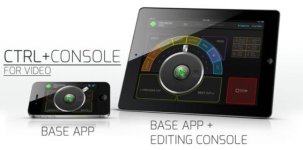
This project has 3 days left to get funded. They have tested every app listed in the Title of this thread (plus Lightroom) and plan to make an iPad control surface for all of them.

The guy behind the project is really cool and wants to build apps with the features people want so backers will have considerable input in the development process.

There will be a base app and as he adds new surfaces you'll be able to get them with an in-app upgrade.

I don't know the developer personally, but I have talked to him 1 on 1 on Kickstarter about the project. I'm just a backer and a fan who would like to see this app happen.

Take a look: http://www.kickstarter.com/projects/jeffchow/ctrl-console-creativity-unleashed

548 backers
$26,493 pledged of $35,000 goal
3 days to go
 

Attachments
  • bff77bd168db2ffe07ec91e6bc5267d2_large (1).jpg
    bff77bd168db2ffe07ec91e6bc5267d2_large (1).jpg
    19.1 KB · Views: 0
Last edited:
Hmmm.... It looks interesting, seems like there's a few good ideas there. Some of these tablet concepts have come and gone before and it seems they always suffer from the same flaw. They are an eyes-on interface with no tactile anything. Myself and most editors/ colorists/ etc.. I know don't look at their interface devices. We look at what we are doing. If I'm tweaking color or fine-tuning a comp, I don't want to look down from my monitor to position my hands, find a button or to see what a control surface is trying to tell me. Those are the "growing pains" of getting a new panel or other control system. With a smooth tablet device and no tactile reference, I don't see how that will ever fade away -- sure we can learn where things generally are, but not everything.

IMO, a tablet-based control surface concept is a great concept. But I think it needs to be almost completely gesture-driven, totally eyes-off and not position-dependent for those gesture operations. In other words, I think all the current touch-interface approaches to control surface implementation are doing it wrong. ....just my thoughts.
 
Hmmm.... It looks interesting, seems like there's a few good ideas there. Some of these tablet concepts have come and gone before and it seems they always suffer from the same flaw. They are an eyes-on interface with no tactile anything. Myself and most editors/ colorists/ etc.. I know don't look at their interface devices. We look at what we are doing. If I'm tweaking color or fine-tuning a comp, I don't want to look down from my monitor to position my hands, find a button or to see what a control surface is trying to tell me. Those are the "growing pains" of getting a new panel or other control system. With a smooth tablet device and no tactile reference, I don't see how that will ever fade away -- sure we can learn where things generally are, but not everything.

IMO, a tablet-based control surface concept is a great concept. But I think it needs to be almost completely gesture-driven, totally eyes-off and not position-dependent for those gesture operations. In other words, I think all the current touch-interface approaches to control surface implementation are doing it wrong. ....just my thoughts.

That's why this one IS completely gesture driven:


Transport:
Two-finger -> one finger slide = Jog
Two-finger slide left and right = Shuttle
Two-finger then tap L or R = Nudge
Two-finger tap = Play/Pause
Two-finger swipe L&R = Jump to cut
Three-finger swipe L&R = Beginning and end
Edit:
Two-finger swipe up = In
Two-finger swipe up-down = Clear In
Two-finger swipe down = Out
Two-finger swipe down-up = Clear Out
Three-finger swipe down = Insert
Three-finger swipe down then up = Overwrite
One-finger swipe from top edge = Mark/Cue
Program:
Pinch to zoom = Zoom timeline
Slide from left edge = Select Source window
Slide from right edge = Select Timeline window
 
IMO, a tablet-based control surface concept is a great concept. But I think it needs to be almost completely gesture-driven, totally eyes-off and not position-dependent for those gesture operations. In other words, I think all the current touch-interface approaches to control surface implementation are doing it wrong. ....just my thoughts.

I agree. He's working on gestures for this too. I should have mentioned that in the first post.
 
I think it is definitely worth the $35 (or whatever) to see it through. I am hoping they make it to their goal. I'd love to try this out!
 
I think it is definitely worth the $35 (or whatever) to see it through. I am hoping they make it to their goal. I'd love to try this out!

Definitely! And remember... You do not get charged when you make a pledge. You only get charged if they meet their funding goal.
 
Don't know how I missed the bit about the gestures, does look promising. The guy heading up this project is local to me too. Heh, didn't notice that before either.

I guess we'll see if they get funded. I bet they will, they may have to extend their deadline to get it. I threw in my $$... While I'm skeptical, it does seem like a project worthy of investigating.... While I don't think their budgeting is too far off the mark, I think at times some of these projects would do better to target a smaller kickstarter amount and aim for a proof of concept rather than the full product. But that's me talking from my corporate development experience. Being an iOS developer myself, many of my corporate clients try that direction with a lot of their bigger ideas. Before committing tens of thousands of $$$ to new software development, they usually invest a smaller amount to expolore interface designs, proof of concept in the form of interactive mock-ups, that sort of thing. Anyway, I wish them well.
 
597 backers
$28,424 pledged of $35,000 goal
61 hours to go

It is really cool to see so many people support this. I wrote Jeff Chow, the project creator, and suggested he register here so he can answer questions anyone may have. He just did and is waiting for approval.

61 hours remain. Kickstarter is all or nothing so if the goal is not reached by the deadline no one is charged and the project fails.

http://www.kickstarter.com/projects/jeffchow/ctrl-console-creativity-unleashed
 
Last edited:
Right now there are 632 backers - if each current backer bumped their contribution by $10, they'd go comfortably over the top.
 
Made my pledge - hope target is reached!
 
I'm trying to understand why this needs to be a kickstarter project, apparently he already has the app in working order, all he really needs to do as far as I can tell is perfect the design of the UI and submit it to the app store.
He doesn't need $32,000 to submit an app to the app store, it's $99 per year to be a part of the development program.
Just finish the damn app and submit it.
 
Back
Top