Welcome to our community

Be a part of something great, join today!

  • Hey all, just changed over the backend after 15 years I figured time to give it a bit of an update, its probably gonna be a bit weird for most of you and i am sure there is a few bugs to work out but it should kinda work the same as before... hopefully :)

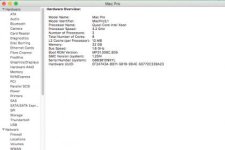
Is our Mac Pro good enough to edit RED Footage?

Joseph Cook

Member
Joined
Jul 4, 2016
Messages
10
Reaction score
0
Points
0
Location
Wilmington, NC
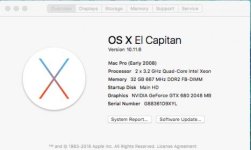
Is there anything we should add to our current Mac or something else we should buy altogether in order to edit 4K, 6K, or even 8K? Attached a pic of current specs of mac. We are using Adobe Creative Cloud's latest version to edit. Thanks so much.
 

Attachments

  • Mac System Specs.jpg
    Mac System Specs.jpg
    15.4 KB · Views: 0
  • Mac System Specs continued.jpg
    Mac System Specs continued.jpg
    13 KB · Views: 0
Honestly you can edit on just about anything it just depends HOW you wanna do it. A red rocket X might come in handy.
 
Agree with Jake. You can make it work, Proxy footage comes to mind.

But maybe a 2009-2012 machine would be a better move, You can pick a dual cpu machine for a good price and upgrade it to fairly good specs.
 
For proxy editorial you should be fine with what you have. I run a 5,1 cheese grater with 12 cores, RR-X and GTX980 4GB that can do full res playback up to 6K with just a couple seconds of buffering to avoid stutters.

Cheers - #19
 
A 2008 Mac Pro with GTX680's is not ideal if you're planning to edit and deliver 4K. It may eventually be possible to put 1070 or 1080 GPUs in it (with a lot more RAM), and that will help quite a bit. Fast RAIDs are a must as well.

You can cut proxies in HD and do fine, provided you have a way of conforming the original files and doing the final color and delivery on a bigger machine.
 
I started out editing RED with proxies on a 2006 MacPro and it got the job done.

I recently switched from a GTX680 in my 2012 MacPro to a GTX980ti, made all the difference. I had a hard time rendering out 4k with the 680, had to unplug extra monitors to free up that VRAM during renders. A 2012 tower with CPU and GPU upgrades is still pretty kickass.
 
I started out editing RED with proxies on a 2006 MacPro and it got the job done.

I recently switched from a GTX680 in my 2012 MacPro to a GTX980ti, made all the difference. I had a hard time rendering out 4k with the 680, had to unplug extra monitors to free up that VRAM during renders. A 2012 tower with CPU and GPU upgrades is still pretty kickass.

How's the GPU upgrade working out for you with Weapon footage? I have a 2010 Mac Pro and am trying to decided what I want to do, upgrade or replace it.
 
I'm setting up a FreeNAS storage server with 24 drive bays that I bought used on ebay. It's pretty amazing what you can get now for cheap. If I run out of space on that I can buy expansion chassis and plug them into the server.
 
I'm setting up a FreeNAS storage server with 24 drive bays that I bought used on ebay. It's pretty amazing what you can get now for cheap. If I run out of space on that I can buy expansion chassis and plug them into the server.

Are you running that over a network or are you directly attached your systems to it?
 
Are you running that over a network or are you directly attached your systems to it?

Over the network. I also picked up a 24 port gigabit network switch with four 10 gigabit sfp+ ports. All of this stuff is so cheap. You can get a 10 gigabit network card for $25 and a sfp+ direct attach cable for $9.
 
How's the GPU upgrade working out for you with Weapon footage? I have a 2010 Mac Pro and am trying to decided what I want to do, upgrade or replace it.


Massive improvement over the 680. I don't need to jump through hoops to render out 4k in resolve. External power supply is the only real drawback, but I deal.
 
Also what is everyone doing for storage?
Big, big drives work for me. I'm a fan of G-Tech, at least in terms of what a small business needs. I think I'm pushing 50TB, and for just one guy working project-to-project, to me that's quite a bit.
 
Also what is everyone doing for storage?

I got 2 rocketstor 8 bay Raid TB2 and an Akito 4bay SSD RAID thru TB2, there all very fast. A bit over 60TB, which is a bit much, but I like redundancy and I expect to fill it all up with 8K footage soon enough. :biggrin:
 
I got 2 rocketstor 8 bay Raid TB2 and an Akito 4bay SSD RAID thru TB2, there all very fast. A bit over 60TB, which is a bit much, but I like redundancy and I expect to fill it all up with 8K footage soon enough. :biggrin:
The problem isn't just your main drive -- it's the backups required. You basically have to have two more sets of the same amount of storage just to prepare against disaster.
 
I have a 2013 8-core trash can with 64gb and dual d700, and a G-Speed Studio XL 48tb. I can play back 6k R3D in Premiere CC at 1/4 res no problem. 1/2 res will play smoothly for a while and then struggle. I expected a major performance boost when adding the G-Speed, but I was disappointed. Perhaps the performance increase from using the G-Speed will be seen more in rendering/exporting, but I haven't done a lot of that recently so I'm not sure. But I am fairly certain that real time playback was not improved after adding the G-Speed.
 
I have a 2013 8-core trash can with 64gb and dual d700, and a G-Speed Studio XL 48tb. I can play back 6k R3D in Premiere CC at 1/4 res no problem. 1/2 res will play smoothly for a while and then struggle. I expected a major performance boost when adding the G-Speed, but I was disappointed. Perhaps the performance increase from using the G-Speed will be seen more in rendering/exporting, but I haven't done a lot of that recently so I'm not sure. But I am fairly certain that real time playback was not improved after adding the G-Speed.


No it wouldn't unless the drive you originally had was slow for some reason. Bigger faster GPU's is what your looking for.
 
Back
Top