Welcome to our community

Be a part of something great, join today!

  • Hey all, just changed over the backend after 15 years I figured time to give it a bit of an update, its probably gonna be a bit weird for most of you and i am sure there is a few bugs to work out but it should kinda work the same as before... hopefully :)

Importing footage looks over saturated

Austin White

Well-known member
Joined
Dec 7, 2013
Messages
131
Reaction score
0
Points
16
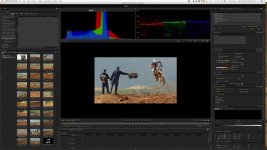
Everything I shot comes in looking nothing like it did when I shot it or the same when in FCPX. Very saturated and I can't seem to change it to how it looked when I shot it. Any help please.

Red Dragon 6k MG
Redcinex pro 50.5
 

Attachments

  • screenshot.jpg
    screenshot.jpg
    95.1 KB · Views: 0
Still does it with the latest plugin.
 
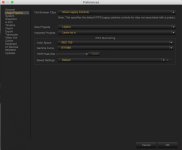
Noticed i have to change my settings to this to get it to work. Guess I need to stay away from IPP2?
 

Attachments

  • screenshot2.jpg
    screenshot2.jpg
    61.1 KB · Views: 0
Austin,


The Red Dragon 6K camera was incapable of IPP2 in-camera and only capable of a "Legacy" "Color Space" and "Gamma". So it makes sense that using "Legacy" controls in Redcine-X would make things look correct. If I may ask, what IPP2 settings did you have before you changed them?
 
Austin,


The Red Dragon 6K camera was incapable of IPP2 in-camera and only capable of a "Legacy" "Color Space" and "Gamma". So it makes sense that using "Legacy" controls in Redcine-X would make things look correct. If I may ask, what IPP2 settings did you have before you changed them?

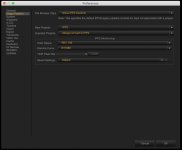
Just uploaded a screen shot.
 

Attachments

  • Screen Shot 2019-01-30 at 8.10.30 PM.jpg
    Screen Shot 2019-01-30 at 8.10.30 PM.jpg
    62.2 KB · Views: 0
Austin,

Yeah, those settings will take you strictly into IPP2 Land. I personally like all that the IPP2 workflow has to offer, the Out of Gamut Control, Smoother Highlight Roll-offs and the Highlight Recovery Algorithm. However, some who own and use Red Cinema Cameras not capable of recording in the IPP2 workflow in-camera, may simply want to just use their cameras in the "Legacy" Mode which their footage was originally recorded in. This way, they will get the image they tweaked so carefully in-camera in post.
 
Austin,

Yeah, those settings will take you strictly into IPP2 Land. I personally like all that the IPP2 workflow has to offer, the Out of Gamut Control, Smoother Highlight Roll-offs and the Highlight Recovery Algorithm. However, some who own and use Red Cinema Cameras not capable of recording in the IPP2 workflow in-camera, may simply want to just use their cameras in the "Legacy" Mode which their footage was originally recorded in. This way, they will get the image they tweaked so carefully in-camera in post.

Thanks Rand. I noticed that it it was like putting a lut on it, but one that was super over saturated. Didn't really want to reverse it all to build it all over again. Hopefully ill have an IPP2 camera some day, then hopefully I can enjoy in all the offerings.
 
Austin,

Yeah, I don't think I would want to rebuild the look over again in the "IPP2" workflow when I already got it the way I wanted it in the "Legacy" workflow.
 
Back
Top