Welcome to our community

Be a part of something great, join today!

  • Hey all, just changed over the backend after 15 years I figured time to give it a bit of an update, its probably gonna be a bit weird for most of you and i am sure there is a few bugs to work out but it should kinda work the same as before... hopefully :)

Import Errors

Harry Clark

Well-known member
Joined
Dec 29, 2006
Messages
1,791
Reaction score
0
Points
36
Location
NYC
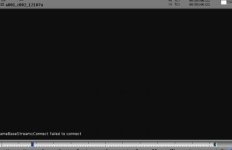
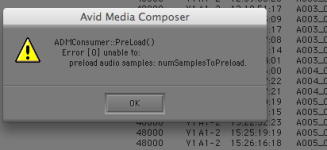
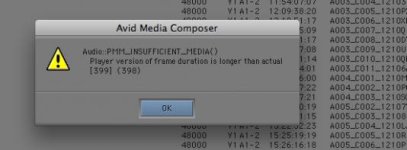
I have a client for whom we made DNxHD files using my Redrocket. Although I have successfully done this many times for others, they are getting strange error messages. I have attached the screen grabs they sent.
Any thoughts?
Cheers,
Harry
 

Attachments

  • Screen shot 2010-12-13 at 2.14.37 PM.jpg
    Screen shot 2010-12-13 at 2.14.37 PM.jpg
    7.2 KB · Views: 0
  • Screen shot 2010-12-13 at 12.16.39 PM.png
    Screen shot 2010-12-13 at 12.16.39 PM.png
    15.5 KB · Views: 0
  • Screen shot 2010-12-13 at 12.22.54 PM.jpg
    Screen shot 2010-12-13 at 12.22.54 PM.jpg
    17.8 KB · Views: 0
Was audio transcoded as part of the R3D files?

Michael
 
That typically means something went awry in the transcode process where there is an unexpected amount of samples per frame. We need to dig into it and see whether is happening in REDCINE X or in AMT (Avid SDK) when the MXF files are being created. Is it all the media, some clips, other?

Michael
 
Not sure... finding out now.
They found some kind of workaround...
BTW, I used Rocketcine X.
Cheers,
Harry
 
Any reason for not using latest version of REDCINE X? It also contains latest version of Avid AMT SDK...

Michael
 
Hi Michael...
Sorry, I was shooting yesterday.
Not to slam Red Team's generosity with the free software tools in development, but I have been burned several times by various versions of Redcine X. I'll try whatever beta version is current at home on a few clips, it will work, then I'll get out there on a busy shoot day with the clock ticking and my personal and professional promise that I can make dailies on set, and the program will fail. Sometimes Redcine X will take up to twice as long as Rocketcine X to render. Frozen frames, corrupt files, crashes, whatever. Then my camera team will be behind the 8-ball on a professional shoot day. Not a test day. Not a fun day shooting with Peter Jackson at Renmar. An out there, in the rain, 3-company-moves-a-day, running out of media since we can't reformat yet, real world shoot. And I will have broken my promise via Red beta software.
And I'll go back to Rocketcine X every time. Which works. Just like a carpenter picking up a hammer. Which is why I can't understand Red stopping development of this very very useful application.
I sent another email to the folks at the editorial company. I will find out whether it's an issue with some clips or all, and I'll get their workaround, which might provide some clues too.
Thanks for your help and stand by.
Cheers,
Harry
 
OK, a little info. The feedback I just got from the editors was, "We are able to work locally off of drives, just are not able to work off of the unity."
Is that a clue? A bit Greek to me (camera guy not editor)
Cheers,
Harry
 
I'll ask - should be no different playing Avid DNxHD off Unity than off storage. Let me check.

Michael
 
I vaguely remember some Redusers having issues on Macs when rendering large multiGB files across a network, but can't remember in what context.
 
Michael,
No definitive answer? I suspect my issue may be rather rare and the info I've gotten somewhat sketchy...
I'm going to update everything, cross my fingers, and give Redcine X 356 a try. I'm sporting a new 17" MBP so perhaps bringing everything up-to-the-moment will help.
Cheers,
Harry
 
I don't have much else to give you. What was the workaround the editor's did? That might give a clue into what may have caused this to start. I have been using REDCINE X for a few features with no issues.

Michael
 
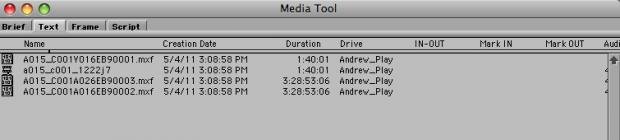
I just posted the same issue at the bottom of another thread. Using redcine-x b454 the meta-data on the audio MXF files is longer than the actual duration (by a few hours!!!). Consequently the files will not play back after being brought into avid. Instead I get the same error message your editors sent regarding media duration. I also attached the media tool display showing the mis-match here.

**Update - media was 29.97 not 23.98 as expected. Once everything in RedCine-X and Avid were appropriately switched to handle MXF 29.97p all is fine.
 

Attachments

  • Picture 1.jpg
    Picture 1.jpg
    14.2 KB · Views: 0
Thanks for updating - I'll check with RED about where this might be happening in the transcode process.

Michael
 
Back
Top