Welcome to our community

Be a part of something great, join today!

  • Hey all, just changed over the backend after 15 years I figured time to give it a bit of an update, its probably gonna be a bit weird for most of you and i am sure there is a few bugs to work out but it should kinda work the same as before... hopefully :)

Ikonoskop Beta

Mark Wilkinson

Well-known member
Joined
Jun 28, 2009
Messages
495
Reaction score
0
Points
0
Location
LA/ATL
I'm a RED owner and I'm also on the list for the Ikonoskop A-cam dII (super 16 sized sensor CCD) which recently went into Beta and Nick Paton ACS shot some test footage down under. I'm posting here because I thought you all might have some thoughts on what is going on in the first images from Nick.

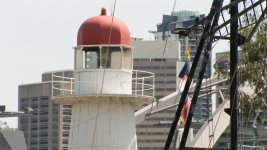
In the lighthouse shot - there is blue fringing on the right and left of frame (look at that ladder shaped thing on the right and the edge of the building far left) - is this a lens coating issue? It was shot with the stock Ikonoskop 11mm lens.

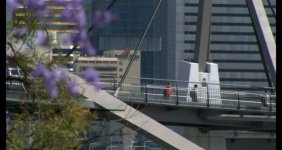
In the bougainvillea shot, the green channel sees to fall off hard -

And the street light detail has some pretty ratty clipping too - seems like color space modeling in the toe?

Thoughts anyone?

PS you can grab the original DNG files from ikonoskop.com
 

Attachments

  • lighthouse.jpg
    lighthouse.jpg
    95.4 KB · Views: 0
  • bougainvillea.jpg
    bougainvillea.jpg
    31.9 KB · Views: 0
  • streetlight.jpg
    streetlight.jpg
    21.4 KB · Views: 0
The blue fringing in the lighthouse shot appears to be typical chromatic aberration. All lenses exhibit CA under certain conditions, some a lot more than others. It seems a bit excessive in that image, but it's hard to say for sure just what we're looking at without more details of the shot and environment. It doesn't help that much of the image is over-exposed either.

Looking at some of the beta images, I have to say I'm not a fan of the bokeh / out of focus regions with the lens(es) used.

I want to see a res chart shot with the camera. There seems to be a terribly large amount of aliased edges. :-(
 
Green channel issue would be from the linear color correction matrix. Similarly, that would be what is doing the funky stuff in the light. This stuff is very hard to get right - I know. I'm sure they'll refine it as they go and you'll get better results - the benefits of raw. Also, could be something in how the DNG is processed.

Graeme
 
Thanks guys - I was hoping you two would chime in.
 
Adobe Lightroom

Adobe Lightroom

It seems they are using Adobe Lightroom to do the de-Bayer.

I'm not sure but it may use a 3D LUT to try to match the colors. At any rate the Adobe program seems to make a "snap-shot" look to the images, not a look like ECN, there is over heavy handed chroma averaging that makes the colors look "cut out".

I do not think DNG is a good fromat for Cinema use in its current form, nor do the Adobe tools seems to be optimized for Cinema image quality.

I have talked to the Acam dII makers about having their software save true RAW data, to save disk space and to make it easer to use other de-Bayer software, like the one I am developing for Cinema use. I have been working on lens aberration corrections, which can help offset some of the lens problems you get into with C mount lenses. Scarlet will also have problems with lens aberrations but without true RAW data, those may be harder to mitigate. The software I am working on will have a lens profile so you can make a correction file for each lens, then maybe meta-data can select the lens profile to have the footage turn out better.

Also some lenses are more yellow or brownish than others, so the de-Bayer needs to compensate for the lens resolution and for the lens color cast to get good results, or you get bluish halos. Blue halos can also be caused by IR passing through the blue and green filters on the sensor, most lenses do not focus IR and UV well, so you get blur from out of band light.

I plan to later add de-coding for DNG to convert it to RAW and ignore the header to do better color correction clip points and such. DNG requires a "burned in" compensation using its header values, so it can be hard in some software to override the header in the DNG. If the header is not done just right for the K value of the light you get off color artifacts.

It seems you can also use dng_validate for a freeware de-Bayer of the Acam dII footage. If someone had a header override editor for DNG then you could make your own adjustments to the frames.

I think the Kodak sensor looks clean for the most part, but what OLPF they are using and such is unknown.

I have a workflow for the Acam dII page on my Web site and its nice to see a sort of RAW camera, I just wish they would save RAW files also and not just DNG since the extra DNG header data does not necessarily make the end conversion Cinema like. I asked them where they are doing the bad pixel removal, since that is required before DNG are processed in the Adobe software, but did not get a clear answer, so it might be in software or in the camera?
 
dear dan
i think you need to redesign your website. when i first saw it a couple of years ago i thought it's an abandoned ARPANET site from the 60's. with all your hard work and intelligent ideas you put in your software you should have a clean and professionally designed website that mirrors these qualities. otherwise visitors will come to the wrong conclusion that your software is as 'amateurish' as your site-design. i'd simplify it very much and have all the additional information as down-loadable PDFs. right now visitors are overwhelmed by the sheer amount of text.
 
dear dan
i think you need to redesign your website. when i first saw it a couple of years ago i thought it's an abandoned ARPANET site from the 60's. with all your hard work and intelligent ideas you put in your software you should have a clean and professionally designed website that mirrors these qualities. otherwise visitors will come to the wrong conclusion that your software is as 'amateurish' as your site-design. i'd simplify it very much and have all the additional information as down-loadable PDFs. right now visitors are overwhelmed by the sheer amount of text.

I sorta like it...
 
i agree on the website of Dan. - it looks homecooked.

In general, and this is not an insult on the contrary, I always find Dan's post very interesting - but 1/3 of the way the always surpass my technical understanding (im no technician). When are your software coming out?
 
DNG support

DNG support

i agree on the website of Dan. - it looks homecooked.

In general, and this is not an insult on the contrary, I always find Dan's post very interesting - but 1/3 of the way the always surpass my technical understanding (im no technician). When are your software coming out?

Thanks for the comments on my Web site, yes it needs some work, but if anyone is serious about using the programs they can e-mail me to have questions about the programs gone into.

I was able to extract RAW data from Kinor-2K DNG files, but the Acam dII ones are not quite the same so I need to look into that more. I asked Acam dII's makers if they could have an option to save RAW data to files rather than the DNG since the DNG header just wastes disk space, I would not be using the header info to get better results.

My de-Bayer program is under development, about 30-40% coded (v0.01) and working on some levels as alpha test. Since there are not cameras out now, other than Kinor-2K that could work with it I will continue to work on it and maybe have it out by about the time Acam dII starts to ship, it depends on how things go. Do you have a true RAW camera to support, if so e-mail me and we can talk?

My other programs for use with RED ONE are up now and at Beta Test level as far as I know so far, for RED ONE or if you use the dng_validate for Acam dII file de-Bayer you should be good to go right now, like this minute...

Edit: Some samples of converted ACAM RAW data are in the next two posts.
 
ACAM DNG files

ACAM DNG files

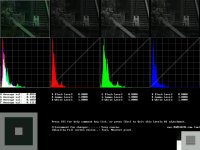
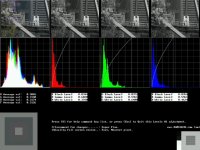
I was able to extract the RAW sensor data and look at the exposure of the example images they have posted, attached are the histograms before and after Levels#1 of the color correction.

In the next post are the raw data, raw interpolated, and rough color correction.
 

Attachments

  • ACAML1A.jpg
    ACAML1A.jpg
    91.7 KB · Views: 0
  • ACAML1B.jpg
    ACAML1B.jpg
    95.5 KB · Views: 0
RAW data from DNG files

RAW data from DNG files

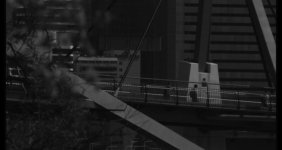
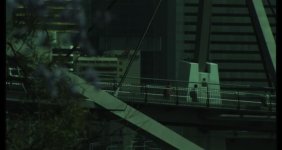
Here is the next post with the sample images showing the RAW exposure first as monochrome Bayer sensor data, then as uncorrected "engineering interpolation" and then as a rough color correction. Full processing results in better images, but I am working on that code still so I posted the rough version here.

In other conversions I am working on with full processing the results look quite nice, but there is some noise in the data, so I need to look into that, maybe this image was 1/2 to 2/3 stop under exposed? (see also the histograms in the previous post on page 1 or 2)

The data format is:

They use three bytes to store 2 pixels, like this:

Byte 1 of 3 bit 8 = pixel 1 bit 12
Byte 1 of 3 bit 7 = pixel 1 bit 11
Byte 1 of 3 bit 6 = pixel 1 bit 10
Byte 1 of 3 bit 5 = pixel 1 bit 9
Byte 1 of 3 bit 4 = pixel 1 bit 8
Byte 1 of 3 bit 3 = pixel 1 bit 7
Byte 1 of 3 bit 2 = pixel 1 bit 6
Byte 1 of 3 bit 1 = pixel 1 bit 5

Byte 2 of 3 bit 8 = pixel 1 bit 4
Byte 2 of 3 bit 7 = pixel 1 bit 3
Byte 2 of 3 bit 6 = pixel 1 bit 2
Byte 2 of 3 bit 5 = pixel 1 bit 1
Byte 2 of 3 bit 4 = pixel 2 bit 12
Byte 2 of 3 bit 3 = pixel 2 bit 11
Byte 2 of 3 bit 2 = pixel 2 bit 10
Byte 2 of 3 bit 1 = pixel 2 bit 9

Byte 3 of 3 bit 8 = pixel 2 bit 8
Byte 3 of 3 bit 7 = pixel 2 bit 7
Byte 3 of 3 bit 6 = pixel 2 bit 6
Byte 3 of 3 bit 5= pixel 2 bit 5
Byte 3 of 3 bit 4 = pixel 2 bit 4
Byte 3 of 3 bit 3 = pixel 2 bit 3
Byte 3 of 3 bit 2 = pixel 2 bit 2
Byte 3 of 3 bit 1 = pixel 2 bit 1

You can read it this way,

If you download the most recent DNG on the ACAM web site, the ones from the cameraman, then write a program to do this,

1) read 512 "dummy" bytes. (skip past header info)

2) read 2048x1092x1.5= 3354624 bytes you can extract their RAW data, and look at it.

The forum reduces the JPGs so they are not as sharp as the original files they were taken from, the CC images are for viewing on a gamma 2.4 monitor and my look lighter than they should on a MAC(?).

You can see the native color balance of the Kodak sensor is very green, if you shoot through a pink filter you should be able to get lower noise and better dynamic range, I wish RED would support optical color balance in their cameras since you cannot get that in REDALERT and REDCINE since they are closed source, you can though use a pink filter with ACAM DII since its RAW data is "open" via the DNG files...
 

Attachments

  • ACAMEX1M.jpg
    ACAMEX1M.jpg
    22.1 KB · Views: 0
  • ACAMEX1C.jpg
    ACAMEX1C.jpg
    23.4 KB · Views: 0
  • ACAMCC1C.jpg
    ACAMCC1C.jpg
    37 KB · Views: 0
Thanks, Dan - that's great.

Hard to tell in those snaps - did your image do a better job with the aliasing and toe/shoulder problems in the green and blue channels?
 
Exposure

Exposure

Thanks, Dan - that's great.

Hard to tell in those snaps - did your image do a better job with the aliasing and toe/shoulder problems in the green and blue channels?

I will have to look at the flowers and stop-light frames to see how the histograms look, I am going for a smoother more film like look, but have some work to do with the chroma aliasing, maybe talk to them about the OLPF adjustments.

I was working on the image above because the exposure looks good and makes a smooth conversion, the rails make a good test for aliasing also.

One thing I notice about Digital vs. Film is that Digital looks better if you get the exposure just right, but it looks like S*** if you over expose. If you under expose you get noise, so if you were a nature filmmaker you might have a hard time getting clean results you would need to under expose more than normal to be sure that you do not burn out something.

My Levels#1 has good histograms for seeing the RAW exposure, so after a time you might get a "feel" for how much "over-head" you need in the Green, red and blue are usually always under-exposed unless you use a pink filter on the sensor to reduce nouse, you can see how grean bias the Kodak sensor is.
 
The green shift is startling - though I've seen RAW images off chips looking like that before - can't remember where, though.

And yes, digital can be unforgiving sometimes. Getting "correct" exposure on these cameras has a lot to do with getting to know the camera, bracketing to pick your poison (noise vs. clipping), etc.

I'm excited for this camera - it looks like it will be capable of some great images.
 
You can see the native color balance of the Kodak sensor is very green, if you shoot through a pink filter you should be able to get lower noise and better dynamic range, I wish RED would support optical color balance in their cameras since you cannot get that in REDALERT and REDCINE since they are closed source, you can though use a pink filter with ACAM DII since its RAW data is "open" via the DNG files...

Ooh, shades of deja-vu on the DVX100 Andromeda - at a certain point, there was a guy named Chris who had white balanced off of a magenta monitor and was shooting through double magenta filters in order to deal with the robust green channel on the DVX's RAW output -

Sorry, that's as much tech info as I have, just thought I'd throw that bit of sidebar out there for fun...
 
Monitor?

Monitor?

Ooh, shades of deja-vu on the DVX100 Andromeda - at a certain point, there was a guy named Chris who had white balanced off of a magenta monitor and was shooting through double magenta filters in order to deal with the robust green channel on the DVX's RAW output -

Sorry, that's as much tech info as I have, just thought I'd throw that bit of sidebar out there for fun...

You can check the white balance with a white card under exposed 2 1/2 stops and you use the probe in the color correction to MEASURE the data values in the RAW data, the monitor has no impact on the adjustments, you can balance the color using a monchrome monitor if you need to.

I have some andromeda data in the form of TIF frames, it was a three chip camera and does not relate to a Bayer filter bias directly.
 
Sample ACAM footage at Adobe and info on CinemaDNG

Sample ACAM footage at Adobe and info on CinemaDNG

There seems to be some close work between Adobe and Acam dII,

http://twitter.com/npdop/statuses/5975983004

http://labs.adobe.com/downloads/cinemadng.html

I'm working on my own de-Bayer code since the Adobe gives a somewhat "snapshot" camera look to the images I have seen so far, and is limited in its adjustments of the de-Bayer filters for cinema use under adverse lighting. I have been using some of the RAW data from the Acam dII sample DNG to make adjustments and plan on having a menu option for their cameras if things go well.
 
Kinor-2K DNG native color balance

Kinor-2K DNG native color balance

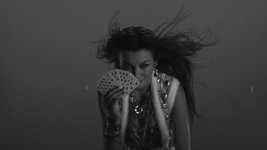
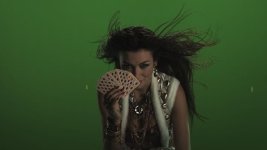
I am working on CinemaDNG support of sorts for my de-Bayer program and was checking the Kinor-2K sample DNG files, and noticed that the native color balance of the Kinor-2K sensor seems MUCH less green Bias than the Kodak sensor used by the Acam dII camera.

The attached images are monochrome of the Bayer checker board RAW data showing the native exposure used, it seems that are exposing very hot to me, but the 10bit Kinor-2K data shows some noise, so maybe they are pushing it out of the noise as far as they can go.

The color image shows the native color balance, if you look at the Acam dII native image above you will see how much MORE green bias it is. I wonder what the RED ONE sensor native color balance (uncorrected) images look like?

(Its a green screen shot, so the background IS green, the white collar is what to look at etc. What those two bright spots on the green screen are I don't know they are in the RAW data. The TIFF are much sharper than what these compressed JPG show...)
 

Attachments

  • S85B003.jpg
    S85B003.jpg
    15.1 KB · Views: 0
  • S85A003.jpg
    S85A003.jpg
    18.8 KB · Views: 0
Those two spots on the green screen are motion tracking locators.
 
Two spots vs. three?

Two spots vs. three?

Those two spots on the green screen are motion tracking locators.

If the camera is on a crane wouldn't it help to use three (or more) spots to get the plane of the green screen as a reference, with only two spots you just have translation but not tilt?

How are those spots made, are they projected or transmitted?

Do you have a link about the making and use of such spots?
 
Back
Top