Welcome to our community

Be a part of something great, join today!

  • Hey all, just changed over the backend after 15 years I figured time to give it a bit of an update, its probably gonna be a bit weird for most of you and i am sure there is a few bugs to work out but it should kinda work the same as before... hopefully :)

How to mix CH1&2 analog audio into one stereo signal?

Mike Krumlauf

Well-known member
Joined
Mar 1, 2008
Messages
395
Reaction score
23
Points
18
Age
35
Location
Denver, CO
Website
www.youtube.com
I got the A Box XLR adapter for my Scarlet MX today and was wondering if it was possible to have Channel 1 or 2 be converted into a stereo signal so if i have one XLR mic attached to the camera I get a right and left channel audio signal? Thanks
 
I got the A Box XLR adapter for my Scarlet MX today and was wondering if it was possible to have Channel 1 or 2 be converted into a stereo signal so if i have one XLR mic attached to the camera I get a right and left channel audio signal? Thanks

Yes go to your audio settings through the menu not the meters and center the pan slider.
 
Yes go to your audio settings through the menu not the meters and center the pan slider.

I must not be firing on all cylinders this morning. I can not find the pan option. Is it in the Channel 1/2 menu? Could you share a screenshot?

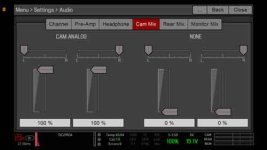
This is all that appears on the Menu>Settings>Audio page. No Cam Mix or anything as I just saw in the manual. What am I doing wrong???

IMG-0614.jpg
 
Last edited:
Click on the Mix button you see there to open up the Balance and Level control sliders?
 
Click on the Mix button you see there to open up the Balance and Level control sliders?

These are the only options I have in the MIX sub menu. Not what i'm looking for.

IMG-0616.jpg
 
Sorry, I thought I thought those were the pan sliders.

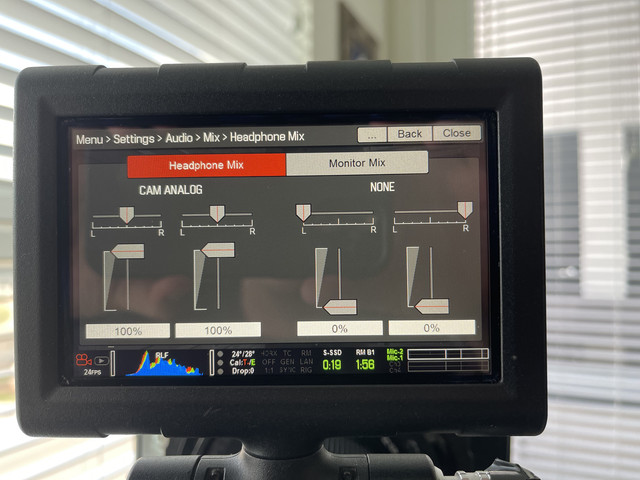
The manual says those mixer settings don't affect the audio embedded in the R3D file, so yeah, that's not how you do it - ("...The mixer affects audio monitoring (such as headphones) and audio recorded to external devices. The mixer DOES NOT affect audio embedded in the R3D file...").

In the manual though there's also another 'Audio Out Mix' setting in-between the 'Headphone Mix' and 'Monitor Mix' ones in your picture, so maybe that's what you need to adjust (when capturing audio via the Audio Out).

I've obviously never used that feature before, maybe someone who has can confirm that's the only way to convert the individual audio channels into stereo.
 
The 5.3.xx firmware goes back to the first half of 2015. Don't know how long after that the 'Cam Mix' feature got changed, would be strange if it's still in there in some other section. Could be worth a try though, if it's possible to roll back that far.
 
Never was able to figure it out and I have no interest downgrading the firmware in my camera. Just going to make adjustments in final cut pro.
 
Are you trying to feed mono to both sides from a mono xlr?

Yes. My microphone is the short shotgun that use to come with cameras like the Sony PD150, im using the ABOX XLR adapter. I feel like a 2 to 1 XLR adapter cable would work best for me.
 
Yes. My microphone is the short shotgun that use to come with cameras like the Sony PD150, im using the ABOX XLR adapter. I feel like a 2 to 1 XLR adapter cable would work best for me.

I’ve designed an audio adapter as well for DSMC1 called the Pro Cube that does what you're asking by default. I’m starting production again soon.
 
I’ve designed an audio adapter as well for DSMC1 called the Pro Cube that does what you're asking by default. I’m starting production again soon.

What are you asking for it? I might be interested.
 
What are you asking for it? I might be interested.

I’m likely to just sell the full kit full a while until demand picks up, but it comes with a mono, stereo and 3.5 mm adapter, i’m asking $165 for it at the moment.
URL]x
 
I’m likely to just sell the full kit full a while until demand picks up, but it comes with a mono, stereo and 3.5 mm adapter, i’m asking $165 for it at the moment.
URL]x

I am very interested at that price, could possibly buy it mid to late next month from you. Could you email me some pictures of what it looks like and how I could mount it to my camera at digitaltproductions@gmail.com Thanks
 
A bit off-topic, but related:

Is there a way besides buying the RED Pro I/O module to get four channels of audio into a DSMC1 camera?

Thanks.

Stephen
 
A bit off-topic, but related:

Is there a way besides buying the RED Pro I/O module to get four channels of audio into a DSMC1 camera?

Thanks.


Stephen


An external recorder like Atomos will give you at least 4 channels
 
I'm not sure what you mean. I have an external recorder (788T). What I want to do is have four channels of audio recorded by my DSMC1 camera like we used to do in the days of the RED One (which had four inputs).

Stephen
 
It's clear I'm not making sense. . . or you're not understanding what I'm saying. I want to record FOUR tracks of audio directly on my DSMC1 camera without the use of a Pro I/O module.

Is there a way to do this?

Thanks.

Stephen
 
Back
Top