Welcome to our community

Be a part of something great, join today!

  • Hey all, just changed over the backend after 15 years I figured time to give it a bit of an update, its probably gonna be a bit weird for most of you and i am sure there is a few bugs to work out but it should kinda work the same as before... hopefully :)

How to deal with color correction with FCP when it's needed during the edit?

Joined
Feb 3, 2010
Messages
24
Reaction score
0
Points
0
First, just want to thank everybody for all the great info I've found already on this forum. This is an invaluable resource.

Here's the challenge I'm dealing with... I've ingested the R3D files into FCP and I'm working with about two hours of footage pairing it down to a 11 minute scene. Some of it needs color correction during the edit to know whether a particular shot is workable or able to be matched to another for lighting and color.

The tweaks required are relatively minor value changes (saturation, iso, brightness, and kelvin). Is there a way to simply edit those values in RedCineX or RedAlert and re-save the footage with new metadata in the R3D file so that it appears corrected when rendered from FCP?

So I have about 4 minutes edited from the ingested footage and I'd like to know how I can check to see if the color is working at this point.
 
Follow-up... After sending an edit with ingested footage from FCP into Color to try and test working with that, I've noticed I cannot get the RED tab to be editable or even click the "enable" on the program despite it being available if I import the R3D files directly.
 
Last edited:
How did you import the footage into FCP? Did you read the FCS whitepaper that comes in the download? That may answer your RED tab question.

Tim
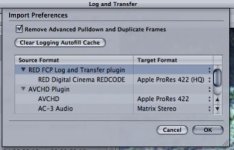
I followed the whitepaper instructions. Did a Log & Transfer of the footage using FCP going from Red to Apple ProRes 422 (HQ). When I send the project to Color I can see the Red tab, click it, but have no way of adjusting any of the values or enabling it.
 
What resolution did you shoot? 3k won't work in Color for example (at least it hasn't in the past, haven't checked the latest Color plugin.)

You may need to adjust your SOURCE FOOTAGE setting in Color to point to the R3Ds. It's been a while since I have done it so I can't be more specific at the moment.
 
If you ingest as ProRes you cannot use the RED tab in Color. That only works with footage ingested as "native".
 
What resolution did you shoot? 3k won't work in Color for example (at least it hasn't in the past, haven't checked the latest Color plugin.)
3840x2160


If you ingest as ProRes you cannot use the RED tab in Color. That only works with footage ingested as "native".
Okay so is there a way to resolve this challenge easily, make the color adjustments and still maintain my current edit?
 
Just ingest the footage again using the "native" selection make your clips offline and reconnect them with the native files then go to color
 
Just ingest the footage again using the "native" selection make your clips offline and reconnect them with the native files then go to color
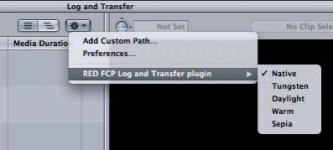
You're talking about the setting under the "RED FCP Log and Transfer plugin" option on the menu, in which case they were all set to "Native" when ingested.
 
You're talking about the setting under the "RED FCP Log and Transfer plugin" option on the menu, in which case they were all set to "Native" when ingested.

But you said in an earlier post that you Log & Transferred the footage to ProRes (HQ). It's either ProRes or native. It can't be both. And the fact that you're not seeing the Red tab available in Color would suggest it's ProRes. Look at the codec column in the FCP browser window and see if it says ProRes or REDCODE.
 
Personally, i don't work with native R3d's ingested because i much prefer the simple redcine or redcine-x workflow, BUT, that said, i've tried the native workflow and it is simple enough.

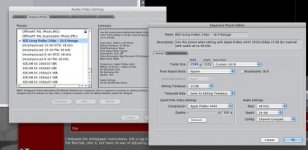
But as i recall, you ingest via log and transfer and before even doing this, you have to go into the Audio/Video settings and create a user setting similar to the standare prores 444 or 422 only you have to then change frame size depth to 24bit and i believe chroma sampling--Anyway end result is you create an easy setup to use when ingesting red native footage first and then you can go into log and transfer --- but be sure to enable "native red" footage. after all of this, you can then export to Color and then you can go into the RED tab and manipulate iso, white balance etc....BUt i did not use it very much since last i used it i could not utilize redcolor or redgamma. At any rate, i just like the flow of redcine-x and then set colors and one lights and then output to prores 444 for edit.
 
But you said in an earlier post that you Log & Transferred the footage to ProRes (HQ). It's either ProRes or native. It can't be both. And the fact that you're not seeing the Red tab available in Color would suggest it's ProRes. Look at the codec column in the FCP browser window and see if it says ProRes or REDCODE.
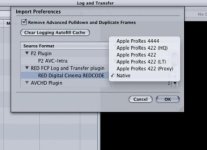
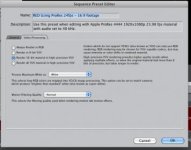
Here's where it gets confusing...
attachment.php


attachment.php


So instead on the preferences menu, not the plugin menu, I should've ignored the whitepaper's instructions to ingest at Apple ProRes 422 and set that to "native?"
 

Attachments

  • Picture 3.jpg
    Picture 3.jpg
    17.2 KB · Views: 0
  • Picture 1.jpg
    Picture 1.jpg
    11 KB · Views: 0
I've left mine set on Native.....I presumed that gave me manipulation over my raw data.....never had mine set as target for prores 422 or 444---doesn't the user want to change iso/wb and other raw data within color?

See my attachment....showing options---but mine has always been left on native.
 

Attachments

  • Log-transfer-options.jpg
    Log-transfer-options.jpg
    16 KB · Views: 0
So instead on the preferences menu, not the plugin menu, I should've ignored the whitepaper's instructions to ingest at Apple ProRes 422 and set that to "native?"

The white paper lists a number of different work-flows. You need to read through all the options and choose what works for you. There is not one "instruction" on what to do.

There are of course plenty of other workflows which do not involve Log & Transfer at all, and many (myself included) prefer those.
 
Okay so right now the fastest option is to re-ingest everything and then reconnect the footage in FCP using the newly ingested footage?
 
Or you can use Clipfinder to reconform an XML to the camera proxies.
 
I have Clipfinder, what's the specific menu item to use so can I do that using and FCP XML export and converting to the proxies?
 
Back
Top