Welcome to our community

Be a part of something great, join today!

  • Hey all, just changed over the backend after 15 years I figured time to give it a bit of an update, its probably gonna be a bit weird for most of you and i am sure there is a few bugs to work out but it should kinda work the same as before... hopefully :)

How do "resize" REDCINE-X Pro (15, and 16) project panels / "reset workspace"?

Michael MK Siu

Well-known member
Joined
Jan 30, 2007
Messages
90
Reaction score
0
Points
6
Location
Montreal, QC; Toronto, On; HKG
How do "resize" REDCINE-X Pro (15, and 16) project panels / "reset workspace"?

Dear all,

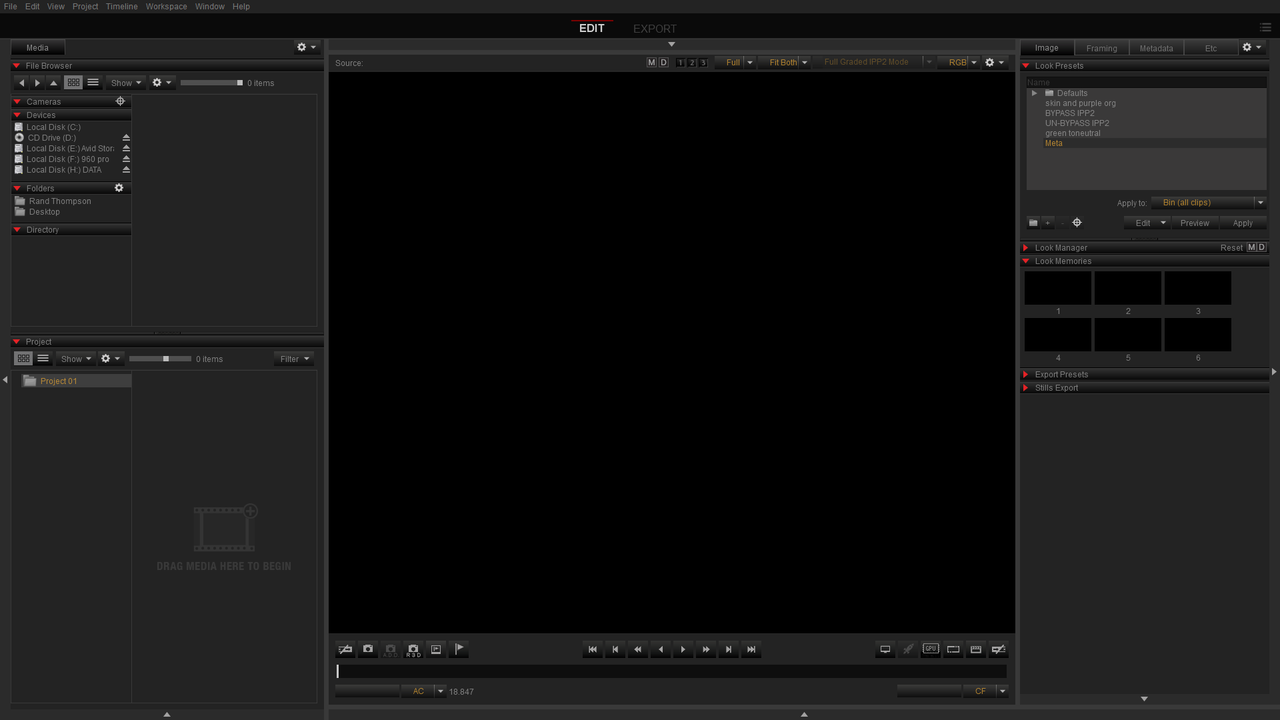
I have a strange issue, I was using REDCINE-X Pro 15 with a red rocket card installed. Monitor is a dell 22in with 1680x1050 resolution. Things have been working well, but upon anOS crash and restart, the right panels of REDCINE-X now extends beyond the desktop / monitor and are cut off.

This is a bit difficult to explain, but please see screen cap below:

REDCINE_CUTSCREEN.jpg


I have upgraded to REDCINE-X PRO 16 now in hope that this will be resolved on its own, but no such luck.

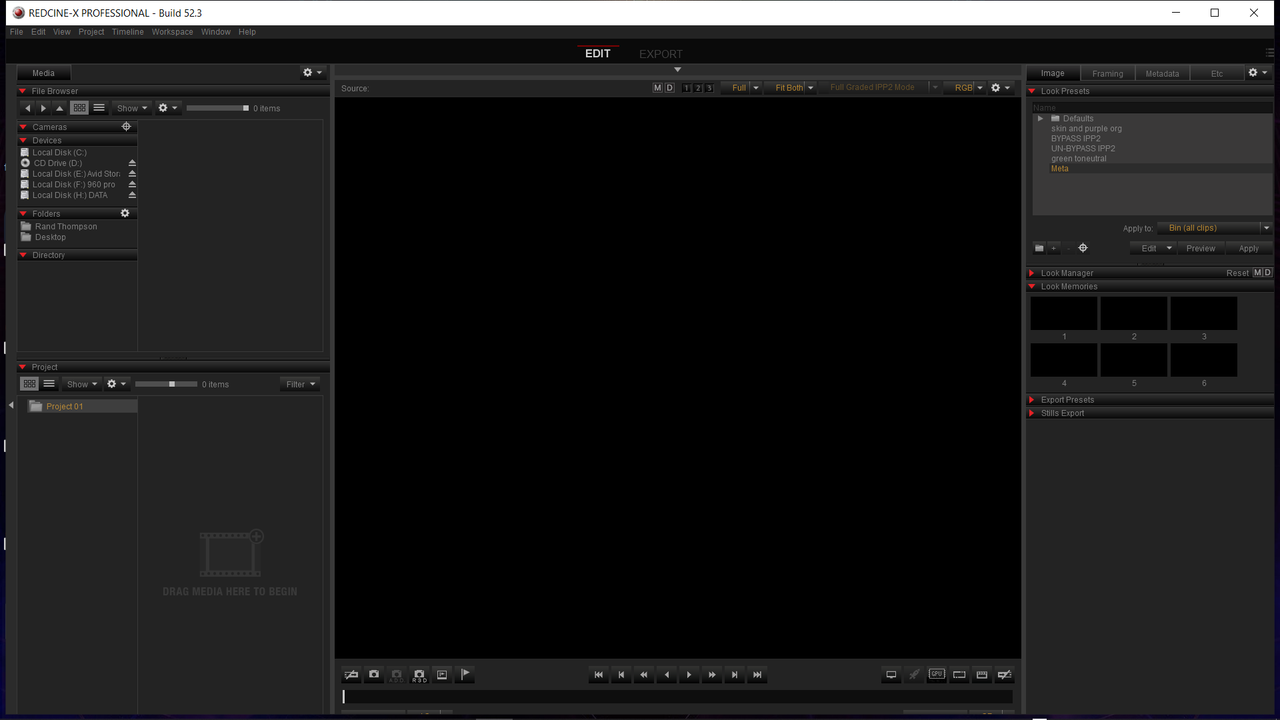
Funny thing is if I opt to do FULL SCREEN VIDEO, everything fits nicely. Screen cap again below:

REDCINE_FULLVID.png


I'm wondering if there's a way to "reset" the workspace, or "resize" the project window / far right panels such that I can gain access to the far right settings again?

Thanks!
Michael
---
[www.cmkmedia.ca]
[www.mksiu.com]
 
Hi all,

Just a quick update. I had to do a hard restart today (OS crashed but with something unrelated to REDCine-X), and strangely, upon the restart, the problem magically fixed itself. I'm now able to see the far right controls on the right panels.

Not sure if this is perhaps just a bug with my resolution settings within the OS itself.

Either way, I'm glad this is resolved, but I do wish to know why it happened and how to fix it for future reference! Any advice / comments are welcome.

Michael
---
[www.cmkmedia.ca]
[www.mksiu.com]
 
What if you toggle the system display resolution, quit RedCineX Pro, then start it up again? I suspect this has to do with the way the program is communicating with the operating system.
 
I had a similar issue. Solved with right clicking on the mouse over the right panel and there's some sort of arrange function. Haven't got redcine x opened but I think after doing the right click its easy to figure out.
 
I FOUND THE SOLUTION !!!!

You have simply to modify the Preferences.ini in the preference file in the library application support ! (with TextEdit)


you have to modify to set the main position point call "main_pos=" to 0 0 exactly like that :

main_pos=@Point(0 0)

Now you can see the border of the window, and modify the size or go full screen easy as any other apps !

He he !
 
Last edited:
Im having a problem that Redcine on my Mac (latest OS) is a little bit bigger than the screen. I cannot reach the buttons that are to the most right. Does anyone know how to fix this.
I cannot find the preferences.ini file

/Andreas
 
Having the same problem (MBP 11.5 with Catalina). Cannot find the preferences.ini file as well
Anyone solved this recently?
 
Is it really only 5 of us having had this problem? I have to move Redcine left and right all the time. Annoying..
 
Have you guys tried CTRL+SHIFT+F for PC and I think CMD+SHIFT+F for Mac?. You may have to do it 2 times in a row or only once.


It should go from No White bar at the Top

Screenshot-1685.png


To a White Bar at the top, which will allow you to move the interface around and resize it.


Screenshot-1686.png
 
Last edited:
In Mac's "System Preferences" go to "Displays" and then choose the Resolution to "Scaled" --> "More Space".
It does the trick on my MacBook Pro 13" M1, Big Sur.
Hope it helps! :thumbsup:

 
Last edited:
In Mac's "System Preferences" go to "Displays" and then choose the Resolution to "Scaled" --> "More Space".
It does the trick on my MacBook Pro 13" M1, Big Sur.
Hope it helps! :thumbsup:


Same M1, Big Sur. It does the trick at the beginning. I double click on a clip and boom, right side expand beyond monitor screen..
There really is no sense. I downloaded a new copy of RCX on a fresh new 13'' M1
How can it be?
 
Back
Top