Welcome to our community

Be a part of something great, join today!

  • Hey all, just changed over the backend after 15 years I figured time to give it a bit of an update, its probably gonna be a bit weird for most of you and i am sure there is a few bugs to work out but it should kinda work the same as before... hopefully :)

How are you configured for audio in?

Kevin D'Haeze

Well-known member
Joined
Apr 29, 2014
Messages
556
Reaction score
6
Points
18
Location
Pacific NW
I know that there are purists who say that you should only record audio separately, then sync it in post. But I am curious to hear about rig setups for those who are recording "final" audio as sync sound in the camera. Essentially, we're talking about light setups that are meant for getting around quickly. I suppose you could call it "documentary style" if you wanted to.

MY SETUP: Raven, with 7" touch screen and handle on top, I/O expander, then a Redvolt XL power module on back.

I know about some different options.... A-Box, external Beachtek, stuff like that.

What are you using that [a] gets XLR audio into the camera, is compact and can move with the camera, and [c] is easy to carry without getting in the way of the monitor, etc.
 
If you're serious, avoid the pre-amps in the camera. I went with a Sound Devices 302.
302-master.jpg
 
If you're serious, avoid the pre-amps in the camera. I went with a Sound Devices 302.

Thanks Bob. How do you configure your rig with that? Do you mount it onto a threaded mount somewhere on/around the camera, or tether on a belt clip or similar?
 
Thanks Bob. How do you configure your rig with that? Do you mount it onto a threaded mount somewhere on/around the camera, or tether on a belt clip or similar?

Nope. If I'm mobile I don't use this because no matter what, sound isn't going to sound great with a mic on the camera. This is mostly for interview settings or when I can be plugged in.
 
Thanks Bob. How do you configure your rig with that? Do you mount it onto a threaded mount somewhere on/around the camera, or tether on a belt clip or similar?[/QUOTE

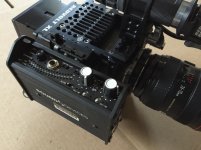
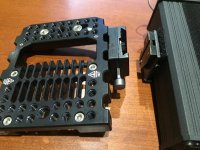
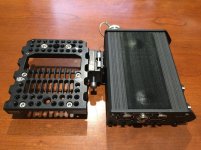
Like Bob, I use a Sound Devices, but instead went with the MixPre-D mounted to the top plate, see photo.
 

Attachments

  • IMG_6482.jpg
    IMG_6482.jpg
    89.2 KB · Views: 0
On my 5D mk3 (famous for bad audio) sometimes when I had to, I would plug my mic into a zoom 5 or 6 and into the camera. It was surprisingly good and very useable for interviews and such. I still prefer dual system when I can.
I'll try this setup with my Raven for sure.
 
The audio Preamps on the RED starting with the scarlet release are significantly underrated IMHO. I would pick them over a juicedlink - and had heard at one point that were similar guts to sound devices pre's in there - Maybe someone from team RED can confirm?

For this reason - we run a 1/8" to XLR adapter cable straight into the RED - better than any of our tascam / sub $400 recorder preamps - (Let alone getting the benefits of 24/48 audio with the master clip already synched). With a high quality countryman lapel, can't imagine it getting much better if you only need 2 channels.
 
I have a Scarlet Dragon. I use a Sound Devices 442 and WC Abox. The nice thing about SD mixers are that you can set the output to mic, which is what you want for the input to a RED. It's always better... well you know. This works fine for me for lots of stuff when I'm using my own sound kit.
 
Hey Mark, what did you use to mount that on the top plate?

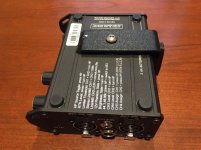
HOW I DID IT, by Mark Phelan

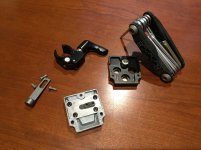
Since I had one lying around from my original R1, I started with one of these from ET: https://elementtechnica.com/product/female-v-lock-2/

Mine had the rail clamp attached, which I disassembled and removed.

Then I screwed it onto the top plate.

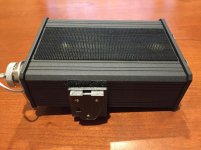
I bought a piece of steel and bent it to 90º, drilled some holes for the male adapter to screw onto the L bracket, then painted it black with truck bed liner paint.

Since the MixPre-D only has the one screw on the bottom, I wound up adding some velcro to keep everything stationary.

I actually played around with it and wound up changing the layout of how it sat on the camera. I preferred it flat, right-side up making it easier to read the settings. Either way worked fine, but I also had to move it to the top handle so I could attach a HotBox to the top plate.

Works great and it's a quick disconnect to pack it all up. Easy peasy.

And that's how I did it.

The End.

p.s. The velcro on top of the MixPre-D is for attaching Lectro receivers to run wireless lavs or boom.
 

Attachments

  • IMG_9469.jpg
    IMG_9469.jpg
    93.2 KB · Views: 0
  • IMG_9470.jpg
    IMG_9470.jpg
    94.4 KB · Views: 0
  • IMG_9476.jpg
    IMG_9476.jpg
    92.6 KB · Views: 0
  • IMG_9484.jpg
    IMG_9484.jpg
    93.8 KB · Views: 0
  • IMG_9485.jpg
    IMG_9485.jpg
    95.3 KB · Views: 0
I have to admit, the Mix-Pre is not a bad little mic preamp. But I still say you have to ride levels for many, many situations, and there's a lot of danger involved in only counting on the in-camera sound. It always, always makes more sense to record sound separately and just use the camera audio as a scratch track.
 
I plan on using my newly bought Zoom F8 on the Raven. It's a field recorder, has 8 XLR inputs, timecode, color screen and amazingly quiet pre-amps for under $1,000.

346-R04-Zoom-F8-Primary.png
 
Back
Top