Welcome to our community

Be a part of something great, join today!

  • Hey all, just changed over the backend after 15 years I figured time to give it a bit of an update, its probably gonna be a bit weird for most of you and i am sure there is a few bugs to work out but it should kinda work the same as before... hopefully :)

Holiday Update + IPP2 Preview Build

Guess would be perhaps your GPU doesn't have enough memory for the 8k image. Maybe Rob can help?

Graeme

Hi Graeme, thanks for the reply.
Well even if I import the 5K file from Epic W is the same issue. BUT if I import the 5k file from the Scarlet W works great! I can export pro res no problem.

Another issue I am having in this days with FCPX is the following:
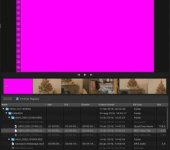
I had problem importing in the latest FCPX 10.3.1 files R3D it was appearing the PINK frames (you can only scrub but as you stop all is PINK)...I thought was Color Finale that was doing some kind of conflict...so I removed it and today I decided to reinstall FCPX.
Also I reinstalled the red workflow from red.com
And nothing happened...same problem (see picture!)
Here is what I don't understand:

1. I also downloaded 8K Helium files from red.com and I have the same problem, so is NOT my camera....
2. If I import in FCPX a files from SCARLET W it works great!

A week ago all was working!!
 

Attachments

  • problem.jpg
    problem.jpg
    10.8 KB · Views: 0
  • sierra.jpg
    sierra.jpg
    14.1 KB · Views: 0
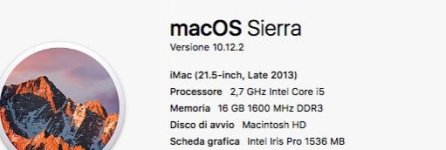
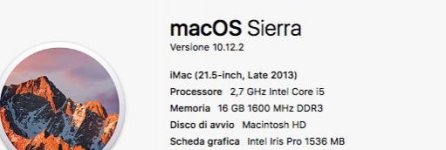
Is this an AMD card? If so then we are already aware of this and looking in to it.

Rob this is what I have see picture thanks.
Also with FCPX I cant import any Epic W files...but a week ago was fine...now I see Pink Frame!
 

Attachments

  • sierra.jpg
    sierra.jpg
    14.1 KB · Views: 0
Ok, i'm getting behind the concept of IPP2. Very interesting. Makes sense, sounds logical and the results i'm getting from playing around with old footage (which is nuts if you think about it) are nice. Looking forward to all the things that will come. This will make grading for SDR and HDR a lot more convenient. Awesome.

Thanks for the early xmas gift. Great work Greame!
 
Rob this is what I have see picture thanks.
Also with FCPX I cant import any Epic W files...but a week ago was fine...now I see Pink Frame!

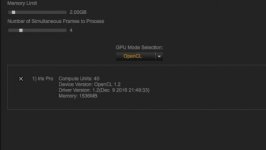
I'm sorry, but that screenshot doesn't really tell us the whole story. Which GPU devices are selected in the REDCINE-X PRO preferences? For now you will likely have to disable the GPU acceleration to get a normal looking image back.
 
I'm sorry, but that screenshot doesn't really tell us the whole story. Which GPU devices are selected in the REDCINE-X PRO preferences? For now you will likely have to disable the GPU acceleration to get a normal looking image back.

Hi Rob please see attached I did the screen shot of the preference.
Thanks a lot
Luca
 

Attachments

  • redcineopnecl.jpg
    redcineopnecl.jpg
    8.3 KB · Views: 0
As long as we're on the subject of the new version of RCX-Pro, I'm on a Dell XPS 15 with a GTX 960M GPU. When I switch colorspace and gamma with my Helium footage (6K) I get this error. My system has 32GB of RAM and I have it set to OpenCL and using the GPU not the CPU's video. Would this be the same as the AMD issue because it's set to OpenCL instead of CUDA?

=== Effect: OCL Stage1 simple. Failed to write 2D image for 7. Memory object allocation failure

Failure within processOpenCL
 
The CPU? Do you mean OpenCL? It might be worth checking for a newer OpenCL driver from Intel; the latest drivers are reasonably stable, even though the GPU itself is still not great.

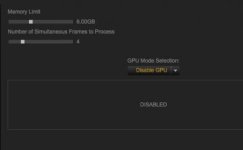
My friend check the screen shot, I had to disabilitate this...but only I need to do for helium files 5k or less, if I export a scarlet w file 5k is all good and I dont need to disabilitate...
 

Attachments

  • redcinedisabled.jpg
    redcinedisabled.jpg
    6.7 KB · Views: 0
UPDATE:
My wife has a mc book with os el capitan and I installed red cine (not the beta) and there I can export the helium files....I am confused now...
 
This new color pipeline to process the raw is blowing my mind (in a good way)

I'm new to RED. Completely blown away by the technology, the company and most impressively the community.

Thank you Jared and Graeme for the open dialogue and transparency. Thank you to my fellow redusers for the tips, debates and
discussions.
 
This new color pipeline to process the raw is blowing my mind (in a good way)

I'm new to RED. Completely blown away by the technology, the company and most impressively the community.

Thank you Jared and Graeme for the open dialogue and transparency. Thank you to my fellow redusers for the tips, debates and
discussions.

Thanks John! There's a lot of good people here! We're all pretty passionate about digital cinema art and technology.

Graeme
 
Graeme,

The work you do is beyond impressive!

The day Jim hired you should be a national holiday for all those who own Red gear. :)

Oh, and, Merry Christmas and Happy Boxing Day!
 
Rakesh might be onto something. Iris Pro on package graphics and discrete GPUs could have several differences, drivers amongst them.

Cheers - #19

I had all sorts of problems with OpenCL heavy software on earlier Intel GPUs, but their latest one is decent, in that the OpenCL apps don't crash constantly now. And they even actually work! I can load up and play Helium footage on my tiny Razer Blade Stealth. On my older machine that had an earlier generation Intel GPU I wasn't able to view more than stills even with 5K footage, let alone 8K.
 
Jan '16 RAVEN pre-order here - in it for the long run and still holding on strong!
 
Jan '16 RAVEN pre-order here - in it for the long run and still holding on strong!


Yes. I'm a Feb.16 RAVEN guy and I absolutely second that. I'm happy to wait for my RAVEN, as there honestly isn't a single camera that get's close to the RAVEN for my needs.
 
The CPU? Do you mean OpenCL? It might be worth checking for a newer OpenCL driver from Intel; the latest drivers are reasonably stable, even though the GPU itself is still not great.

Well honestly I dont want to mess with drivers, I spoke with Red UK and I sent all the crash logs, I think my actual configuration which is Sierra 10.12 plus FCPX 10.3.1 don't support helium files.
Weird things is that I can import, work and edit also quite quick (having Imac 2013 and 8gb ram) R3D files from Dragon Sensor (4,5,6K) but as soon I import a Helium file of ANY size I see that Purple Frame and FCPX crashes.

I suppose that after the last update of Sierra of two days ago something has happened, I suppose that at the moment FCPX and Sierra 10.12 can't support helium files at the moment...is a mess!!
 
Well honestly I dont want to mess with drivers, I spoke with Red UK and I sent all the crash logs, I think my actual configuration which is Sierra 10.12 plus FCPX 10.3.1 don't support helium files.

Yes it does. I told you that in the other thread that you started on this subject. I have the exact same setup software wise and it works great. Your problem seems to me to be hardware related. My GPUs btw are also AMD, the D700 cards, but AMD nonetheless.

EDIT: And to reiterate here, it also works on my stinking old MacBook Pro from early 2011.
 
Back
Top