Dewi Bungsu
Active member
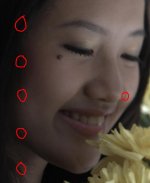
Am having a strange result on my R3D footage after shooting with RED ONE last week. A strange vertical white lines appeared on my footage but it only appears in this scene and its every frames. If we play it, the strange vertical lines are moving down in a straight line from the top of the footage. Just for another information, all footage in this scene was saved in only one CF card, so it doesn't separated in 2 or more CFs. It was a really hot day when were shoot it, but this is not the only scene that we shoot outdoor. There is another outdoor scene that has more frames, but it turned out fine.
This has never happened before and am wondering if you guys has ever experienced this.
We're shooting at:
REDCODE 28
50 FPS
COLOR TEMP 5000
SHUTTER 180
3K 16:9
Build 21.4.1
Here I attached a still frame of one of the footage from the particular scene. If you need to see it clearer, there's a link to watch the short clip. (Watch closely on the hair beside her cheek).
Can anyone help, please? Am hoping to find the answer of what causing this strange result. Thanks heaps, guys. Any kind of comment or those who's just sharing experiences would be very much appreciated
Video File (mov with prores codec, resolution SD PAL):
http://rapidshare.com/files/384106192/FOR_RED.mov.html
Cheers,
Dewi
This has never happened before and am wondering if you guys has ever experienced this.
We're shooting at:
REDCODE 28
50 FPS
COLOR TEMP 5000
SHUTTER 180
3K 16:9
Build 21.4.1
Here I attached a still frame of one of the footage from the particular scene. If you need to see it clearer, there's a link to watch the short clip. (Watch closely on the hair beside her cheek).
Can anyone help, please? Am hoping to find the answer of what causing this strange result. Thanks heaps, guys. Any kind of comment or those who's just sharing experiences would be very much appreciated
Video File (mov with prores codec, resolution SD PAL):
http://rapidshare.com/files/384106192/FOR_RED.mov.html
Cheers,
Dewi