Welcome to our community

Be a part of something great, join today!

  • Hey all, just changed over the backend after 15 years I figured time to give it a bit of an update, its probably gonna be a bit weird for most of you and i am sure there is a few bugs to work out but it should kinda work the same as before... hopefully :)

(HELP!) Strange Result in R3D Footage (strange vertical lines)

Dewi Bungsu

Active member
Joined
Apr 16, 2010
Messages
25
Reaction score
0
Points
0
Location
Jakarta, Indonesia
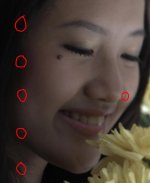
Am having a strange result on my R3D footage after shooting with RED ONE last week. A strange vertical white lines appeared on my footage but it only appears in this scene and its every frames. If we play it, the strange vertical lines are moving down in a straight line from the top of the footage. Just for another information, all footage in this scene was saved in only one CF card, so it doesn't separated in 2 or more CFs.

This has never happened before and am wondering if you guys has ever experienced this.

We're shooting at:

REDCODE 28
50 FPS
COLOR TEMP 5000
SHUTTER 180
3K 16:9
Build 21.4.1

Here I attached a still frame of one of the footage from the particular scene. If you need to see it clearer, there's a link to watch the short clip. (Watch closely on the hair beside her cheek).

Can anyone help, please? Am hoping to find the answer of what causing this strange result. Thanks heaps, guys. Any kind of comment or those who's just sharing experiences would be very much appreciated :)

Video File (mov with prores codec, resolution SD PAL):
http://rapidshare.com/files/384106192/FOR_RED.mov.html


Cheers,

Dewi


Attachments

  • Footage_Trouble.jpg
    Footage_Trouble.jpg
    76.3 KB · Views: 0
No, I haven't..do u recommend me to just ask them straight away?
Will do then.

I post it here just because am wondering if anyone has ever get the same problem as me.
Wondering if there's maybe any possible trouble connecting with the camera, the CF card,
or the temperature because it was a really hot day when we were shoot it.

-DEWI-
 
Last edited:
I've had two things at least cause me image problems, and although the vertical lines were more continuous than yours seem, i'll tell you what caused them:

1) loose cable to sensor
2) Dodgy drive cables.

Number 2 is the cause of most problems I've had, including freeze on post. If you're using 6" drive cables, stop now! ditch em for 18" ones, they're seriously flakey. In such a case, make other arrangements for the disk ie, I have a top mount with two five inche ali tubes (from a skip), and secure the disk with a piece of gaffa, all snug.

When the 18" cables go bad, the problems are just as bad, but they're more reliable, and no doubt easier to manufacture and QC.

I recommend that anyone having a recurring problem with a R1, such as post hangs or freezes, try just using a CF card and see if the problems all go away, and if they do, buy a new drive cable. I'm sure they're a many things can go bad with a R1, including CF card modules and whatever else, but most of the time problems for me have been drive cable related.
 
Hi Ronx,

Thank u for the reply, but it seems that we have different issue since, as I stated before, we're using CF card in that shooting and we always do (in any other shooting).

Finally got a reply from the Support Team after getting a support ticket, but they ask us to send the camera so they can try and replicate it and have their techs to take a look at it.

My concern is, for the past three days I've been browsing to find other threads with the same issue. The result is, many people experienced this but until now I haven't find any problem-solving comment from either Red Team, Bomb Squad, or Fire Tech that can solve our problem. Moreover, we need the camera for our operation as we are fully booked until the end of the month (and other tbc bookings on June).

Any thought about this? Anyone?


DEWI
 
I am part of RED team...and my recommendation to start the problem-solving process is to file a support ticket on RED.com. If you want to get in touch with RED support, why not contact them directly?


BC
 
Hi Brent,

I have follow your recommendation for filing a support ticket. Jonathan Bennett (RED Digital Cinema) replied me and, as I wrote on my prev reply, they want us to bring the camera in to try and replicate this and have the technicians take a look at it. While it does not possible for us to do that based on our busy schedules, I am looking forward to hear a precise solution from the Red Team of what may causing the problem and what we can do about it. Thanks for your help, Brent :)


DEWI
 
I just saw this, and I know it's been a few months, but in case you never found out an answer:

I run into this frequently in the Summer (I live in Phoenix). It is an overheating issue. Keep a courtesy over the camera when you're in direct sunlight and keep some instant cold packs on the camera when it starts to feel hot. Don't use anything that will sweat moisture on the camera.

Do what you can to keep it cool and you're usually safe.
 
I spoke to guy a few months ago who said he suffered the same issue. Black shading cured it for him.
Paul
 
Back
Top