Welcome to our community

Be a part of something great, join today!

  • Hey all, just changed over the backend after 15 years I figured time to give it a bit of an update, its probably gonna be a bit weird for most of you and i am sure there is a few bugs to work out but it should kinda work the same as before... hopefully :)

Help! ProRes 4444 looks TERRIBLE in FCP

I'm not sure the QT component has anything to do with it because doesn't this just allow you to view proxies? The R3Ds are being converted to PR4444 so the QT Component doesn't even come into play.

Unless I'm missing something, but I don't think so.
 
Hi David,
yes, using redcolor/redgamma. I had also loaded the latest QT beta component and that made a very slight change in the look of the QT's, but still very washed out. I even turned off rocket monitoring and then connected the Dreamcolor via DVI to my Mac and still looks washed out....the thinking was maybe it was my CC monitor showing me a nice look, but it shows it also when i open it from my Mac. My gamma settings are at 2.2 on Mac.

So my next step is to reload the old QT component and go back to redcine-x build 104 and check with those transcodes. Can't think of any other changes to make./?

Is it the transcoded files or the wrapper files that are washed out?

When I do transcodes they match redcinex in fcp.
 
I think Im running into the same issue... in FCP it looks good (sent from color) exported from FCP it looks awful... I will do some more tests next week.... I was hoping it was just to gamma automation setting.... but now Im not sure...
 
I think my thread has been hijacked! I don't have the same issue as the other guy.

James,

What were your ISO, FLUT™ and histogram settings?

Is this the M or M-X sensor?

Try this:

Go back to the old QT component and also use the build of RC-X on the RED.com site. The QT codec and 221 are both beta.

David
 
James,

What were your ISO, FLUT™™ and histogram settings?

Is this the M or M-X sensor?

Try this:

Go back to the old QT component and also use the build of RC-X on the RED.com site. The QT codec and 221 are both beta.

David

ISO:320 Flut unchanged. Mysterium Sensor.

As i said, it looks absolutely fine in quicktime, just not in FCP, which indicates its not a RCX thing, but a FCP thing. which is why i posted it in here.
 
James,

I can only offer this explaination and it is a guess. Perhaps the QT component is not yet tweaked to work with FCP.

It's strange though because you are working with rendered media and that means there is no reference to the r3d at all.

Can you do a snapshot of your FCP settings, and show a snapshot of the QT and the FCP side by side?

David

It feels like the problem is in FCP and/or you rlubrary QT folder.
 
James,

I can only offer this explaination and it is a guess. Perhaps the QT component is not yet tweaked to work with FCP.

It's strange though because you are working with rendered media and that means there is no reference to the r3d at all.

Can you do a snapshot of your FCP settings, and show a snapshot of the QT and the FCP side by side?

David

It feels like the problem is in FCP and/or you rlubrary QT folder.

I've been in communication with Graeme Nattress and he's stumped too. Posting stills doesn't communicate the difference, its really when its in motion that it looks drastically worse. But its only in FCP that it looks different.
 
I've been in communication with Graeme Nattress and he's stumped too. Posting stills doesn't communicate the difference, its really when its in motion that it looks drastically worse. But its only in FCP that it looks different.

FCP uses a low quality 8 bit yuv for playback in the gui which could be why you're seeing quantization.
 
Banding or not enough gradations which in turn exaggerates the macroblocks in prores.

Well thats exactly what im getting, but something curious is happening.

I set my screen gamma to 2.2, and the footage looks darker than it should be, but with no Quantization, then i change it to 1.8, and it looks lighter, and it looks fine also. but as soon as i start working in fcp, the Quantization comes back. Any clues?

Jim
 
Jim,
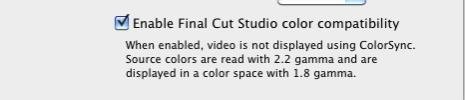
Here's something rather elementry that you likely have done, but in Quicktime Pro 7 there is a setting you can click to allow FCP to keep 2.2 gamma---see attachment. You have that checkmarked?
 

Attachments

  • Screen shot 2010-04-27 at 1.59.35 PM.jpg
    Screen shot 2010-04-27 at 1.59.35 PM.jpg
    8.1 KB · Views: 0
Be warned that QuickTime Pro 7's FCP compatible thing doesn't have to be on if the clip inherit 2.2 gamma. That means if you work in Snow Leopard, export from REDCINE-X with automatic gamma turned off, that clip will be referring to gamma 2.2, so you don't have to turn the QTP FCP compatible on.
 
Well thats exactly what im getting, but something curious is happening.

I set my screen gamma to 2.2, and the footage looks darker than it should be, but with no Quantization, then i change it to 1.8, and it looks lighter, and it looks fine also. but as soon as i start working in fcp, the Quantization comes back. Any clues?

Jim


Fcp has a different mode for playing back vs idle.
Not sure if that's what you were seeing.
 
Fcp has a different mode for playing back vs idle.
Not sure if that's what you were seeing.

I haven't seen that happen in 10.6.x with FCS3, but I used to see a lot with 10.5.x with FCS2.
 
Back
Top