Welcome to our community

Be a part of something great, join today!

  • Hey all, just changed over the backend after 15 years I figured time to give it a bit of an update, its probably gonna be a bit weird for most of you and i am sure there is a few bugs to work out but it should kinda work the same as before... hopefully :)

Help! Epic Skintones are very red.

Tyler Maddox

Member
Joined
Apr 1, 2013
Messages
8
Reaction score
0
Points
0
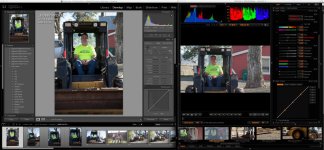
The skintones I've been getting out of my Epic are very red. It looks like the person is sunburnt. I've been able to get them back when I grade, but it takes a lot of work. Here is a screen shot side by side of a Still Raw image from a 5D3 in lightroom next to a r3d in Redcine-x. All the colors look relatively the same except the skintones from the r3d are way too red. Any suggestions how to get these to match better before I grade? Thanks for any help!
 

Attachments

  • REDSkintones.jpg
    REDSkintones.jpg
    102.1 KB · Views: 0
The skintones I've been getting out of my Epic are very red. It looks like the person is sunburnt. I've been able to get them back when I grade, but it takes a lot of work. Here is a screen shot side by side of a Still Raw image from a 5D3 in lightroom next to a r3d in Redcine-x. All the colors look relatively the same except the skintones from the r3d are way too red. Any suggestions how to get these to match better before I grade? Thanks for any help!


image.tiff

Can you post an R3D still? No way to really help you without one. You can do this by opening the clip in Redcine X and clicking the R3D still button down by the snapshot button below the viewer. Then host that file somewhere like dropbox and post the link here.

That does not sound right and really sounds like an incorrect look was created in camera. In the meantime reset the camera to default and tell us if the image looks different.
 
Try Redcolor2 or even CameraRGB for your color space. That usually pulls some red out of skin, keep an eye on what it does to other things though.
 
Last edited:
Your color temp was a bit high and you are using the saturation slider which will increase the warmth. Try to avoid using the sliders in the debayer section (same as setting saturation, contrast, etc. in camera) and stick to using the post fx. There's a slider for alchemy which is a contrast slider and post saturation which I always use. Using those upper controls can sometimes give you some ugly looks but can always be reversed. Here's the R3D with metadata for my changes: http://matthayslett.com/wp-content/uploads/2014/03/RedSkinMH.zip

REDSkin.jpg

Screen-Shot-2014-03-11-at-3.35.47-PM.png
 
Yeah, RC2 does help it, as does a 5600 kelvin setting instead of 6050 and reducing saturation from 1.163 to 1.0
 
It's a combination of a warmer color temp and the debayer saturation set up higher. If you set WB to 5600 and Saturation to 1, it already looks a lot better. It has nothing to do with Redcolor 2 vs. 3 but rather some slider settings... If you use the curves to bring up the mids, you'll notice that will help remove some red from the skintones. Underexposure leads to greater saturation so keep that in mind.

RedSkin2.jpg
 
FYI, the default color/gamma rendering in RCX is RC3/RG3. This matrix balances for the MX sensor, in part by reinforcing reds. With Dragon that is no longer necessary which is very good news in terms of color linearity for Dragon sensor with as yet unreleased DC1/DG1 (or whatever they decide to call it). In the meantime there are some issues with red push, which should be sorted in an upcoming revision. From the outside it looks like the OLPF replacement solved problems that needed to be dealt with, but the "cost" was having to take a few steps back in engineering/refining the Dragon color science which had been developing for over a year based on the old OLPF.

The path RED suggests (and Sydney notes) is to switch the color matrix to RC2 and grade from there. This should make it simple enough to get the rendition you want, though it may take a little more effort to get there.

Cheers - #19
 
Also, if you start with REDLogFilm, you can end up landing your skin tones closer to what you might be looking for. It can take more work to get the look there, but in the end I find it's often worth it.
 
FYI, the default color/gamma rendering in RCX is RC3/RG3. This matrix balances for the MX sensor, in part by reinforcing reds. With Dragon that is no longer necessary which is very good news in terms of color linearity for Dragon sensor with as yet unreleased DC1/DG1 (or whatever they decide to call it). In the meantime there are some issues with red push, which should be sorted in an upcoming revision. From the outside it looks like the OLPF replacement solved problems that needed to be dealt with, but the "cost" was having to take a few steps back in engineering/refining the Dragon color science which had been developing for over a year based on the old OLPF.

The path RED suggests (and Sydney notes) is to switch the color matrix to RC2 and grade from there. This should make it simple enough to get the rendition you want, though it may take a little more effort to get there.

Cheers - #19

This is shot with MX, not Dragon...
 
This is shot with MX, not Dragon...

I could be wrong, but until recent RCX/SDK versions I rarely saw such a prominent red push on MX sourced material. This leads me to believe that either flags in the metadata are not fully supported yet or some other issue that doesn't accurately match decode parameters to source characteristics. I stick to my note that I expect RCX and the SDK to evolve a fair bit in the next couple of months to handle R3Ds from various generations better than it does today.

IAC, if your footage looks too red in RC3, try RC2 as the starting point. As Matt showed in his post, a little manual tweaking in the current RCX should sort you.

Cheers - #19
 
Side note: Interesting looking at both cameras exposure settings the the Epic needed about 2 more stops of light than the Canon to get to the same exposure. Did you have ND's on the Epic?
 
Last edited:
Matt you deserve some sort of RU medal. You are always so helpful on threads like this. Thanks for all your time and generosity. It does not go unnoticed.
 
Matt you deserve some sort of RU medal. You are always so helpful on threads like this. Thanks for all your time and generosity. It does not go unnoticed.

Appreciate it Nick. In the early reduser days this is where I got my info and advice so it's nice to be in a position to give advice. This forum is a great source of information sharing, love it.
 
Did you by any chance do a custom WB? If so, check your tint as well as your color temp.
 
Did you by any chance do a custom WB? If so, check your tint as well as your color temp.

His tint was neutral.

Matt you deserve some sort of RU medal. You are always so helpful on threads like this. Thanks for all your time and generosity. It does not go unnoticed.

He IS extremely generous with his time, isn't he? :-)

It's a combination of a warmer color temp and the debayer saturation set up higher. If you set WB to 5600 and Saturation to 1, it already looks a lot better. It has nothing to do with Redcolor 2 vs. 3 but rather some slider settings... If you use the curves to bring up the mids, you'll notice that will help remove some red from the skintones. Underexposure leads to greater saturation so keep that in mind.

Yeah, you beat me to it. However while I did wonder if we were missing a Dragon flag I wasn't suggesting that incorrect colorspace settings were the problem but rather a possible of quick fix, as Sidney and Jeremy also suggested.
 
Back
Top