Welcome to our community

Be a part of something great, join today!

  • Hey all, just changed over the backend after 15 years I figured time to give it a bit of an update, its probably gonna be a bit weird for most of you and i am sure there is a few bugs to work out but it should kinda work the same as before... hopefully :)

Helium 8k using 7" vs Dragon 5" monitor

Rajiv G

Well-known member
Joined
Dec 7, 2013
Messages
85
Reaction score
1
Points
8
Hi,

I run a small rental co. in Mumbai India... I rented out to a very prestigious production a Stormtrooper helium and the Red Dragon

A few days into shoot ... The DOP calls me and says there is an issue and wanted me on set ... On landing up on set he put both cameras together

Dragon ISO 800 , Helium ISO 800
Both cameras with Skin tone OLPF's
Dragon 5"monitor Helium 7"monitor

He says ,the dragon LCD looks brighter and more correct than the helium LCD , yes there was a marginal difference ...
I told him if we interchanged the LCDs , I am sure the helium would also look better too, but unfortunately I can't use the 5"LCD on the helium as I already lost one 5" LCD , by using it on the helium.
He and lots of other DOP's here prefer the 5" LCD but unfortunately Red does not manufacture them anymore

Was wondering is there any other way of convincing this guy !!! As he does not want the helium now and wants to continue with 2 dragons instead ....

Any thoughts ??

Thanks

Rajiv
 
What do you mean you lost one 5" by using on the Helium? The 5" is more than double the brightness as the 7" it's no where near color accurate. 7" is closer to real colours but is biased a little to warm color. But neither should be used for color reference. This goes for any camera. He's aware it's all metadata and can be adjusted later? Nothing is baked in other than exposure.
 
Hi,

I run a small rental co. in Mumbai India... I rented out to a very prestigious production a Stormtrooper helium and the Red Dragon

A few days into shoot ... The DOP calls me and says there is an issue and wanted me on set ... On landing up on set he put both cameras together

Dragon ISO 800 , Helium ISO 800
Both cameras with Skin tone OLPF's
Dragon 5"monitor Helium 7"monitor

He says ,the dragon LCD looks brighter and more correct than the helium LCD , yes there was a marginal difference ...
I told him if we interchanged the LCDs , I am sure the helium would also look better too, but unfortunately I can't use the 5"LCD on the helium as I already lost one 5" LCD , by using it on the helium.
He and lots of other DOP's here prefer the 5" LCD but unfortunately Red does not manufacture them anymore

Was wondering is there any other way of convincing this guy !!! As he does not want the helium now and wants to continue with 2 dragons instead ....

Any thoughts ??

Thanks

Rajiv
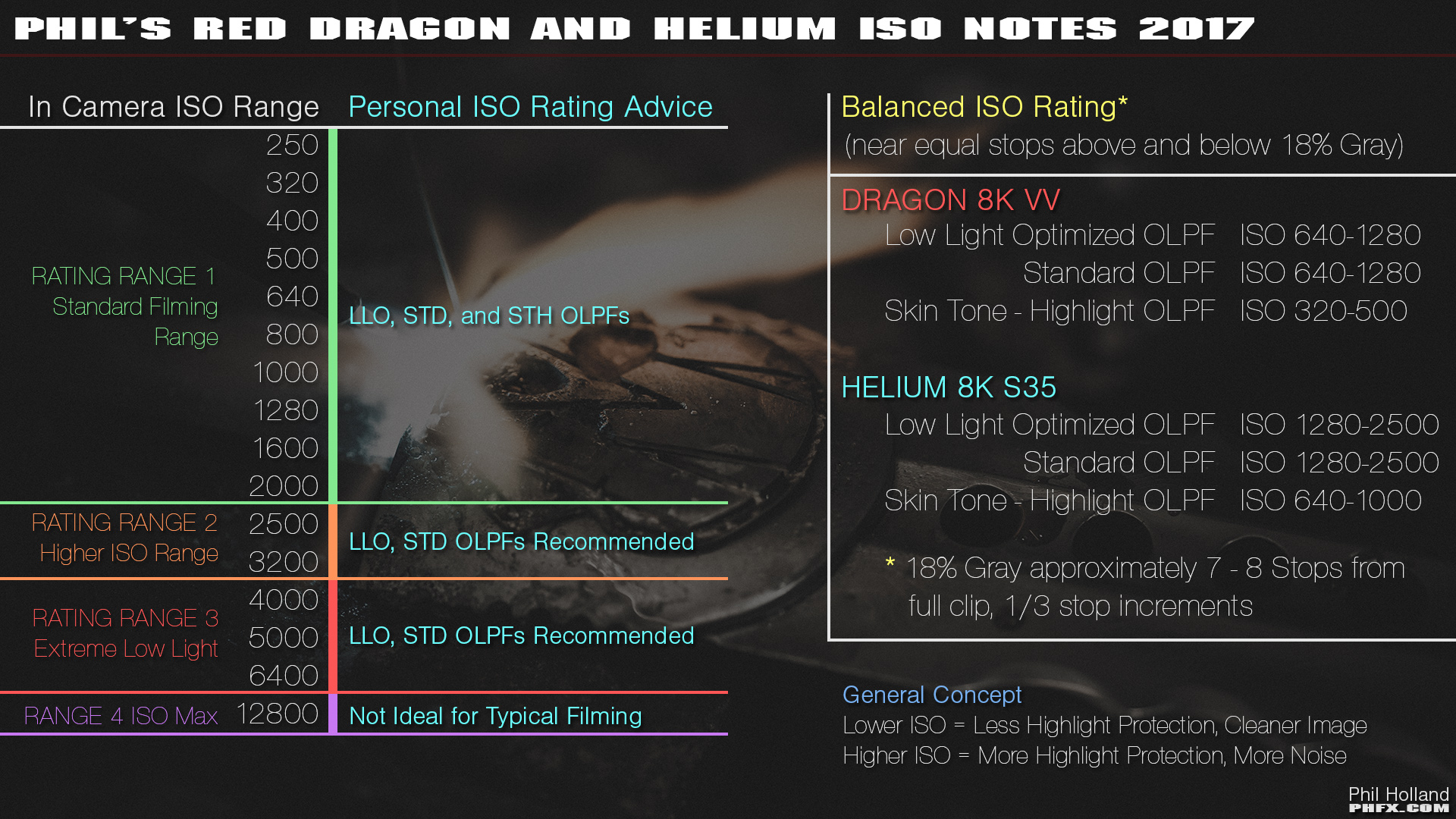
If your Stormtrooper Weapon is on the release firmware 6.3.xx then the native / base ISO should be set to 1280 ISO or even 1600 ISO. The newest beta firmware 6.4.xx shifted the native / base / balanced ISO for Helium cameras to more accurately reflect light meters so one would then use 640 / 800 ISO on the beta firmware (which would match the Dragon sensor ISO rating). That most likely accounts for the exposure difference (one stop) in how the Dragon and Helium cameras look on the monitors.

As your Stormtrooper Helium camera is out for rental on a production, I would recommend that the DOP change the Helium sensor ISO rating to 1280 or 1600 ISO (Dragon sensor stays at 800 ISO as the DOP picked this as his ISO with the STH OLPF) and stay on the release firmware 6.3.xx; it's the height of folly to switch the camera's firmware to a beta version while on a job. There will be about 8 stops dynamic range latitude above and below middle gray at the native / base / balanced ISO rating for each camera at their respective settings and identical OLPF.

As far as the previous shot material, the ISO setting (as you probably know) is just metadata and can be "reset" in post to match the exposure of the Dragon material by setting it to 1600 ISO (assuming both cameras were set to the same T-stop, frame rate and shutter speed).

From Phil Holland's posting:

Putting this here as this is what I'd typically recommend:

phfx_2017_RED8KSensorTest_REDHeliumDragon_ISONotes.jpg
 
Last edited:
I lost a 5" LCD by using it on the helium .... It was fine for about 10days and then it just stopped working.
It's happened with many 5"LCDs here in India, therefore people stopped using it on the helium.

The DOP says he uses the 5"LCD on the dragon to judge the lighting so he keeps feeling when he looks at the 7" , he needs to keep pumping more light !!!


Thanks,

Rajiv
 
Rajiv, tell him to use the lightmeter and exposure tools on camera to judge exposure...like everyone else...

Always! Never rely solely on your monitor look to judge exposure. That's why RED gave us those in-cam tools.

Regarding you "losing" a 5" monitor, I think there is some other issue going on. Helium won't brick 5" touches...at least not to my knowledge, so maybe you have a bad Lemo adapter? Try different cables/different adapters if you have them. I think it's just a coincidence that your 5" touch no longer works after using it on Helium.
 
Thanks !! All you guys for your feedback and suggestions , unfortunately this DOP is someone who doesn't use a light meter ... He just goes by the LCD , which to my knowledge , as suggested by all of you is not the right thing to do ....
I feel he is just being stubborn ...!!!
Though he is very happy with the quality of the image the helium produces , but he needs the 5"LCD to judge while shooting ... It's weird but that's how it is ....
Cant really argue with a wall ..!!
On the 5" LCD .... As you know red does not manufacture them anymore , I can't get mine repaired too...I know of at least 15 such LCDs which are not working , and they have all tried sending it back to red ,but it's not being repaired either,so they have just bought a new 7"
 
Thanks !! All you guys for your feedback and suggestions , unfortunately this DOP is someone who doesn't use a light meter ... He just goes by the LCD , which to my knowledge , as suggested by all of you is not the right thing to do ....
I feel he is just being stubborn ...!!!
Though he is very happy with the quality of the image the helium produces , but he needs the 5"LCD to judge while shooting ... It's weird but that's how it is ....
Cant really argue with a wall ..!!
On the 5" LCD .... As you know red does not manufacture them anymore , I can't get mine repaired too...I know of at least 15 such LCDs which are not working , and they have all tried sending it back to red ,but it's not being repaired either,so they have just bought a new 7"

Its not that hard to read the in-camera histogram and the stop lights to know when you are clipping. Worth a read.

http://www.red.com/learn/red-101/red-camera-exposure-tools
 
I lost a 5" LCD by using it on the helium .... It was fine for about 10days and then it just stopped working.
It's happened with many 5"LCDs here in India, therefore people stopped using it on the helium.

The DOP says he uses the 5"LCD on the dragon to judge the lighting so he keeps feeling when he looks at the 7" , he needs to keep pumping more light !!!


Thanks,

Rajiv
I reasently lost my EFV on my Helium! The had found somthing on the logfile of my Helium Epic-W and had to sent both back to Red yesterday!!
 
Always! Never rely solely on your monitor look to judge exposure. That's why RED gave us those in-cam tools.

Regarding you "losing" a 5" monitor, I think there is some other issue going on. Helium won't brick 5" touches...at least not to my knowledge, so maybe you have a bad Lemo adapter? Try different cables/different adapters if you have them. I think it's just a coincidence that your 5" touch no longer works after using it on Helium.
Hi Chris,

Same thing happend to me, but with my "old" EVF, i had just send my Helium and EFV back to RED because they saw in the logfile that there is a problem in the camera.
 
Back
Top