Welcome to our community

Be a part of something great, join today!

  • Hey all, just changed over the backend after 15 years I figured time to give it a bit of an update, its probably gonna be a bit weird for most of you and i am sure there is a few bugs to work out but it should kinda work the same as before... hopefully :)

HDR Grading

Hi Stacey,

286642_orig.jpg


If I am reading this correctly, the BBC have increased the minimum black level by 5? times.

I would guessed that would in dark rooms this would lead to less realistic images (black looking like dark grey).

Seems like a step in the wrong direction.

AJ

Hi Antony,

Can you be more specific?[/COLOR]
 
HDR_Light_Output_Vs_Screen_Size.png


There are five HDR displays in this graph. Some 2015 and 2016 models. The names have been changed to protect the innocent. You will notice that three of the five displays go down in brightness as the window size gets larger. Two go the opposite direction. Which is better? In my opinion, HDR bright pixels are mostly specular highlights, which means small areas of the image. Therefor I would say that 1-3 are better in that regard.

Marc Wielage said:
I would also bet that if you lined up Sharp, Panasonic, Sony, and Samsung consumer displays that are all certified for UHD Premium, none of them will reproduce the same pictures out of the box. (LG has refused to join the UHD Premium group so far, saying their sets already meet the standard.) I'm not sure if they could even do it if they were calibrated, or even if they could be calibrated at all.

VIZIO is not a member either. This is a logo program that is made up by some parties with a vested interest in having a logo program. To be fair, there are others that are part of UHDA Premium that actually want to raise the quality bar. Just because a display does not have the logo does not mean that it is not superior to a display with the logo. I believe a logo program like this needs to created by an independent 3rd party with no vested interest in what passes and fails. The UHDA premium program is a pretty low bar to pass. THX, for example, would carry much more weight in my opinion.
 
HDR_Light_Output_Vs_Screen_Size.png


There are five HDR displays in this graph. Some 2015 and 2016 models. The names have been changed to protect the innocent. You will notice that three of the five displays go down in brightness as the window size gets larger. Two go the opposite direction. Which is better? In my opinion, HDR bright pixels are mostly specular highlights, which means small areas of the image. Therefor I would say that 1-3 are better in that regard.
There si actually another issue, that must be addressed. And that is backlighting. OLED for obvious reasons doesn't need the backlighting, unlike LCD. But for LCD display to achieve good black levels, backlighting needs to be the local dimming type. And with HDR images we run smack into a problem- blooming. Specularity for HDR is very important, as that is where most of the HDR effect is seen. But local dimming with small addressable area/many zones becomes complex as well as very expensive. But with large local dimming backlit areas you will get massive blooming in the highlights. I had seen some pictures, where Pulsar has very bad blooming, when it is seen off axis. And that monitor is $250k! So, personally, i feel OLED technology is much more promising. Yes, right now it is limited in the amount of brightness, but anyone who had seen 1000 nits Sony X300 can attest, that that is plenty enough to truly appreciate HDR. I suspect, even 540 nits can be great. So, in my opinion, it's not the quantity of light output, but quality of that light is what counts.
 
If you can hook up the given display and get the picture to look nice on it in the right colorspace, then you should be good to go. I think you monitor display lut on you mac or what computer you are using is not right. So even if you set RCXP to HDR-2084 your display is set to somthing else like rec709 or linear rub or such. I assume you need a HDR-2084 profile in your screen seeing in preferences on you mac/pc, no?

I do believe this is my main issue. Do you have any suggestions on how to go about doing that?
 
Do you need to edit in HDR? I don't think many will want to. At HPA more than one person complained about limited time grading HDR before needing a break due to eye strain.

I agree, Stacey. I have heard anecdotal stories from three different people at three different facilities that eyestrain and monitor heat are still considerable problems

I've warned about this back when this HDR circus was announced. Wait till the next clueless director gets "creative" in the cut with the effect on the audience.

If the editor is cutting in HDR he's slapping his own visual system gazillion times during a longer project.
If he's not seeing what the audience is seeing he's making editing decisions based on a different visual experience, while the audience gets whatever comes out.

If the colorist is not seeing what the audience is seeing...the work makes zero sense.
If the colorist is grading in HDR he's effectively desensitizing his most valuable possession.

Looks like a win-win situation so far.
The neurological effect of long term exposure, never investigated before pushing new toys out is, of course, likely to show positive results.


...

So far, humans have a great track record of proper utilization of new technologies. Typically, it requires few decades of research of how and what went wrong, after which a famous doctor on a TV show re-discovers the wheel.

Following the current reasoning, I'm waiting for the upcoming viewing tech featuring a built "Tru-Punch System", designed to enhance storytelling by punching the viewer in the face, and immersing the viewer more into those important HDR CU shots of two people talking about something which should be engaging for some reason but isn't.

Tru-Punch System overview:

The director decides where the punches go, thus enriching his story even more than a brighter image does, and editor just sets the markers which go into metadata, to which TV sets and cinema chairs respond. Smacking the viewer based on the targeted, though otherwise imperceivable, emotional tension of the shot. No need for special calibrations and post compensations and colorists are hassle free in this case.

As long as tv makers sell more stuff with a new "wow" factor obsoleting the last year's pile of over-produced stuff, and masses get stuck to staring at the wall in perpetual state of hypnosis.
 
jake blackstone said:
And with HDR images we run smack into a problem- blooming.


Great point! Some LCDs are worse than others with blooming. The Samsung has more severe blooming than VIZIO as an example. Samsung has both horizontal and vertical axis issues with blooming.
A curved display will have more severe off axis blooming than a flat one.

OLEDs don't have the same issue because each pixel is a zone. While VIZIO might have 384 zones on their R65, which is a lot, LG has over 6 million zones.
 
Antony Newman said:
If I am reading this correctly, the BBC have increased the minimum black level by 5? times.

The short answer is no, they did not raise the black level for HLG like that graph suggests. Where did that graph come from? I would burn it. :) It has some issues with it, one being that they used the inverse OETF for 709, which is wrong. No one should ever use the OETF or inverse EOTF from 709 or 2020. The 709 below is the same as theirs, the inverse OETF, just for reference.
[TABLE="width: 300"]
[TR]
[TD]709 8-bit[/TD]
[TD]0.101471[/TD]
[/TR]
[TR]
[TD]1886 8-bit[/TD]
[TD]0.000242[/TD]
[/TR]
[TR]
[TD]1886 10-bit[/TD]
[TD]0.000009[/TD]
[/TR]
[TR]
[TD]DICOM 10bit @ 5000 cd/m[/TD]
[TD]0.050159[/TD]
[/TR]
[TR]
[TD]SMPTE 2084 10-bit[/TD]
[TD]0.000053[/TD]
[/TR]
[TR]
[TD]SMPTE 2084 12-bit[/TD]
[TD]0.000005[/TD]
[/TR]
[TR]
[TD]HLG OOTF 10-bit @ 1000 cd/m[/TD]
[TD]0.000023[/TD]
[/TR]
[/TABLE]
 
Just to add to this discussion, noted author and colorist Alexis Van Hurkman recently posted a 14,000-word article on grading for HDR displays:

HDR, Resolve, and Creative Grading
http://vanhurkman.com/wordpress/?p=3548


He draws some interesting conclusions, particularly with Dolby Vision grading and its potential for the future. If nothing else, it should give users a better idea as to specifically how complex and costly the workflow will be with HDR for the near future.

It's sobering to reflect that there are already at least four different "HDR" standards being used for consumer displays: 300, 500, 800, or 1000-1400 nits peak luminance. For pro use, displays now available run at 1000, 2000, or 4000 nits. And the overall brightness levels will change depending on how large an arera the peak brightness hits on the display. This is a very, very complex subject.
 
Just to add to this discussion, noted author and colorist Alexis Van Hurkman recently posted a 14,000-word article on grading for HDR displays:
It's sobering to reflect that there are already at least four different "HDR" standards being used for consumer displays: 300, 500, 800, or 1000-1400 nits peak luminance. For pro use, displays now available run at 1000, 2000, or 4000 nits. And the overall brightness levels will change depending on how large an arera the peak brightness hits on the display. This is a very, very complex subject.

Marc.
In case you missed the info in the article, you just recommended, those different brightness levels are not HDR standards. HDR specifies MINIMUM brightness for OLED (540 nits) and higher brightness for other technologies (1000 nits) based on specified minimum contrast necessary for HDR. And that brightness needs to be reached on no less, than 10% of the total area. This minimum brightness is the same for all three HDR standards- Dolby, Alliance and BBC.
 
I do believe this is my main issue. Do you have any suggestions on how to go about doing that?

Luke, did you finally find a solution to this problem? I am currently in the same dilemma as you were. How did you master to HDR for your client?
 
HDR specifies MINIMUM brightness for OLED (540 nits) and higher brightness for other technologies (1000 nits) based on specified minimum contrast necessary for HDR. And that brightness needs to be reached on no less, than 10% of the total area.
Look at this chart, shown earlier in this discussion, and check the numbers on the peak nits actually being delivered in consumer "HDR" sets.

HDR_Light_Output_Vs_Screen_Size.png


This is where the 400-nit "HDR" comes from. The problem is all the consumer manufacturers each have their own definition of what HDR is. My fear is that we're going to see wildly different results depending on which pseudo-HDR set you buy for $695 at Costco.

Note that not a single one of them can even hit 1000 nits, particularly across a large portion of the display. It's a troubling problem. There's no problem with the professional industry definition of HDR -- the problem is how the consumer set manufacturers are interpreting those numbers and defining HDR differently, deviating from the real standards. This is not much different than the number of consumer sets using 8000° white temperature settings in the 1980s and early 1990s: they made up their own fake standard and ignored what the pro filmmaking and post industry were doing.

I don't think there's a solution for the o.p. as to grading HDR except to use a real professional HDR grading monitor. There were a few new ones announced at NAB, but none are shipping yet and all of them are over $10K, from what I saw.
 
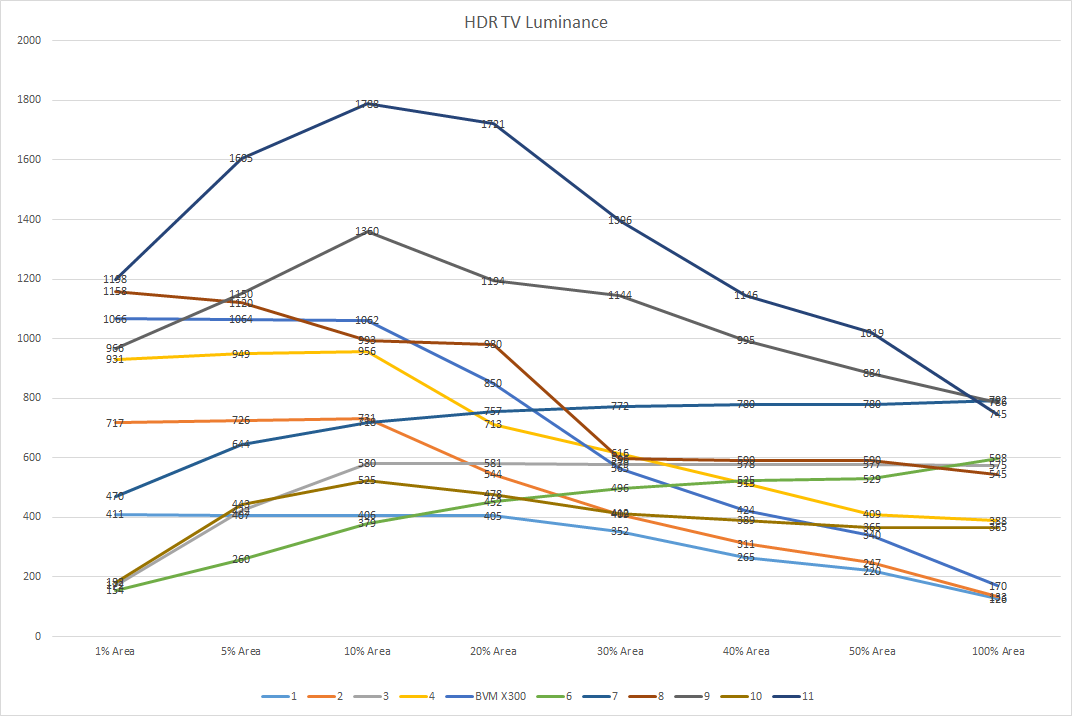
I need to add all of the new 2017 displays, but this does have more than the previous version I posted.
HDRLuminance.png


The display that has the highest peak is the 65" Sony Z9D. This is what I am using for HDR pattern development. It also has a mode that hard clips (not tone map) at 1000 nits to be used along side the X300. Also notice the X300 is in this graph. Open the image in a new tab to see full size.
 
I need to add all of the new 2017 displays, but this does have more than the previous version I posted.
HDRLuminance.png


The display that has the highest peak is the 65" Sony Z9D. This is what I am using for HDR pattern development. It also has a mode that hard clips (not tone map) at 1000 nits to be used along side the X300. Also notice the X300 is in this graph. Open the image in a new tab to see full size.

It actually makes perfect sense. HDR is not designed to blind the viewer. It's designed to recreate what we see every day. Our eye have irises and they will dynamically adjust the overall brightness. Otherwise, every time anyone would step outside in the bright sun, they will go blind. The same goes for HDR displays. You just need to hit something like 1000 nits on a small portion of the screen to reproduce the specular highlights- stars, light bulbs, sun, moon etc. So, 10% of the screen works for me. That is why anyone who ever worked with X300, even though it can "only" hit 170 nits on a full screen, still looks absolutely SPECTACULAR.
 
Back
Top