Welcome to our community

Be a part of something great, join today!

  • Hey all, just changed over the backend after 15 years I figured time to give it a bit of an update, its probably gonna be a bit weird for most of you and i am sure there is a few bugs to work out but it should kinda work the same as before... hopefully :)

Hdr gradeing for indie, small production companies, one man band

Joel Arvidsson

Well-known member
Joined
Nov 3, 2008
Messages
3,044
Reaction score
6
Points
38
Age
46
Location
Sweden
Im starting this thread with the hope we could collect knowledge how to start doing grades in HDR on a budget. So this should be no mean be tended for the highest tier but instead for indie or small productions companies.

Would it be possible to do HDR work on gear like Atomos sumo, Lg c8, Asus 32″ ProArt PA32UC-K. So yeah I mean on affordable gear.

Im curios if you could get the new atomos shogun 7 and use it to betwen a decklink card (bmd) to the LG c8 to color grade in Dolbo vision? How would you set this up.

What is you favorit HDR output? HLG, HDR10, HDR10+ or even Dolby vision?


Have you already created an HDR workflow that you could share? and what gear is you using.


Will restart reading the blog on mystery box again
https://www.mysterybox.us/blog-home

Im sure alot is already using the Panasonic oleds for HDR gradeing like Dado Valentic.
https://www.youtube.com/watch?v=jDtnmvkNW3I
So I believe the Lg c8 should work aswell. Perhaps its not as bright with its 825 nits (10% window – D65). But it cant be that bad.
 
No, you can't do it with an LG C8 because it's not good enough. Nor are the other displays you mention. I believe @Steve Shaw from LightIllusion.com has written about this several times. HDR is a lot harder to do than you might think.

This Dolby Vision "Best Practices" paper outlines some of the challenges:

https://www.dolby.com/us/en/technologies/dolby-vision/DolbyVisionColorGradingBestPracticesV3_0.pdf

The short explanation is: consumer HDR monitors will tend to dynamically change brightness due to stability problems once you get much over 100 nits. Accurate HDR is really hard to do. If you can get a professional HDR grading display, like the ones from Canon, FSI, or Sony Broadcast, those can work very well. Note that Mystery Box is using the Sony BVM-X300 (recently replaced with the X310).

Netflix has several tech papers on HDR and what they will accept for HDR delivery:

https://partnerhelp.netflixstudios.com/hc/en-us/articles/360000599948-Color-Grading-Dolby-Vision-HDR

More and more, they're also requiring a PQ "data sidecar" that will convert the HDR file to SDR, which is part of the Dolby Vision license. Dolby has a free series of tech videos you can download that outline the HDR grading process, and MixingLight.com also has several insights on HDR grading and what's involved.
 
No, you can't do it with an LG C8 because it's not good enough. Nor are the other displays you mention. I believe @Steve Shaw from LightIllusion.com has written about this several times. HDR is a lot harder to do than you might think.

It's not good enough - until it is. It doesn't really matter what you, or Steve, or anyone else here thinks. Some project - possibly one that inspired this thread - will deliver HDR that was graded on the equipment you're dismissing here, it will be perfectly acceptable, and will be written about in various places on the Internet and elsewhere, and become a model for how to do HDR on a budget, just like the original poster is suggesting.

I long ago stopped putting down DIY approaches as unacceptable. It's been reiterated again and again that the cost of entry for "professional" work comes down to an ever lower level seemingly every month, and that the cost of the equipment is less and less relevant to what it can produce. One ignores that reality at one's own peril.
 
Game of Thrones Season 8 ep.3 was graded on one of the best currently available monitors, they just forgot that the audience are watching it on a TV and that they get a heavily compressed codec.
Grade for you audience and make it look good for them.
 
Thank you DC For this very informative Course! Watching it now!
Note that one of the first thing the Dolby Vision course says is:

first... get a real HDR grading display.

Game of Thrones Season 8 ep.3 was graded on one of the best currently available monitors, they just forgot that the audience are watching it on a TV and that they get a heavily compressed codec. Grade for you audience and make it look good for them.
It's a shame that HBO currently does not have a way to provide first-run programming to their audiences via UHD HDR. I would bet the HDR version of this episode would be brighter enough that nobody would complain about it. You can have a scene that's dark, but still has enough detail to have a sense of what's going on. The feed I saw was adequate, but the question of "how dark is too dark" is a creative choice. I try to get my clients to lean on the side of making things a little lighter rather than darker, but the ultimate choice is theirs.
 
Marc Wielage

Note that one of the first thing the Dolby Vision course says is:

first... get a real HDR grading display.


AHH.....Okay, Yeah Kinda Figured that, Which is why I won't be doing any HDR-Dolby Vision Color correction anytime soon. I'll stick to Rec709 BT1886 for the time being.
 
Game of Thrones Season 8 ep.3 was graded on one of the best currently available monitors, they just forgot that the audience are watching it on a TV and that they get a heavily compressed codec.
Grade for you audience and make it look good for them.

It's not the screen as much as most consumers probably do not watch in a dim room. I've watched that episode and parts of it on some really junk displays. It looked amazing because the ambient light was correct.
 
AHH.....Okay, Yeah Kinda Figured that, Which is why I won't be doing any HDR-Dolby Vision Color correction anytime soon. I'll stick to Rec709 BT1886 for the time being.
I have to say, there was a time not long ago when even color-correcting Rec709 cost you $25,000-$30,000 for a display as a minimum. It's a miracle that today, you can get a reasonably-decent OLED display that will do this for less than 10% of this cost. So to me, the glass is half-full.

Bear in mind that manufacturers still have been unable to make a true Grade-1 mastering display larger than about 31". And that's been going on for 7-8 years now.

It's not the screen as much as most consumers probably do not watch in a dim room. I've watched that episode and parts of it on some really junk displays. It looked amazing because the ambient light was correct.
The OLED in my bedroom is calibrated, but the room is very dark (no bias light behind the display), and the episode was dark but OK to me in that situation. I can imagine in a very bright room with a marginal monitor and a lot of cable/satellite/streaming compression, it could look pretty bad.
 
I have to say, there was a time not long ago when even color-correcting Rec709 cost you $25,000-$30,000 for a display as a minimum. It's a miracle that today, you can get a reasonably-decent OLED display that will do this for less than 10% of this cost. So to me, the glass is half-full.

After going through 7 of the 12 part tutorials, I've gained a new respect for those who work in Dolby Vision. Even though I'm sure the price of admission is going down monthly, it's still a little too cost prohibitive for, IMHO, the "little guys".
 
Last edited:
After going through 7 of the 12 part tutorials, I've gained a new respect for those who work in Dolby Vision. Even though I'm sure the price of admission is going down monthly, it's still a little too cost prohibitive for, IMHO, the "little guys".
I think this is still true. It's very telling that neither Blackmagic nor Red have opted to jump into the grading monitor or projection business. Red did (famously) demonstrate a laser projector prototype some years ago, but I think it became obvious that getting the reliability, quality, and cost to a realistic level were insurmountable problems. It's relatively easy to make a $100,000 laser projector that hits all DCI specs; not so easy to make one for $10,000.
 
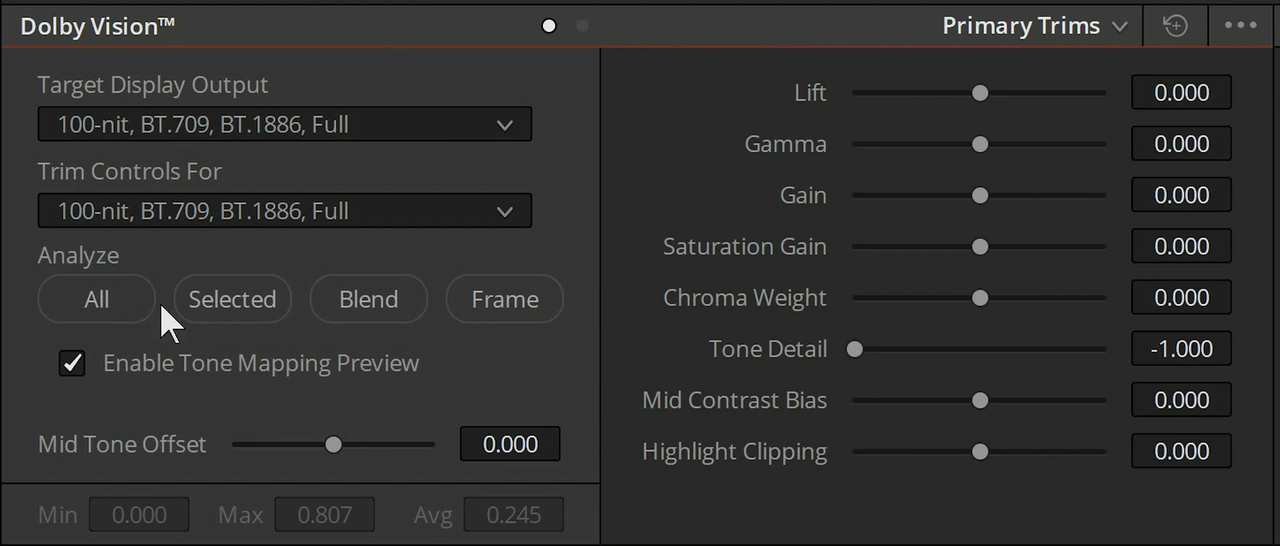
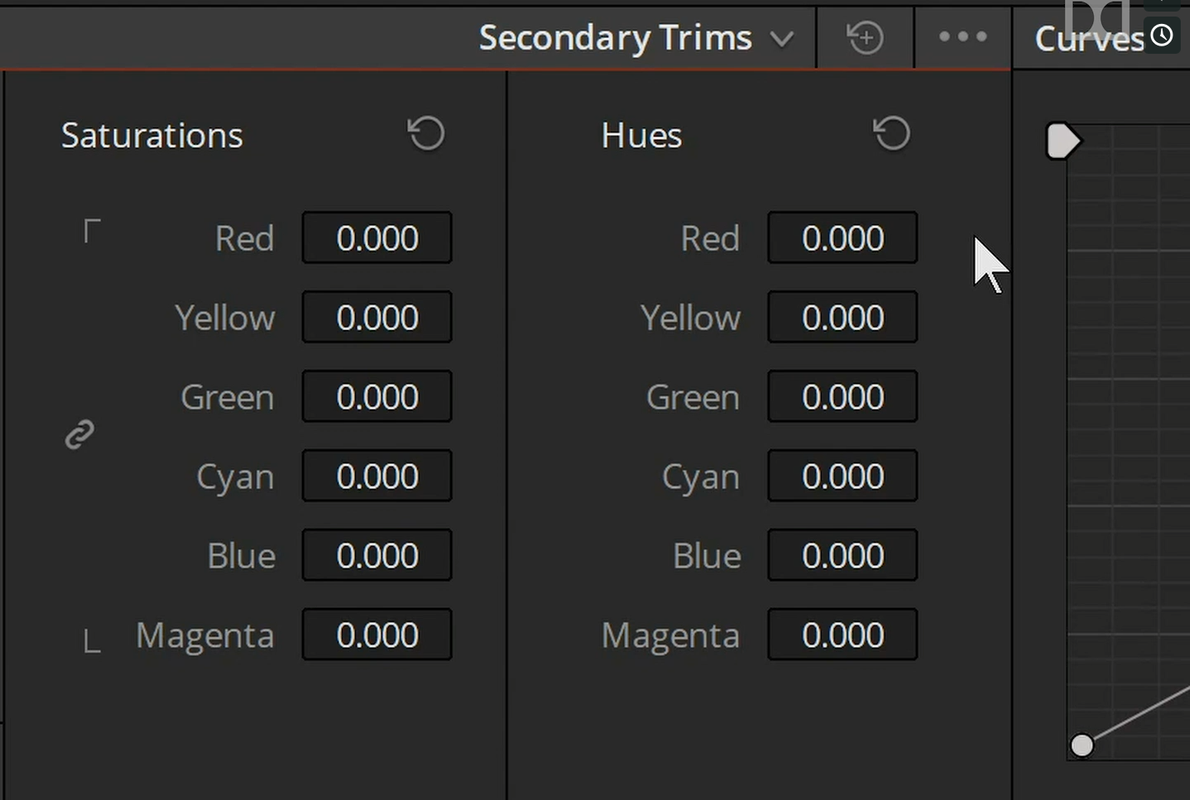
I would love to have control of some of the same parameters available in the "Primary Trims" and "Secondary Trims" Tools Available in Dolby Vision 4.0 in either ACEScct or the regular "Primary" tools in Resolve.


Screenshot-388.png


Screenshot-387.png
 
I think this is still true. It's very telling that neither Blackmagic nor Red have opted to jump into the grading monitor or projection business. Red did (famously) demonstrate a laser projector prototype some years ago, but I think it became obvious that getting the reliability, quality, and cost to a realistic level were insurmountable problems. It's relatively easy to make a $100,000 laser projector that hits all DCI specs; not so easy to make one for $10,000.

Maybe Red will feel that this will need to be more of a focus for whatever the DSMC 3 cameras will bring. Maybe bring out a $15-$20,000 "off camera monitor" with "close enough" capabilities.
 
I think this is still true. It's very telling that neither Blackmagic nor Red have opted to jump into the grading monitor or projection business. Red did (famously) demonstrate a laser projector prototype some years ago, but I think it became obvious that getting the reliability, quality, and cost to a realistic level were insurmountable problems. It's relatively easy to make a $100,000 laser projector that hits all DCI specs; not so easy to make one for $10,000.

They all wait for microLED to mature.
 
I would love to have control of some of the same parameters available in the "Primary Trims" and "Secondary Trims" Tools Available in Dolby Vision 4.0 in either ACEScct or the regular "Primary" tools in Resolve.
Dolby has a (free) 2-hour series of Dolby Vision training videos available on their website, and they deal specifically with the setup of how this can be done in Resolve and in ACES. The link is here:

https://www.dolby.com/us/en/professional/content-creation/tutorial-series.html

One bigger issue is the cost of getting the Dolby Vision license, and for that you have to give Dolby a call and make the decision for yourself. I think the additional control set in Resolve is formidable and worth the cost, but it is a fairly hefty expense.
 
Dolby has a (free) 2-hour series of Dolby Vision training videos available on their website, and they deal specifically with the setup of how this can be done in Resolve and in ACES. The link is here:

https://www.dolby.com/us/en/professional/content-creation/tutorial-series.html

One bigger issue is the cost of getting the Dolby Vision license, and for that you have to give Dolby a call and make the decision for yourself. I think the additional control set in Resolve is formidable and worth the cost, but it is a fairly hefty expense.

Marc,


Thanks for the Link! I will watch it in its entirety tomorrow when I have the time. It seems the more you learn and know, the more expensive things seem to get.


Edit:


I watched all 12 of theses tutorial already, but thanks for giving me a reason to watch them all over again, meaning to do that again.
 
They all wait for microLED to mature.

This. I think we still got a solid 10 years till they are more affordable but its the way we are heading.

By the way this thread is a very nice starter on HDR in general. The links are A+
 
MixingLight.com has also done some very good Insights on HDR grading, and there's a lot of good basic information and cautions in their explanations. (Note this is a pay site, but I think the expense is worth it.)
 
Thanks for the link Marc and heres a more direct link to the Tutorials


https://mixinglight.com/?s=dolby+Vision


Here's a list from Dolby of a list of movies from 2015 to 2019 that were either released in "Dolby Vision" or "Dolby Atmos" or both


https://www.dolby.com/us/en/cinema/theatrical-releases.html


And, Here's a couple of older training videos, one from three years ago and one from 2 years ago. So they might be out-of-date yet still have some useful info.


Dolby Vision Content Creation Workflow


By Dolby Vision


This presentation is a high level overview of the production and post production workflows involved in creating Dolby Vision content, as well as the key benefits of Dolby Vision for both the cinema and the home. Dolby Vision provides a dramatic imaging experience, with striking highlights, deep, vivid blacks, and a much wider color space than seen on current HD TV technology. We feel that it gives filmmakers the widest pallet to best tell their story. For more information, go to dolby.com/vision
Links:
Dolby Vision white paper: dolby.com/us/en/technologies/dolby-vision/dolby-vision-white-paper.pdf
The Art of Better Pixels white paper: dolby.com/us/en/technologies/dolby-vision/the-art-of-better-pixels.pdf


Dolby Vision Content Creation Training Video 1


By Dolby Vision


This video helps understand the basic components needed to create Dolby Vision content and how to connect and configure them. (The CMU hardware shown is the HD model and the color correction system is BlackMagic DaVinci Resolve). For more information, go to dolby.com/vision
 
Back
Top