Welcome to our community

Be a part of something great, join today!

  • Hey all, just changed over the backend after 15 years I figured time to give it a bit of an update, its probably gonna be a bit weird for most of you and i am sure there is a few bugs to work out but it should kinda work the same as before... hopefully :)

Hd-sdi (slot) modification - home repair 101

Johnny Friday

Well-known member
Joined
Feb 11, 2007
Messages
3,367
Reaction score
0
Points
36
Location
La Paz, Baja Ca. Sur, Mexico
Website
bajaproductions.com
Ok....
So, got the REDROCKET and installed nicely---i could go on about the performance, but that's another thread. Here is what i have installed in my PCI slots:
1. ATI Radeon HD 4870
2. RED Rocket
3. Sonnet Tempo SATA E4P
4. MXO2 board

.....All slots now full Scotty. The ATI card stands so tall so it takes up the slot above it.

.....Now where to install the HD-SDI module that connects to REDROCKET....
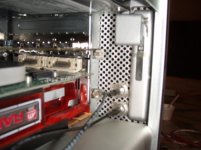
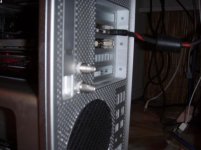
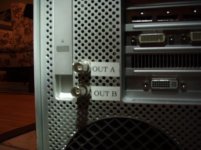
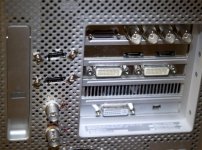
Well, i break out the drill and hammer and go to it. Have to be careful and use metal (very sharp) drill bits to drill the back of the Mac...that plastic is quite breakable. Also if you do this go very slowly with the drill and if you get locked up, DON'T continue, put the drill in reverse and back it out and start over.

.....I then unthreaded the HD-SDI modules off the metal plate from Red and installed them through the back plastic panel on my mac.
....so it's a bit crude, but it works just fine.
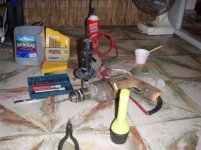
 

Attachments

  • P2102028.jpg
    P2102028.jpg
    49.2 KB · Views: 0
  • P2102035.jpg
    P2102035.jpg
    38.2 KB · Views: 0
  • P2102031.jpg
    P2102031.jpg
    31.1 KB · Views: 0
  • P2102040.jpg
    P2102040.jpg
    34.6 KB · Views: 0
Is this the only solution?? You have to disfigure your Mac to make the RedRocket work???
 
attachment.php


Looks great!!
 
If you have a PCIe card that has lots of space like a eSATA card, it's easy to make holes on the plate.
 
Thanks for sharing @ Deanan and John
 
I am currently selling my old G5 on eBay for parts. So, I decided to see if the side door would fit on my Mac Pro. It does! Now, if I run out of room for the slot filler, I will just drill holes in my extra side door.

In case anyone was wondering:

G5 dual 2.5 GHz PPC (June 2004)
Mac Pro 2.8 GHz 8-core (Jan 2008)
 
I was able to put mine in the cd slot out the front.

I was thinking to do that, but I just installed a blue-ray burner so both DVD/CD positions are taken up on my mac.

Also looked at drilling out one of my e-sata slots, but have four e-sata connections and hardly any room so easiest for me was drill out the back of the mac---Nothing to it and i doubt most would even notice it if i took it back for repairs under warranty. BUT I'll also likely be upgrading it in a year anyway, so no loss and don't really care how it looks as long as it functions and is functional. Plus I like the cables all out the back so when i swing around in my chair my legs don't hit a cable coming out of the front of the machine...but each has their own config ideas and needs. This is only one of ten i could have done.
 
thank you for sharing, did this today as well as hdmis

now accomodating:
gpu (ati 4870 for now) , rocket, sata, blackmagic decklink 3d

nvidia gpu is coming soon to replace ati and then i'm davinci-ready with this.
 

Attachments

  • 1.jpg
    1.jpg
    70.8 KB · Views: 0
thank you for sharing, did this today as well as hdmis

now accomodating:
gpu (ati 4870 for now) , rocket, sata, blackmagic decklink 3d

nvidia gpu is coming soon to replace ati and then i'm davinci-ready with this.

I did basically the same thing....red rocket card installed...with HD-SDI out drilled at the back. Only difference i see is that I have MXO2 LE....and esta card, therefore no room for anything else unless i dump something.
 
I am currently selling my old G5 on eBay for parts. So, I decided to see if the side door would fit on my Mac Pro. It does! Now, if I run out of room for the slot filler, I will just drill holes in my extra side door.

In case anyone was wondering:

G5 dual 2.5 GHz PPC (June 2004)
Mac Pro 2.8 GHz 8-core (Jan 2008)

I still have a old G5 that I broke down for parts and may do the same thing...I'll try the door tomorrow to see if mine fits also...Great idea....
 
thank you for sharing, did this today as well as hdmis

now accomodating:
gpu (ati 4870 for now) , rocket, sata, blackmagic decklink 3d

nvidia gpu is coming soon to replace ati and then i'm davinci-ready with this.

nice one... so only the RAID controller is now missing....
with a R380 card I will test if its possible to connect on one channel the raid and with a SAS-Sata cable drives to the other channel without RAID config... if that works, that would be great... have the similar config in my macpro....
I had troubles with my 4870... yours running ok ?? I switched over again to Nvidia cards....
 
hey can somebody suggest me where i put my blackmagic card in my mac pro
i am using slot 1 - red rocket

slot 2 - ati radeon display card

slot 3 - call digit e-sata port

slot 4 - blackmagic hd xtrem
 
Use Matrox MXO with your second DVI or display port output to free up a slot

Use Matrox MXO with your second DVI or display port output to free up a slot

I did basically the same thing....red rocket card installed...with HD-SDI out drilled at the back. Only difference i see is that I have MXO2 LE....and esta card, therefore no room for anything else unless i dump something.

I haven't tried using the MXO yet on a tower, but I'm tempted. I'm reminded of a conversation I had with a Matrox rep at NAB-2010 where he was telling me how they had developed the MXO to get data (not simply the video card output) through the second DVI or display port on a mac. They worked with Apple to get the ability to do this, as a DVI port is nothing more than a data port anyway. Because of this they're able to go into the NLE and grab the YUV video data and audio and pull them out through the DVI port into the MXO, a calibratable device, and display out the HD/SDI ports.

So essentially, this device would replace a PCIe version, like the MXO2 LE, BM Decklink or AJA card, freeing up a slot in your mac for something else.

It's not as versatile as a Decklink or Kona3, though. This would just be for Video accurate playback on a production monitor or DVI monitor and for tape laybacks, and it doesn't support 2k edit resolutions, and it does not ingest (no inputs).

Here's the data sheet PDF.

http://www.matrox.com/video/media/pdf/products/mac/mxo/en_mxo_guide.pdf
 
But you have to have the Matrox Pcie device installed....i'm downloading now the pdf you sent. but having this device i believe was mandatory....not sure you you run form second DVI to the matrox box?
....will have a read.
 
But you have to have the Matrox Pcie device installed....i'm downloading now the pdf you sent. but having this device i believe was mandatory....not sure you you run form second DVI to the matrox box?
....will have a read.

Let me know if you see a "gotcha" in there. But you shouldn't need any PCIe connection with the MXO. If it works to give SDI output on an iMac's DVI or display port, then that's all you need. Look at the diagrams of setup configs later on in the PDF document.

Cheers.
 
Back
Top