Welcome to our community

Be a part of something great, join today!

  • Hey all, just changed over the backend after 15 years I figured time to give it a bit of an update, its probably gonna be a bit weird for most of you and i am sure there is a few bugs to work out but it should kinda work the same as before... hopefully :)

Having playback problems in final cut pro

Ian619

Banned
Joined
Jan 22, 2010
Messages
1
Reaction score
0
Points
0
Hello, I have been having problems playing back "red" footage in Final Cut Pro. The video in the viewer when play is pressed turns a lime "ish" green with streaks through it. I have downloaded all the codecs and installed them, unlimited RT has been disabled, and I have tried playback in apple res 444 and 422 HQ both do not work. However when I open up the footage outside of final cut in quicktime, the video plays perfectly. So this can't be a video card or memory problem is it? I have 4 GBS of ram coming tommorrow, but I have a feeling there is something in Final Cut Pro that I am not activating?? Please help!!
 
Are the files you are playing back camera proxies or rendered ProRes? Proxies that are corrupt will cause green frames etc.. total hell but the easy fix is to regenerate proxies with an application like REDAlert or Clipfinder. If you are unable to playback ProRes and are getting the aforementioned problems, call Apple. Never seen that in correctly transcoded footage!
 
Make sure you select "yes" to match your sequence settings to your media.
 
Make sure you select "yes" to match your sequence settings to your media.

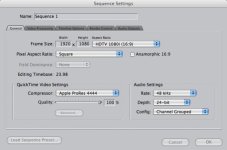
I'm curious, why do you match the settings? I normally avoid it because of external monitoring issues. It also causes geometry problems with the pre-1.5 Color output. When going the Color route, I use this:
 

Attachments

  • sequencesettings.general.jpg
    sequencesettings.general.jpg
    32.6 KB · Views: 0
Are you playing back the 2K footage in the viewer window in FCP? I've had a similar case where the footage in the viewer looks "green" with stripes. I think its because of the 2K resolution not matching settings.

Try moving your clip to the sequence without changing the sequence settings. It might have a problem playing in the viewer but when you drag it to your sequence it should fix itself.

BTW, what are you sequence settings at now? You could also change them to match your 2K footage (2048x1920, I think?) That might fix it too.

Let us know, I'm curious as well.
 
scrub high quality

scrub high quality

Hi! I had the same issue (green lines appearing when stopping on a 2k frame in the viewer) and solve it by disabling the "Scrub High Quality" option in the System Settings menu (Playback Control tab). I also set the "video quality" to dynamic instead of "High" (which is the default).
It worked for me.
MR
 
Last edited:
Green video

Green video

I found that the green video issue typically means your graphics card is in pain. Upgrading to a more powerful graphics card will clear that up. The stock Nvidia 7300 cards that shipped with the MacPro has a fan-less heat sink on it and it's probably overheating.
 
Back
Top