Welcome to our community

Be a part of something great, join today!

  • Hey all, just changed over the backend after 15 years I figured time to give it a bit of an update, its probably gonna be a bit weird for most of you and i am sure there is a few bugs to work out but it should kinda work the same as before... hopefully :)

h264 level issues?

Mark B.

Well-known member
Joined
Dec 31, 2006
Messages
731
Reaction score
0
Points
0
Age
49
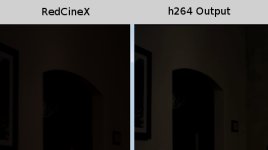
I might be doing something wrong, or maybe it's a bug. Perhaps you can identify why the output is not matching what RedCineX is showing.

The h264 output shown in the picture was a screen capture from VLC Player, which is normally pretty accurate. If I play the h264 in QuickTime, the picture gets even further from the RedCineX levels.
 

Attachments

  • RedCineX_Versus_Output.jpg
    RedCineX_Versus_Output.jpg
    28.6 KB · Views: 0
Most likely caused by automatic gamma correction. You can change it in the advanced codec settings when you render.
 
Most likely caused by automatic gamma correction. You can change it in the advanced codec settings when you render.

I'm not seeing automatic gamma in the export settings options or the Quicktime file format setup window. Could you tell me where that option is located?
 
Back
Top