Welcome to our community

Be a part of something great, join today!

  • Hey all, just changed over the backend after 15 years I figured time to give it a bit of an update, its probably gonna be a bit weird for most of you and i am sure there is a few bugs to work out but it should kinda work the same as before... hopefully :)

Green channel not recorded?

puck

Member
Joined
Feb 22, 2008
Messages
6
Reaction score
0
Points
0
Website
www.perceptual-engineering.com
Howdy,

I am involved with a short film shooting on the RED ONE camera.
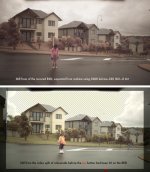
We have incounted a problem with one of the setups/scenes where it appears
the GREEN channel has not been record on to the RAW R3D file. The
Signal was fine onto the video split for the rehearsals but once the camera
went into record the signal seemed to lose the green channel (ie all the
green things in the shot went pink and magenta), it was also recorded this
way onto the R3D on the drive. The problem seemed to fix it self when the
camera was moved for the next shot.

I have tried fixing the problem in redcine thinking it might be a "white balance" or "tint" issue but with no luck.
I have attached a snapshot of the problem R3D and a still from the video split before the error occured.

Anyone come across this problem, any info would be apprectiated.

Chrs

Puck Murphy
New Zealand
 

Attachments

  • GREEN-channel-issue.jpg
    GREEN-channel-issue.jpg
    91.2 KB · Views: 0
Hi Puck,

Can you email me please (deanan at red)?
I'd like to take a look at the R3D.

Thanks,

Deanan
 
Since the R3D RAW file is "pre-color" -- unconverted from a monochrome Bayer-filtered image into full RGB color -- I don't see how a channel can be dropped during recording because there are no separate color channels being recorded in the first place, it's a single image with a baked-in mosaic pattern that has to be processed later into three colors. So I suspect the file itself is fine but something is causing the conversion of it to be screwed up.
 
Since the R3D RAW file is "pre-color" -- unconverted from a monochrome Bayer-filtered image into full RGB color -- I don't see how a channel can be dropped during recording because there are no separate color channels being recorded in the first place, it's a single image with a baked-in mosaic pattern that has to be processed later into three colors. So I suspect the file itself is fine but something is causing the conversion of it to be screwed up.

Agreed, It should not be possible. If you where missing the green photo site info from the sensor, I or they returned black, I doubt you'd get much of an image.
 
Wow.. this(or something very similar) has happened before from what I once read here on RedUser over a year ago. Mostly I remember the guy trying to fix the imagery. I even jumped in on that thread. Seems to me it was some kind of freak white balance error* and it had only happened to him on one take (Murphy's Law: of course they only did ONE for that shot). BUT please remember that was over a year ago, and forgive me that I do not have time to dig up that thread for you... :(

*I say that loosely... I know we are dealing with RAW footage. It was something that happened in the pipe before the RAW recording though within the camera.. not in any form of post-processing.

~s
 
Its possible to set the buttons right beneath the REC button to do an auto-white balance. Perhaps "fat fingers" started the white balance process? In Red Alert can you take the file and adjust the colors to "find" the green channel again?
 
Hey.. don't have time to play with it right now.. but I threw your image into PS and the overall hue is off(I should put it thru a vectorscope to see how bad, but you can do that yourself) and the red channel histo is very abnormal. Considering the whacked nature of the color on this image I'm leaning toward an unhappy WB (looked like it tried to factor in the cyan of the sky, etc.) and with that/or as simple as Mr. Mullen suggests that maybe bad data is getting in your way. I know I've seen posts on that sort of thing before here.

~s
 
White Balance

White Balance

Absolutely. White Balance is just metadata.

So you can toss the camera's calculated value and use your own later in post.
 
Back
Top