Welcome to our community

Be a part of something great, join today!

  • Hey all, just changed over the backend after 15 years I figured time to give it a bit of an update, its probably gonna be a bit weird for most of you and i am sure there is a few bugs to work out but it should kinda work the same as before... hopefully :)

Grain

Austin White

Well-known member
Joined
Dec 7, 2013
Messages
131
Reaction score
0
Points
16
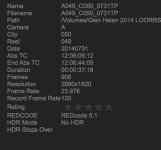
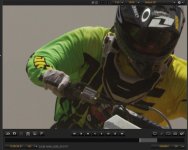
On a recent shoot I noticed some serious grain issue. Wanted to pick some peoples brain on it and tell me what I did wrong? and not have it happen again.

2.jpg
 

Attachments

  • 2.jpg
    2.jpg
    66.2 KB · Views: 0
  • 2.jpg
    2.jpg
    79.2 KB · Views: 0
I have 4K clips the same way? Do I just need to shoot 5K the whole time?

No, just don't underexpose and bring up the low end. It looks like you pushed the shadows in that first shot (until I can check the R3D). This will always create noise. You want to do the opposite, expose to the right, and bring the low end down in post.

The lower you go resolution wise the more apparent the noise will get... This shot looks mainly like chroma noise though (Color noise) which could be from the motion mount.
 
Anything between 1/3-1/16 still is very acceptable ND that shouldn't be too noisy. I recommend to use the motion mount more for the square/soft shutter effect and keep ND to minimum value
 
Noise looks fine to me. I was right in that this shot is grossly underexposed and you were pushing it pretty hard. At proper levels it looks good.

Biker2.jpg

(Right click and open in a new tab to view at 100%)

After viewing your file my initial assumption was correct. The shot is quite a bit underexposed. At 800ISO the majority of the image falls below 60% and your highlights don't even touch 80%. Next time expose as far to the right as possible without clipping. As you will see your noise bar is pretty full which is an indicator if you lift the low end you will have quite a bit of noise... For the chroma noise (colored noise) use the Denoise slider in RCX. I bumped it up to 6 and it did the job. Make sure your blacks when coloring get at or near 0% or you will have noise in those areas with the noise bar raised.

Also, you had some funky settings like contrast, saturation, and brightness a bit wonky. I'd recommend staying away from those controls and making sure they are at default values. 99% of the time those sliders will kill your footage. Try to go Redcolor 3, Redlogfilm, and use the ISO slider, and Curves to set your levels and create contrast. Then use the post saturation at the very bottom if you want to boost the colors.

Screen-Shot-2014-08-07-at-8.23.19-PM.png


In saying that, I hope this all helps!

This is with the blacks pulled down to proper levels for your exposure. If you open up and give the sensor more light you will have more room to play with on the low end.:
BikerProperBlacks.jpg
 
Back
Top