Welcome to our community

Be a part of something great, join today!

  • Hey all, just changed over the backend after 15 years I figured time to give it a bit of an update, its probably gonna be a bit weird for most of you and i am sure there is a few bugs to work out but it should kinda work the same as before... hopefully :)

Graded files from DaVinci are mismatched in Premiere. Timecode issue?

Jamy Vodegel

Member
Joined
Jan 24, 2016
Messages
5
Reaction score
0
Points
0
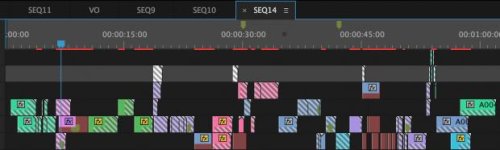
In short, I edited raw RED files in Premiere, exported the xml, imported the raw files in DaVinci to grade and exported the graded files. Then I want to replace the original RAW files in premiere with the graded .mov files but the timing doesn't match. I've been looking into this problem for two days but can't find an answer anywhere. Please have a look at the attachment to see what I mean. I'm really hoping the RED community can help me. Thanks!
 

Attachments

  • Schermafbeelding 2016-04-05 om 16.40.09.jpg
    Schermafbeelding 2016-04-05 om 16.40.09.jpg
    18.2 KB · Views: 0
I am not sure what you mean by timing?

And did you round-trip back to Premiere?

Ive been doing this for a few years never a timing issue unless you changed timeline/sequence settings.

What was the original Premiere sequence setting and did you match in Resolve during grading?
 
The screenshot looks to me that you have used the wrong framerate on exporting from DaVinci.
Double-check please.
Exporting a timeline from Premiere in AAF format will give you the wrong length of all cuts and clips in DaVinci.
Always use FCP-XML, so you are sure to have the correct stuff in DaVinci!
You can check the rendered framerate easy with Quicktime.
Best ones from Austria.
Bruzz
 
@Eric. What do you mean with round-trip?

I've exported the FCP-XML and by the looks of it the framerate of the rendered file is the same. But I'll have a better look into it tomorrow when I have access to resolve. Thanks so far!
 
I think what he means is most people usually finish editing in premiere or AMC and then master in resolve


If you mean me yes I dont stop at Resolve.

For all three NLEs I always round-trip.

Jamy check your Delivery option for Round Trip back to FCPX which is same for Premiere CS.
 
Going crazy, some clips line up perfect but some won't show and I get those diagonal lines in the clips in Premiere. I've tested everything, multiple settings etc. but I can't get it to work.
Also when exporting from resolve it doesn't add the _001 to the files like the RED RAW's have, is that normal?

This is my first time with RED files but normally working with proxies etc works great. Loving the image though!
 
I'm not an expert but every time you have that many video channels or you have clips with speed changes/reverses, Resolve will struggle to interpret it. It's always a mess when it comes back to Premiere.
Even if you master in Resolve, it will come out wacky.

There's a workaround but it's not pretty.

I don't edit/color for a living, it could be an entirely user error. Just my experience.
 
Didn't find the solution but Resolve managed to export the sequence as a single file correctly so we used that option. Thanks everybody for your feedback. The end result can be watched here:
https://vimeo.com/161936931
 
Back
Top