Welcome to our community

Be a part of something great, join today!

  • Hey all, just changed over the backend after 15 years I figured time to give it a bit of an update, its probably gonna be a bit weird for most of you and i am sure there is a few bugs to work out but it should kinda work the same as before... hopefully :)

Got 6K ? ( link to my LA vista shoot test )

Removing the OLPF, no surprises there. Check out the Nikon D800 against the D800E model ( Nikon removed OLPF effect in the "E"). Nikon says "D800E: subsequent images are the sharpest possible"….

As we all know, there are pretty good reasons for OLPF's.. Moire and false colors… Not so easy ( damned near impossible) to remove in moving images. But then perhaps a filter might be applied only when these moire causing situations arise? Might need a stout heart for when your nuts are on the line. ( :
More usable on stills.

Looking good though, Les. You mentioned something about "coding" ?
 
Your Rose Bowl samples are quite exceptional Les.
What the heck are you up to? ( :

Do you have any moving images to share with us?
 
@Peter M : Yes, thanks again for the full res. image links. I am encouraging people to post full resolution final images ( as opposed to raw r3d ) so we can see what the 'world' would see.

@Bill : I have a link to a 1920 crop video from the 6k Rosebowl shot. It's boring, but it is in motion. see post #91 above.

So I also had with me a lens which was $29 used. This shot from the Vivitar was at 70mm f8 , 4K , I thought I'd post it just for fun. Not good enough for 6K , but pretty sharp for $29 !!

link to 4K jpeg : http://www.mediafire.com/view/?scrckeghmmxmk5t
 
Very nice.

And not any more "boring" than most tests. Especially when you know that Graeme and a few others are close by, pacing, watching…… ( :
 
Does anyone know if the OLPF in the R1mx is different than what's in DSMC?

Also Les, is the "strobing" you were taking about exhibited in that Rosebowl clip? If so, it just looks like the shutter speed is high (which could be a byproduct of having a sharper image sans OLPF... In which case, you may be able to reduce the shutter speed without motionblur looking worse than it does at 1/48th.)

It'd be interesting to test out other OLPFs, find one that's not as strong as the default one, but still manages the colour/moire issues... Like the Monochrome OLPF might better suit the Scarlet because of it's sensor punch-in.

As for that 120/90fps skateboard clip, was that without the OLPF as well? Look way sharper than any 120/90fps stuff I've ever seen (even after sharpening) and its with a softer than average lens... OR are you using more post-mojo to revive the images somehow?
 
Last edited:
Yes, the shutter was fast, I wanted to make sure the sharpness held for demo purposes. That's the interesting thing about shooting for resolution, you have to realize that if you are using more normal shutter speeds, say 1/48, you are only going to get actual 4K+ when the camera is locked off.
On some time lapse I've done, I did some synthetic post motion blur, but with a special twist that keeps more of the shot crisp while it motion blurs stuff that is moving more than a certain threshhold more. You start with non motion blurred footage in that process. I can always add blur, but it is hard to remove.

The skateboarding clip was using the same methods, yes. I was surprised when I posted it nobody really noticed it or cared. Epic owners couldn't be less interested in what the lowly Scarlet people are trying to do high frame rate wise, I guess! Other than the bad color correction, I think it would hold it's own inter-cut with some HD material, pretty much.


Does anyone know if the OLPF in the R1mx is different than what's in DSMC?

Also Les, is the "strobing" you were taking about exhibited in that Rosebowl clip? If so, it just looks like the shutter speed is high (which could be a byproduct of having a sharper image sans OLPF... In which case, you may be able to reduce the shutter speed without motionblur looking worse than it does at 1/48th.)

It'd be interesting to test out other OLPFs, find one that's not as strong as the default one, but still manages the colour/moire issues... Like the Monochrome OLPF might better suit the Scarlet because of it's sensor punch-in.

As for that 120/90fps skateboard clip, was that without the OLPF as well? Look way sharper than any 120/90fps stuff I've ever seen (even after sharpening) and its with a softer than average lens... OR are you using more post-mojo to revive the images somehow?
 
Very interesting stuff, looks like there are some big things to come that we can add to our cameras. Would love to see more!
 
This is not to toss the spanner in the works, but more to give the study more formal and scientific approach. As they say, the devil is in the detail (pun intended):

Here are a few general suggestions:

1. Using poor quality lenses is actually bad to demonstrate the technique. The reason is that poor quality lens will cause some degree of blurring or poor contrast and this can easily mask aliasing and Moire pattern artifacts. In order to take the glass out of the equation, one should use a lens that has extremely high contrast at small detail, let's say a Master Prime would be ideal glass for the experiment. The 14mm would be my choice as this was the sharpest I have measured.

2. The aperture at which you shoot must be at least f/4 or larger. This is in order to remove the diffraction limit out of the equation. The Airy disc will cause a fixed size blur that will inevitably spread the light on the neighboring pixels and make the aliasing and Moire patterns less pronounced than they can be. The Master Prime 14mm reaches maximum MTF about f/4.0. This is what I would set it to.

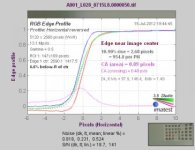
3. In order to compare the results, you need to first measure and quantify the properties that you want to improve upon. How otherwise can you show the improvement? There is no shortage of "arm chair commentators" that will shoot your findings down by saying: "it looks soft to my eye". And, they are right in so far that, as a scientist, you need to remove the subjectivity out of your results. The industry standard way of doing so is by calculating MTF charts. I use Imatest for this and one of the reports that you can generate is called RGB Edge Profile. It is a wonderful tool to measure and clearly see whether or not you are getting aliasing artifacts or not and whether or not you improved the sharpness and by how much.

I have done my own research on the subjects and, on this occasion, I have decided not to share the results or findings like I have done with flat port, dome port and submersible lenses underwater. Depending on the subject size (and here is a mystery that I don't reveal), we can achieve up to quadruple resolution improvement underwater. Funny enough, it doesn't work on land... :)

All I can say is that some improvements are possible, but they are neither simple or obvious and, much like Les has done so far, require deep understanding of what you are doing, when and why in order to achieve superior results.

Keep up the good work, Les :)
 
Thanks Pawl,

The recent 'Rose bowl' examples were from a sharp 50mm lens, at f8 . I don't think I was getting to much into diffraction, but you never know.
I used the simple scientific control of shooting first with the OLPF and using a normal post processing , and then the experiment with no OLPF and the alternate post processing.
I do plan on filming a test chart, I have to fire up my printer and print the recommended chart out first.

With charts and the high contrast edges I fear that the numbers may come out better than reality. The reason this may happen is that the processing of Bayer pattern images may have some 'smarts' in the algorythm to improve the sharp edges, which are so very easy to find in a black and white test pattern.
Does Imatest have any provisions to lessen this possible effect ? Perhaps something as simple as colored patterns with varying contrast ?
I'm not even sure it is an issue, but I do know that I could possibly game the system so to speak, if I knew what it was looking for !

Another Imatest question, can it be 'tricked' much by something as simple as fancy sharpening/ deconvolution ? Does the analysis it does go further than 'out in the open' edge stuff, perhaps looking at the modulation of a high line pair per MM section ? Something like a zone plate image ?

I'm a newbie as far as imatest, sorry if my questions are not applicable!
 
Hey Les,

The RGB Edge Profile does respond to sharpening to certain degree, but you can actually see the effect of the sharpenning and the actual transition in the profile. The great thing about RGB Edge Profile is that it not only gives you a precise measurement for a blak edge contrast (and this is how Imatest computes MTF), but it gives you the same for R, G and B, hence any problems with colour Moir patterns can be picked up fairly easily.

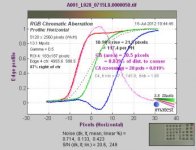
see example of RGB Edge Profile for a flat underwater port + Master Prime 14mm lens combination in the centre and corner of the frame. See how CA nicely shows up in the corner and, this is just by analysing black/white edge transition ... impressive, huh? :)

Without OLPF, when shooting a black/white edge at f/4 with lens that has high micro contrast, those RGB lines will be apart by some amount. This is what your software will need to fix. At f/8 the size of airy dics is about the size of the pixel, so you probably don't want to make the tests at f/8.

With OLPF removed you will be able to pass the Nyquist limit. But, in doing so, the R, G and B aberrations will show up and so will false detail (Moir pttern). They will be up to 1 pixel size and will be more prominent with a high micro-contrast lens at f/4.0 or wider apertures.

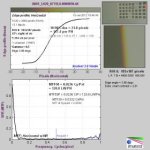
The last graph is the Edge Profile plus MTF graph. See that it reaches 0% contrast at less than 20% of the Nyquist limit of the sensor. This means that no amount of sharpenning is going to help in getting more than only 20% of the sensor resolving limit (we are getting less than standard definition quality here and can't really fix it "in post")...and it goes even worse as we move more towards the edge. This is what I measured close to the edge of the frame shot with flat underwater port.

Imatest is a great tool. I use it often and I love it.

Have fun and I look forward to hearing/seeing more :thumbsup:

edit: forgot to add, yes, you can shoot using white, red, green and blue light.
 

Attachments

  • A001_L028_0715L8.0000050_YBR7_01_ca.jpg
    A001_L028_0715L8.0000050_YBR7_01_ca.jpg
    18.9 KB · Views: 0
  • A001_L028_0715L8.0000050_YR87_04_ca.jpg
    A001_L028_0715L8.0000050_YR87_04_ca.jpg
    19.7 KB · Views: 0
  • A001_L028_0715L8.0000050_YR87_04_cpp.jpg
    A001_L028_0715L8.0000050_YR87_04_cpp.jpg
    14.9 KB · Views: 0
Pawal, regarding your own research, when you say you can achieve up to "quadruple the resolution improvement underwater", I assume you mean quadruple the resolution typical of underwater performance. In other words you have managed to overcome some of the resolution reducing conditions typically encountered underwater (damage control, so to speak), and have not, as Les is aspiring to demonstrate, improved the resolution of the sensor in general? If I understand the distinctions, if Les' claims are accurate they would give you (and everyone else) an even better point of departure for your underwater image enhancing methods. ????


Les, as well as the charts and graphs, PLEASE continue posting "before and after" images.
 
Pawal, regarding your own research, when you say you can achieve up to "quadruple the resolution improvement underwater", I assume you mean quadruple the resolution typical of underwater performance.
Hi Bill,

No. This is on top of approximately 10 fold improvement over flat and dome ports traditionally used in underwater cinematography....very exciting :)

edit: Here, we are discussing resolutions past Nyquist limit of the sensor density. What I published so far were improvements up to the Nyquist limit.
 
Sort of combination between de-bayered and non-debayered image I think. Every matrix has naturally occuring offset between different colour pixels, theoretically it could expand effective resolution but some special processing needed to extract additional resolution from it :) it is NOT just super smart upscale filter, definitely not. Also there was a lots of algorithms to extrapolate additional image information using difference between consecutive frames, like time-based upscale, maybe this method, who knows? I'm just guessing.

Anyway, damn cool, Les - you rock :)
 
Back
Top