caroline harrison
Well-known member
- Joined
- Jun 14, 2010
- Messages
- 52
- Reaction score
- 0
- Points
- 0
Hello everybody,
The latest DP6 firmware has enabled me to connect a DP6 to Red One seamlessly providing full menu displays.
Here's the info:
Note: this is only tested using a Red Mysterium-X Body, build 30 (firmware 30.6.0) connected to the Red One via HDMI.
1. Let SmallHD know that you are connecting to the RED and make sure your DP6 firmware is updated to the latest version they suggest. I am using version 1_1_1 and it works perfectly (they sent it to me as a beta test).
2. Before connecting the monitor, set the camera’s internal menu settings like this:
System – monitor – preview: set to menus DVI (not video 720)
System – setup – preferences – display (check status)
[in the AV menu – viewfinder – set the desired meters and assists as you normally would]
3. Connect the monitor and power up. Note that even on factory presets, the DP6 will show RED monitor menus i.e when DP6 advanced menu is set to scale – 16:9 and PC menu is set to scale – normal.
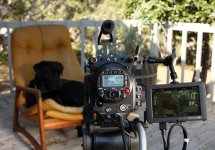
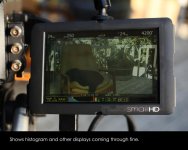
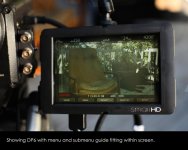
Pictures attached to prove it!
The latest DP6 firmware has enabled me to connect a DP6 to Red One seamlessly providing full menu displays.
Here's the info:
Note: this is only tested using a Red Mysterium-X Body, build 30 (firmware 30.6.0) connected to the Red One via HDMI.
1. Let SmallHD know that you are connecting to the RED and make sure your DP6 firmware is updated to the latest version they suggest. I am using version 1_1_1 and it works perfectly (they sent it to me as a beta test).
2. Before connecting the monitor, set the camera’s internal menu settings like this:
System – monitor – preview: set to menus DVI (not video 720)
System – setup – preferences – display (check status)
[in the AV menu – viewfinder – set the desired meters and assists as you normally would]
3. Connect the monitor and power up. Note that even on factory presets, the DP6 will show RED monitor menus i.e when DP6 advanced menu is set to scale – 16:9 and PC menu is set to scale – normal.
Pictures attached to prove it!