Welcome to our community

Be a part of something great, join today!

  • Hey all, just changed over the backend after 15 years I figured time to give it a bit of an update, its probably gonna be a bit weird for most of you and i am sure there is a few bugs to work out but it should kinda work the same as before... hopefully :)

Framing / Framing Presets?

Aaron Hucker

Well-known member
Joined
Sep 1, 2008
Messages
124
Reaction score
0
Points
0
Is this function working yet?

If so, any sugggestions on how to get a 2.40 crop (fit into a 1080p 16:9) from 4k 2:1 at full res debayer
 
framing

framing

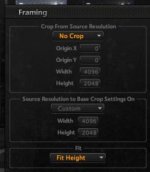
Don't adjust anything in the Framing window except the bottom setting "Fit". Make it say "Fit Height"...nothing else should change in that window. Make sure you change your export settings to 1920 by 1080 in the Export window.

I attached a screen grab
 

Attachments

  • framing.jpg
    framing.jpg
    9.2 KB · Views: 0
How exactly does that give me only the footage captured within the 2.40 guides I set while shooting ?
 
4096 / 2.4 = 1706

Therefore select the clip in the timeline, and then set "center crop", 4096x1706, base on 4096x2048, "fit width"

Export using a 1920x1080 preset.
 
it seems as though nothing is happening when I apply this numbers.

Is there something I'm missing? Shouldn't this be showing up in the display? or only in a render?
 
Only in a render. Works for me.
 
Back
Top