steve green
Well-known member
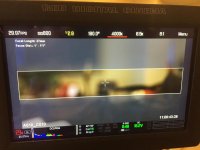
Hi everyone, I'm doing a shoot for a corporate event and the screen is 6480x1080. It'll be 120' wide, 6 to 1 ratio. I've got my frame lines on my E-W at 6.5K FF with a scale of 97.35 to give me the exact 6480x1080 ratio. Below is a frame for reference....
A couple of questions:
If I change that scale to 100% I get a larger field of view (which I'm looking for) the pixels are 6656x1109, still 6 to 1 ratio. I'm looking for confirmation that the higher pixel count will still fit on the 120' screen without having to crop from what we frame for on set.
Is it possible to keep the frame lines in playback? Now when I switch to playback, no frame lines. If so, how do I get there?
This is an action sequence with cars, motorcycles, jet skis, etc., with all that action on that size screen do you think a 90 degree shutter is a plus? It needs to feel fast but I'm thinking the motion blur on that size screen might not be good. I don't want to take all the blur away.....Looking for a happy medium.
Any other tips offered would also be greatly appreciated.
As always thanks for the help!
A couple of questions:
If I change that scale to 100% I get a larger field of view (which I'm looking for) the pixels are 6656x1109, still 6 to 1 ratio. I'm looking for confirmation that the higher pixel count will still fit on the 120' screen without having to crop from what we frame for on set.
Is it possible to keep the frame lines in playback? Now when I switch to playback, no frame lines. If so, how do I get there?
This is an action sequence with cars, motorcycles, jet skis, etc., with all that action on that size screen do you think a 90 degree shutter is a plus? It needs to feel fast but I'm thinking the motion blur on that size screen might not be good. I don't want to take all the blur away.....Looking for a happy medium.
Any other tips offered would also be greatly appreciated.
As always thanks for the help!