Welcome to our community

Be a part of something great, join today!

  • Hey all, just changed over the backend after 15 years I figured time to give it a bit of an update, its probably gonna be a bit weird for most of you and i am sure there is a few bugs to work out but it should kinda work the same as before... hopefully :)

Frame averaging - help please

Tim Bradley

Well-known member
Joined
Apr 19, 2007
Messages
602
Reaction score
1
Points
18
Age
61
Location
North Coast NSW Australia
Website
www.coastvideo.com.au
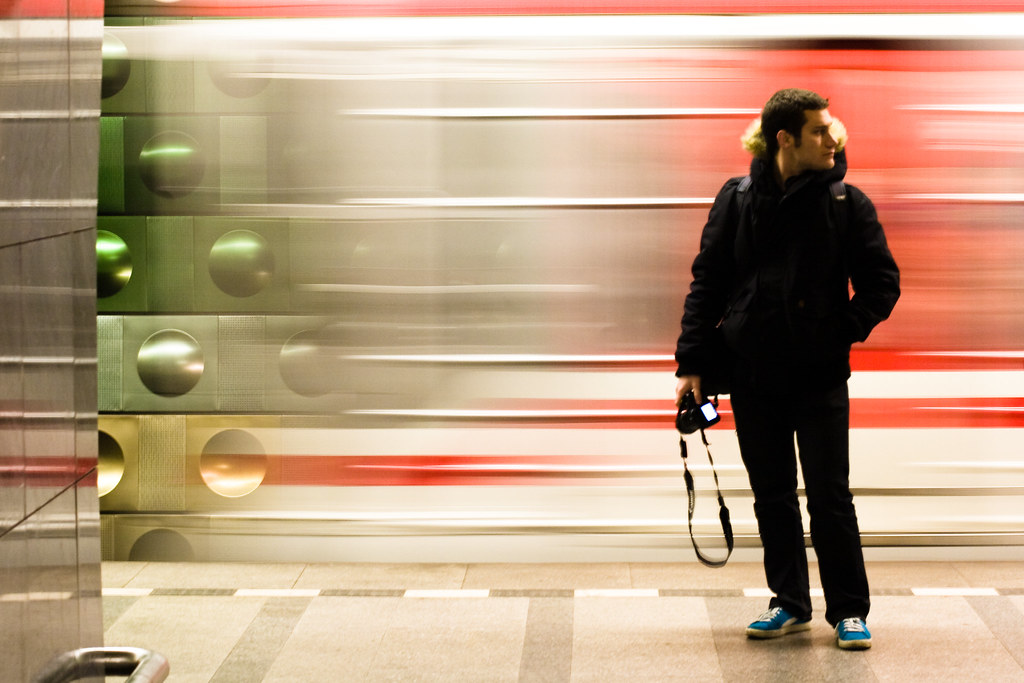
I want to shoot a motion blurred / long expose type shot and thought I'd used the Frame Averaging mode to achieve this. I want a very blurred image on motion in the frame so would like to use 16 or 8 frames for the averaging. However when I set up to shoot with 16 or 8 frames I can not get real time (25 FPS) playback.

Is there a way to achieve this sot of effect with 25fps playback?
2191640443_05d037612a_b.jpg
 
If you want the motion to be at normal speed but just an extreme increase in motion blur, I would do it with an echo type effect in post. Maybe test either shooting at 1/25 shutter or using a normal shutter speed and a plugin that does optical flow style motion blur. And if you only want streaks, you can limit the post effect to just the highlights. Looks pretty awesome when doing light painting.
 
Tim

You want to use frame summing not averaging for long exposure effects. Effectively it is taking 8 frame and adding them together for the blur. If you are on a Scarlet, you will never achieve full speed 25fps.

But on an EPIC you can at 4 frame summing at 5k and maybe 8 at 3K. You also want to be at a 360 degree shutter. That will effectively still only give you 1/3 second shutter but it will get you close. It is hard to expose with summing on though, because whatever you have it set to, it doesn't show in the preview only on record. If it is set to 4, I think that's 4 stops under you need to be at.
 
Matthew has very good points here.

If your subject is relatively still and a train is moving behind them, then you might be able to pull it off on a tripod at 270 or 360 degree shutter.

Frame averaging = Shutter speed stays the same for the exposure
Frame summing = Frames are blended together to create the "effect"


Battistella
 
Averaging and summing are exactly as their name implies. Averaging blends frames, like a cross/fade, whereas summing adds them (like Add Layer Mode in Photoshop or AE). Averaging does not affect exposure (although it very much lowers the noise floor), whereas summing reduces about one stop per frame (in practice, maybe 2/3rds of a stop, or 3/4).

You cannot play back timelapses made this way in the camera because it's just too much data (4 frames summed or averaged = 4 X data rate)

Whatever you do, use 360 shutter because otherwise the blurs will have have little steps missing. Yes you can do this in post, by hand or with a script, using normal 360 video.
 
Rob

Not sure what firmware you last tried playing back the footage, but as far as I know I have shot numerous timelapses and played them back with frame summing. When recorded, it only records 1 frame, so it either is buffering the summed frames or merging them on the ssd. Because I have shot 2 hour timelapse like this.

In my eyes, frame summing lets the camera act like a long exposure stills. To the OP, you could also try shooting at 12 or 12.5 and if the subject moves less, you won't notice. And you definately want to blackshade at the shutter you will be at. So at like 1/2 or 1/4 second
 
Frame Summing and playback are not correlated.

Frame Summing is a way of extending the electronic sensors exposure range (since a traditional BULB exposure can not be down on RED, the team created this as a way of extending the 1/2 second exposure time) In essence using a multiple exposure technique and writing one frame.

By summing or averaging 2, 4, 8, or 16 "exposures" into one written R3D frame. It uses a combination of multiple exposures to create 1 frame, so playback is the same as any other R3D.

A guideline.

1/2 second exposure at frame summing or averaging 2 requires 1 second to create ONE frame
1/2 second exposure at frame summing or averaging 4 requires 2 second to create ONE frame
1/2 second exposure at frame summing or averaging 8 requires 4 second to create ONE frame
1/2 second exposure at frame summing or averaging 16 requires 8 seconds to create ONE frame

Just handy numbers to keep in mind when using these modes. if you stay at a 360 degree shutter the sensor will expose for a half second 16 times, then SUM the frames to create one frame. IN summing mode it might give you a kind of effect you see in the OP image. If you AVERAGE these frames it will produce a more staccato effect.

Hope this clarifies things a bit.

David
 
David

That is all correct. But in my experience, you can get to a 1s exposure on any RED camera. Set the camera to 1fps and a 360 degree shutter yields a 1 second exposure.
 
I just found the image online as a reference so sadly can't tell you its location. Thanks everyone for the information and the suggestions. I do me tests to see if I can achieve whats needed on my Epic. My Sony F800 has a similar feature of frame summing but it works differently. By increasing the number of frames summed does not change the capture speed (it stays at 25fps) but does increase the motion blur and exposure. This is what I want t achieve with the Epic. The frames steps are the same (2, 4, 8,16)
 
Tim,

you can achieve this on epic as well. Just leave your TIMEBASE to 25fps, and set your frame rate to 1fps shutter at 360degrees and tell you actor to stay very still.

Thtats your our starting point before you get into frame summing.

Battistella
 
Thank you David, but I need to capture the scene at 25 FPS as I need the action in the scene to be at real time on playback. So what I would like to be able to do is use the 16 frame summing or averaging but still be capturing at 25fps.
My Sony broadcast F800 camera does this. As far as I can tell by increasing the summing or averaging frame number (2, 4, 8, 16) then slows the sensor capture rate. So using 16 fame averaging at 25fps base gives you an equilant rate rate of around 1.6 FPS.

I thank you all for your help and helping me clarify how to capture the scene I need to.

At this point I think I'll use 4 frame summing at 5k at a 360 degree shutter which is seems to the the longest exposure time I can achieve at 25FPS capture (thank you Mathew R)
 
Thank you David, but I need to capture the scene at 25 FPS as I need the action in the scene to be at real time on playback. So what I would like to be able to do is use the 16 frame summing or averaging but still be capturing at 25fps.
EDIT
At this point I think I'll use 4 frame summing at 5k at a 360 degree shutter which is seems to the the longest exposure time I can achieve at 25FPS capture (thank you Mathew R)


This is not possible. the moment you enter the frame summing mode your FPS will drop to 25fps/the frame summing number.

battistella
 
Back
Top