Rob Macey
Well-known member
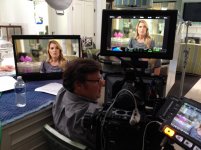
I picked up my Dragon last week and had our first production with Dragon yesterday. A packed day shooting in a Beverly Hills mansion with various interior locations. Client edits in ProRes 4444 so went sdi out into Pix240. For over a decade, some of my work is network TV interviews for newsmag's and I have to say, Dragon was dead quiet for pretty much 8 hours straight in adaptive mode. Temp didn't change at all. Ran the beta firmware. No issues.
The image…wow. It has tons of room in the real world. Dragon sees everything. DR all day. So much beautiful highlight to floor latitude. Supplementing available light with just a few HMI's and a show card was all I needed for most of the day. Skin tones are so silky and creamy. Color is WAY improved over Epic. Shot DC/RG4. No post color correction at all. Just created the look with lighting, shot it all and handed off the drive.
After shooting these network show promo's, I plan on using Dragon for all my interviews where S35 is now, for the most part, standard.
The image…wow. It has tons of room in the real world. Dragon sees everything. DR all day. So much beautiful highlight to floor latitude. Supplementing available light with just a few HMI's and a show card was all I needed for most of the day. Skin tones are so silky and creamy. Color is WAY improved over Epic. Shot DC/RG4. No post color correction at all. Just created the look with lighting, shot it all and handed off the drive.
After shooting these network show promo's, I plan on using Dragon for all my interviews where S35 is now, for the most part, standard.