George Nelson
Active member
Hello all, I don't post here very often but I'm in the need of some help. I just sent an email a few seconds ago to my bomb rep to ask for help with this matter, but I'm considered that my Epic Dragon is toast and possibly damaged the internal motors in my Zeiss ZE 85mm, 35mm, and 28mm lenses.
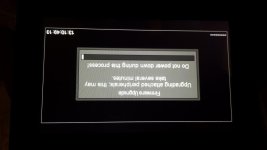
To make a long story short, but if you want more detail on the matter because it peaked your interest just let me know. When I was updating to the new 6.0.28 firmware the updating peripherals, the update bar stopped moving just before the end and sat there for over 20 minutes, but the timecode was still counting. At around 12 minutes the camera started to smell like the bad kind of hot and I placed it along the path of some AC to help cool the camera which seemed to help a bit. I was afraid to force a turn off on the camera due to the warning box on the update but I ended up having to do this after conferring with two people I know who shoot on REDs during this issue.
Upon the restart of the camera everything seemed to pop right up and the camera said that the peripherals were all updated and I verified that the new firmware took. I installed my Zeiss 50mm onto the camera and it seemed allow the iris control, after a little bit I put on my Zeiss 85mm and I heard an audible clicking sound like a clock and the Iris started to stop down by itself without changing what it was set at on the LCD. This happened with also my 35mm, and 28mm, but my Zeiss 21mm, and my Canon 8-15L seemed to work without the clicking and visual stopping down.
I switched to my PL mount but all that I was able to see was what the sensor sees, the timecode information, and Mag information on the bottom left.
I went to the previous firmware and everything still is doing the same thing but now there is an "NA" where the F-stop is supposed to be. I re downloaded the new firmware and this install went light-speed compared to the first one but everything is still messed up with the "NA" in place of the F-stop.
Does anyone have an idea on how I can fix this?
Could the clicking damage the irises on my lenses?
I enclosed a photo of the location where the bar stopped moving at.
I hope I covered everything and made sense. I'm extremely tired at this point.
Thank you all,
George
To make a long story short, but if you want more detail on the matter because it peaked your interest just let me know. When I was updating to the new 6.0.28 firmware the updating peripherals, the update bar stopped moving just before the end and sat there for over 20 minutes, but the timecode was still counting. At around 12 minutes the camera started to smell like the bad kind of hot and I placed it along the path of some AC to help cool the camera which seemed to help a bit. I was afraid to force a turn off on the camera due to the warning box on the update but I ended up having to do this after conferring with two people I know who shoot on REDs during this issue.
Upon the restart of the camera everything seemed to pop right up and the camera said that the peripherals were all updated and I verified that the new firmware took. I installed my Zeiss 50mm onto the camera and it seemed allow the iris control, after a little bit I put on my Zeiss 85mm and I heard an audible clicking sound like a clock and the Iris started to stop down by itself without changing what it was set at on the LCD. This happened with also my 35mm, and 28mm, but my Zeiss 21mm, and my Canon 8-15L seemed to work without the clicking and visual stopping down.
I switched to my PL mount but all that I was able to see was what the sensor sees, the timecode information, and Mag information on the bottom left.
I went to the previous firmware and everything still is doing the same thing but now there is an "NA" where the F-stop is supposed to be. I re downloaded the new firmware and this install went light-speed compared to the first one but everything is still messed up with the "NA" in place of the F-stop.
Does anyone have an idea on how I can fix this?
Could the clicking damage the irises on my lenses?
I enclosed a photo of the location where the bar stopped moving at.
I hope I covered everything and made sense. I'm extremely tired at this point.
Thank you all,
George