Welcome to our community

Be a part of something great, join today!

  • Hey all, just changed over the backend after 15 years I figured time to give it a bit of an update, its probably gonna be a bit weird for most of you and i am sure there is a few bugs to work out but it should kinda work the same as before... hopefully :)

Finally switched from Mac to PC: And this is what it looks like!!

Never have I been so eager to see Microsoft logo on a screen. However, I do dread that there is no proper implementation of mission control, quick looks, spaces multi-touch gestures to show desktop. And will have to rely on third party apps that are build very buggy and clunky.

Nevertheless. I feel free...Full I possibilities.

 
SadMac.jpg
 
Ok this is whats happened, apparently Supermicro shipment got blocked in Dubai, eventually when it got released received it.

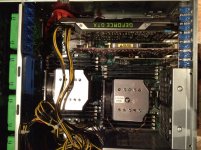
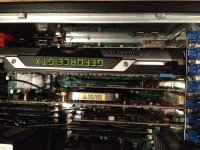
You can not put 2 GTX 690 GPUs in this system especially with the SuperMicro Casing, as PCI x16 lane 01 is in the bottom and the casing just does have the room to install the GTX690 hence only one goes in x16 lane 03 that covers x08 (which is x4, actually) x16 lane 02.

Now I have a Cyclone 2707 PCI-E2.0 GPU Expander and its HBA can be inserted in Lane 01, so I was going to install the 2nd GTX690 in the expander.

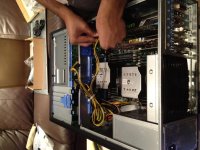
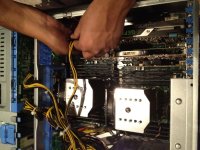
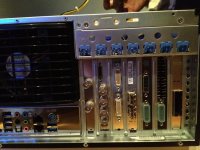
This is how I populated the system with

PCI-E x16 01 - Cyclone 2707 GPU Expander -------> GTX690
PCI-E x04 02 - Got covered by GTX690 (wasted)
PCI-E x16 03 - GTX 690
PCI-E x08 04 - Qlogic FC HBA
PCI-E x16 05 - RED Rocket
PCI-E x08 06 - BMD Decklink

Everything was working fine when these were not installed.

However, after installing these, my USB keyboard stopped working, i tried all the slots, different keyboards, etc. The mouse works not the keyboard.

But after removing all of the above with just one GTX 690, at boot up the USB is not working, but as soon as windows login screen shows up it does.

Still troubleshooting, its a pain :-(, but workable pain. I still dont have to wait till end of 2013 to get my work done fast.

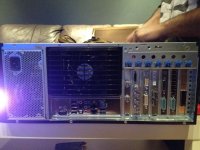
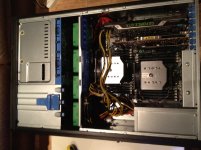
Here are some pictures
 

Attachments

  • IMG_1025.jpg
    IMG_1025.jpg
    92.6 KB · Views: 0
  • IMG_1026.jpg
    IMG_1026.jpg
    94.4 KB · Views: 0
  • IMG_1027.jpg
    IMG_1027.jpg
    94.1 KB · Views: 0
  • IMG_1028.jpg
    IMG_1028.jpg
    94.1 KB · Views: 0
  • IMG_1029.jpg
    IMG_1029.jpg
    97.1 KB · Views: 0
Some more pictures
 

Attachments

  • IMG_1030.jpg
    IMG_1030.jpg
    96.7 KB · Views: 0
  • IMG_1031.jpg
    IMG_1031.jpg
    91.9 KB · Views: 0
Very cool! I just got most of my parts, will also be building very soon. Bummer about lane 01 not being wide enough, I was hoping the GTX690 would fit there. Perhaps a job for my dremel and a horizontal orientation? (sorry, just thinking out loud, it'll probably compromise structural integrity, but I will check on that). Thanks for the update and pics! Hope RCX, your NLE's and Crysis will SCREAM on it! Keep us posted on any troubleshooting issues.
 
PCI adjuster

PCI adjuster

Very cool! I just got most of my parts, will also be building very soon. Bummer about lane 01 not being wide enough, I was hoping the GTX690 would fit there. Perhaps a job for my dremel and a horizontal orientation? (sorry, just thinking out loud, it'll probably compromise structural integrity, but I will check on that). Thanks for the update and pics! Hope RCX, your NLE's and Crysis will SCREAM on it! Keep us posted on any troubleshooting issues.

Oh Hey Michael,

Did you mean something like this?
 
I feel you man.

Windows 7 is stable, I will miss time machine, finder etc

But for a workstation, when doing edit on n number of screens, its the software that matters.

After they f***ed up with FCPX, people started shifting their software choices (I have both Avid Symphony 6 and Adobe CS6 MC, both of these work on windows 7) Its just made the transition easier.

My MP 09 is getting all clogged with 5K native edits and finishing. :-(

Sadly I may have to move too (for non film making reasons). I have been so happy with OS/X since 2003 now and converted all my machines over, but the Mac is just not keeping up in performance terms.
Even just running a couple of Android Emulators, everything grinds to a halt.

Now that finally Windows 7 seems to be stable, as much as I hate windows it's looking like time to switch back for all non "Email/web/personal stuff"

Sad day.
 
Very cool! I just got most of my parts, will also be building very soon. Bummer about lane 01 not being wide enough, I was hoping the GTX690 would fit there. Perhaps a job for my dremel and a horizontal orientation? (sorry, just thinking out loud, it'll probably compromise structural integrity, but I will check on that). Thanks for the update and pics! Hope RCX, your NLE's and Crysis will SCREAM on it! Keep us posted on any troubleshooting issues.

I am also looking into Coolmaster or some other casing for this. Adding a GPU Expander, is just plain stupid just because of the casing, I could use the GPU expander for my older Mac Pro.....Hmmm what to do.
 
Sadly I may have to move too (for non film making reasons). I have been so happy with OS/X since 2003 now and converted all my machines over, but the Mac is just not keeping up in performance terms.
Even just running a couple of Android Emulators, everything grinds to a halt.

Now that finally Windows 7 seems to be stable, as much as I hate windows it's looking like time to switch back for all non "Email/web/personal stuff"

Sad day.

After Apple being lazy on not including new I/O for current Mac Pro. And my issues getting power from USB ports with X9DAi. I just hate technology at this point. Sorry.
 
Update:

1. Trying to figure out how to install RED ROCKET on windows 7 as the manual only shows Windows XP and the dialog box to detect RED ROCKET has not shown yet.

2. I am working with a mouse and on-screen keyboard, apparently there is power coming through one USB port. check the BIOS settings etc, updating Windows 7 as of now.

Guys if you have any suggestion please do let me know.

Note: If you want RAID on the system for boot drive, you will need to copy the Motherboard Driver CD onto a USB on another computer and then put the Windows 7 disc for installation, as it will ask for drivers (including CD/DVD ROM as well). Just a tip.
 
Update 2:

1. Figured out how install the drivers for RED ROCKET, quite easy I must say.
2. I had to update the whole system till the bone to get the USB stuff working. SO be wary of this and dont panic like I did :-)
3. For some reason windows performance index is not completing. Probably the system kick total ass (This is what I would like to think...hmmm
4. Second GTX690 in Cyclone 2707 is recognized properly
5. Onto installing Adobe CS6, AVID Symphony, Davinci Resolve etc.
 
WHat am I doing wrong here.

Red rocket is not giving smooth playback of 5k footage at full.

Do I need to do a full windows firmware upgrade on the card???
 
Just found out that Windows client cannot connect to Xsan except if we use Stornext FX. And now how does that work.

Until then I have six sata 2 bays with raid controller sitting empty any suggestions.
 
:)

And how do you "show desktop" on a PC?

This thread would of been so much more entertaining had you just had a giant jpeg of a blue screen error...
 
Just picked up the GTX690 today and am waiting for the Xeon(s) to arrive. I'm going to start assembly with the MOBO and PSU today. Seems like you are making great progress Asif! You've met many obstacles and were able to overcome them. I'm still at the "wonder if the components work" stage." I look forward to the "making everything work together stage".

Did you get the X9DAi with the chassis installed or did you get them separately? I may have a couple of silly "plug goes where?" questions for you.
 
http://www.amazon.com/PCI-E-Express-Riser-Flexible-Cable/dp/B004XD74MC

Oops... forgot to link.

Basically, was your plan to attach a cable, extending it to some open location, and secure it in place?

That would be a nicer, more elegant solution to what I had in mind, I was actually thinking about cutting a large hole through the chassis to make the card shroud fit through, but I probably shouldn't. Once I make sure all the parts work, then I'll figure out the optimal arrangement, that's the fun part.
 
After listening to the massive pain that workstation has been to set up I am not so sure you have convinced me to switch yet lol.:hand:..
 
After listening to the massive pain that workstation has been to set up I am not so sure you have convinced me to switch yet lol.:hand:..

I am going through it so you guys won't have too :angelsad2:, until you want to change some major components.

Anyways, its always good to have a windows system around.
 
Back
Top