Welcome to our community

Be a part of something great, join today!

  • Hey all, just changed over the backend after 15 years I figured time to give it a bit of an update, its probably gonna be a bit weird for most of you and i am sure there is a few bugs to work out but it should kinda work the same as before... hopefully :)

Film Making Masterclass with Final Cut Pro X

rand thompson

Well-known member
Joined
Aug 9, 2011
Messages
18,878
Reaction score
608
Points
113
Film Making Masterclass with Final Cut Pro X


By Guildhall School of Music & Drama


A Film Making Masterclass from Soho Editors, partners of Guildhall's Electronic Music Department, in Apple’s award-winning film editing software, Final Cut Pro X.

Hosted by Film Director John Williams, who takes you through a complete workflow, from initial concept to final colour grading. See an expert at work as John covers topics including direction, shooting and editing, followed by a quick behind the scenes presentation on the ‘making of the day’, including footage captured during the Film Scoring Masterclass - https://www.youtube.com/watch?v=_1XkB...

Find out more about Electronic Music at the Guildhall School at: https://www.gsmd.ac.uk/music/principa...

Take an Evening Class in Logic Pro X at Guildhall in 2019, with Beginners and Advanced courses offered: http://bit.ly/2RyilTO
 
It's definitely a good program Rand, cheap too.
The logging and keyword capability is just brillant for larger documentaries - where storyboards are often not as clear.

I am just waiting for it to cope with 'in camera' ProRes files that can easily reconnect with the original R3D.
Then it will be outstanding.
 
William,


I used Avid Media Composer for many years, Now, only Davinci Resolve. I purchased Final Cut Studio with all its apps I think around 2007 or 2008 just as an alternative to have around along with Media Composer. Long story short, I just could never really love it as much as I did Media Composer.

I'm not using a Mac anymore so its Windows based apps for me from now on. However, I see a lot of members here who swear by Final Cut Pro X, and when I saw this Master Class for Final Cut Pro X, it really interested me. So I just thought it would interest Avid Final Cut Pro users even more.


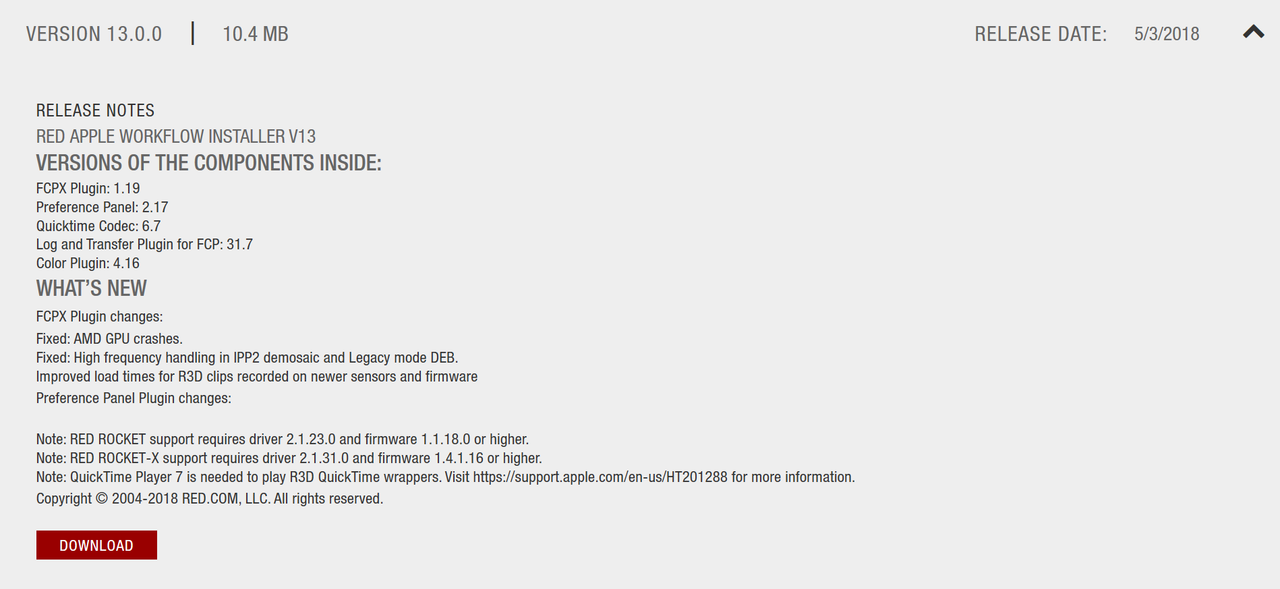
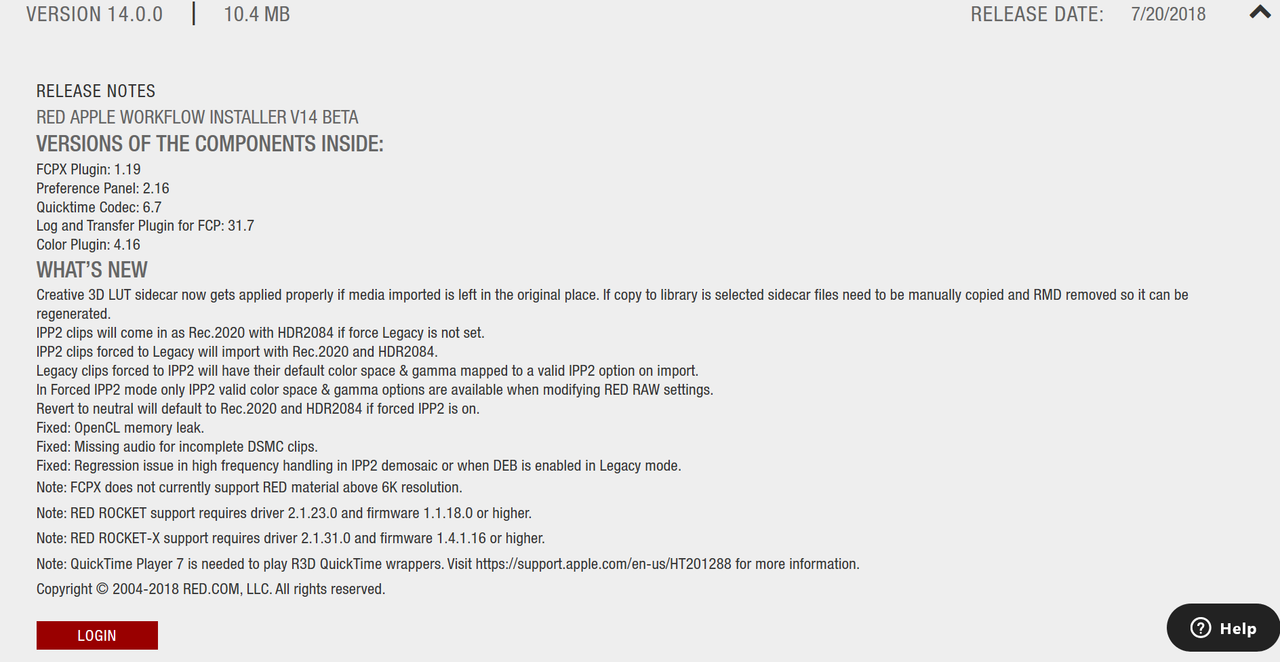
Are you using One Of The "Red Apple Workflow Installers"? either version 13.0.0 or the 14.0.0 Beta to see if that may help with your problem?

https://www.red.com/downloads/options?itemInternalId=16135


Screenshot-111.png


Screenshot-112.png
 
Hi Rand,
Thanks for replying. I haven't used either of these installers and perhaps I should?
Our 90 minute documentary project spans 1-2 years and I normally shoot simultaneously 5K (8:1) R3D and 422 ProRes HQ in camera.
The latter is really useful for quick access to dailies which we normally view immediately after logging/backup. It's a lot of material and this is where FCPX is outstanding when it comes to logging and cross referencing. It has never been easier to find 'that shot'.

However, I am the first to admit that I am not particularly technical; our workflow consists of an offline 2K edit (iMacPro) and then linking back to the original R3D for online finish. What is not clear to me, as yet, is the best way to 'reconnect' in-camera-ProRes that you use in the edit back to the original RAW files?
Apple doesn't seem to have a clear path for this as yet. FCPX assumes you generate ProRes within the program from R3D files. We don't do that.

Of course I might just be out and 'cycling' but any suggestions/advice would be most welcome. Cheers!
 
William,


Unfortunately, I neither have a Red Cinema Camera or Final Cut Pro X. I'll look Around to see what I can find. Maybe until then, Another reduser who has a solid FCPX /Red workflow will chime in.
 
William,


Here is something from 2015 so....hopefully it can of help until I can find something else.


Thanks for this thread Rand. It's a good addition to the very useful Resolve thread you created.

FCP X has an active user base and a bit of content dedicated to learning the program.
The third party support is perhaps the best around for any of the current NLEs and even bigger than the Final Cut Pro classic days.

Ripple training recently started a Live weekly Youtube show that discusses features, techniques, and news regarding FCP X, Compressor, and Motion. Well produced show with very knowledgeable hosts in Steven Martin and Mark Spencer.

NOTE VIDEO STARTS AT AROUND 3:12.

Brian Timmons
BRITIM/MEDIA
 
Thanks Rand. Yes, I have seen that clip before but it was good to look again. However, his ProRes files are generated within FCPX and stored locally in that library.

What will be nice to discover is how in-camera-ProRes files that are committed to the FCPX edit can be 'relinked' to external R3D files? What is the best pathway? We shall find out! :))

Here are a few more tutorials from Soho Editors. Thomas Grove Carter's work is especially good.

https://vimeo.com/channels/1215220/194855528
 
Thanks for the link to the tutorials William!
 
Final Cut Pro multi-cam must have tips! | FCPX tips for editing music videos


By Harv Video/Audio Stuff


Subscribe to my channel by clicking this magic button: http://bit.ly/2FBjWlQ

Interesting grading videos
Grade vintage B&W https://youtu.be/XaNTINhKYSw
Colour grade LOG footage https://youtu.be/PvSEFGZgqDU
Colour grading thought process https://youtu.be/ljHfM932-zE

Check out my original royalty free music on my website www.harvvideo.com

This video was graded with Vellichor LUTs, check them out here http://bit.ly/2oHSQAM (By Ricardo Sousa)

⬇️ GEAR I USE TO MAKE THESE VIDEOS ⬇️
My favourite camera for video - (US) http://amzn.to/2nfmBwZ
(UK) http://amzn.to/2n1THMx
My favourite lens - (US) http://amzn.to/2jxQ9kE
(UK) http://amzn.to/2ByV1OH
The lens I use for my studio angle - (US) http://amzn.to/2Cb6MyB
(UK) http://amzn.to/2oaPcSM
My favourite tripod - (US) http://amzn.to/2oEG4rt
(UK) http://amzn.to/2nw3spI
My favourite external monitor - (US) http://amzn.to/2j0O6Zn
(UK) http://tidd.ly/819a6de9
The best slider I’ve ever used - (US) http://bit.ly/2sF37Dg
(UK) http://tidd.ly/e3d5b3d0
My favourite microphone…ever! - (US) http://amzn.to/2vCjNtH
(UK) http://amzn.to/2tGtfdV

Check out all the gear I use https://kit.com/HarvVideoAudioStuff/a...

My favourite place to get second hand gear http://tidd.ly/540439c5 Wex photographic used cameras, lenses etc. Buy with confidence (not a sponsor I just love wex!)

Buy me a coffee ☕ If you found this helpful and are feeling generous you can support this channel by donating here www.paypal.me/HarvVideoAudioStuff ...huge gratitude in advance :)

Facebook http://bit.ly/2uiWqZD
Instagram @harv_video_audio_stuff
 
How to Get Video Revisions Done Faster Using Frame.io and Final Cut Pro X


By Marcos Rocha


How to Get Video Revisions Done Faster Using Frame.io and Final Cut Pro X. Getting revision on a video can be time consuming for our clients, that is why it's good to make it as simple as possible for them. Frame.io is a tool that speeds up the process of getting revisions because they can quickly add comments within the video. They can look at the video and make revisions from their phone, their tablet, or computer. I recommend they use a computer because it easier to make comments, plus there's more features that are enabled.

Get 1 Month Free of Frame.io with this link: http://r.frame.io/rbq8l?c

Jump ahead:

1:26 Exporting from FCPX

2:30 Using Frame.io Website

5:54 How the Recipient makes Revisions

6:48 Looking at Revisions

8:40 Using Frame.io Extension
__

Main Camera: https://amzn.to/2BlDo6L

Lens: https://amzn.to/2U2D4RC

2nd Camera: https://amzn.to/2KoLNHW

Lens for 2nd camera: https://amzn.to/2WE94gu

My complete video gear: https://kit.com/elmarcosrocha/my-yout...

DISCLAIMER: Some of the links are affiliated, if you purchase gear with these links I will receive a small commission at no additional cost to you. Thank you for your support.
___

Music is from Artlist, get 2 months free with this link: https://artlist.io/Marcos-79980
___

Free ebooks:

Learn Video Book:

http://bit.ly/learnvideobook

7 Reasons Why Your YouTube Channel is Not Growing!:

http://bit.ly/7ReasonsYTube
 
Apple Final Cut Pro X 10.4.4 Presentation


By LumaForge


Watch Apple's Final Cut Pro X 10.4.4 presentation from the Los Angeles Creative Pro User Group meeting in January 2019. Learn about the new Workflow Extensions, Noise Reduction, Batch Export, Comparison Viewer, and VR tools built into FCPX 10.4.4.

Hear from Emery Wells from Frame.io about their new FCPX workflow extension. Also see how FCPX and ProRes RAW were used to create a recent episode of Lowerider Roll Models.

For super easy collaborative video storage, check out the LumaForge Jellyfish.
https://lumaforge.com/jellyfish/

Don't forget to Subscribe for more presentations from the Faster, Together Stage.

To learn more about us, go to our website, or follow us on social media.
Website: https://lumaforge.com
Twitter: @lumaforge
Facebook: LumaForgeInc
Instagram: @LumaForgeInc
 
Special Effects in Final Cut Pro X - Beginners Guide


BY VJ Video Production Tutorials


There are some really cool special effects in FCP X that are easy to do
if you know how.

Final Cut Pro X Beginners Course: https://bit.ly/2uuDgii

In this tutorial we’ll teach you how to do everything from cloning your subject to changing the color of just one part of your shot. These are the kinds of effects that look so much more complicated than they really are but they make your videos look very professional.

Learn much more about producing video with your smartphone, or any other camera, and turn it into a profitable career with a free trial of TheVJ.com.
 
MBS Ep 449: Batch Export from the FCPX Timeline


By Ripple Training


In this tutorial, Steve will show you how to batch export clips from Final Cut Pro X's Timeline.

Click here to see all of our FCP X Plugins:
https://www.rippletraining.com/produc...

Topics Covered:

How to Flag Timeline Clips for Export
How to Choose a Frame.io Share Preset
How to Configure for Exporting
How to Monitor the Export Process

LEARN FCPX - COMPLETE TRAINING: https://www.rippletraining.com/produc...

Learn FCP 10.4 New Features -https://www.youtube.com/playlist?list...
 
You're welcome William! I looked around for tutorials for final cut pro X, but they all seem old and somewhat out of date. I don't use Final Cut Pro X so I don't want to seem disingenuous by posting tutorials for a product I don't use. However, I just thought I would contribute tutorials for the Final Cut Pro X users on the forum from time to time to help as much as the Davinci Resolve tutorials ,a program I do use, helps the Resolve users on this forum.
 
Master The Ken Burns Effect - Final Cut Pro X


By David A. Cox


Published on Mar 6, 2019
Today I'm showing you how to master the Ken Burns Effect using Final Cut Pro X. If you're looking to create a slideshow, documentary, or really any video that contains photos, the Ken Burns effect is a very effective way to bring them to life.

SUBSCRIBE & HIT THE ��
http://bit.ly/TTASubscribe

The Ken Burns effect is used in all types of videos including graduation ceremonies, funerals, weddings, bar mitzvah's, etc. Today we're talking about how to achieve this effect in Final Cut Pro and also how to use a combination of a simple copy/paste formula along with the freeze frame effect in order to create multiple camera movements.

STEP BY STEP DIRECTIONS FOR MULTIPLE CAMERA MOVEMENTS:
1. Add the Ken Burns effect to your first image and figure out the first movement.
2. Move to the first frame of that clip in order to create a freeze frame (arrow up to move to the beginning and then option + F to create a freeze frame)
3. Create another freeze frame for the last frame of the clip.
4. Copy and paste the clip that contains the first camera movement.
5. Swap the start/end images
6. Adjust the end image to reposition it.
7. Repeat steps 2-6 as needed.


- - - - - - - - - - - - - - - - - - - - - - - - - - - - - - - - -

Why Book A Private Lesson with David?

➔ Get your questions answered from the comfort of your own home.
➔ Priced to be affordable.
➔ YouTube Channel Consulting Now Available
➔ Sample Topics Include: Photos Organizing/Editing/Projects, Video Editing, Clean Up Hard Drive, Organizing, Backup Solutions, New to Mac Instruction, etc.

Click Here to Book A Lesson: http://bit.ly/DavidACox

Check Out All the Tech Products David Recommends Here:
http://bit.ly/TechRecommendations

Follow Tech Talk America on Facebook:
https://www.facebook.com/techtalkamer...

Occasionally catch us on Instagram:
http://instagram.com/techtalkamerica

We almost never use Twitter, but here's our handle anyway:
http://twitter.com/techtalkamerica

http://bit.ly/TTASubscribe
 
MBS Ep 451: Creating a 3D Transition for Final Cut Pro X


By Ripple Training


Published on Feb 20, 2019
Mark shows you how to create a custom animated transition in Motion, then publish it for use in Final Cut Pro X.

Topics Covered:

Set up a Transition Project in Motion
Add a 3D Camera
Animate a 3D Camera
Publish the Transition for Final Cut Pro X

Want to learn to do even MORE in Motion?
https://www.rippletraining.com/produc...

Get Your questions answered every week on RippleLIVE
https://www.youtube.com/playlist?list...
 
Advanced Multicam Techniques in Final Cut Pro X FCPX


By Idustrial Revolution


Published on Feb 18, 2019
https://idustrialrevolution.com/blogs...
Take look at three different multicam projects that each feature a little bit more than just cameras!

#FCPX #FinalCutPro #Tutorial

Please help us by liking the video and subscribing. We hope to bring you many more great Final Cut Pro X tutorials in the future and every click helps!

***XEffects News Graphics Plugins for Final Cut Pro X***
https://idustrialrevolution.com/produ...

*The Gear We Use*

THE MAC WE LOVE https://amzn.to/2VFNnME
10GigE SHARED STORAGE https://amzn.to/2RJzNZG
10TB DRIVES FOR RAID https://amzn.to/2CYu1uF
BACKUP DRIVES https://amzn.to/2M0L6ap
VIDEO & AUDIO OUT https://amzn.to/2SHF5Ss
ACTIVE SPEAKERS https://amzn.to/2SMtNwb
BACKLIT KEYBOARD https://amzn.to/2VH3zNu
V. FAST ROUTER https://amzn.to/2SHFMv2
USB TO GIGE https://amzn.to/2SLlv7M

We use this app to record Skype calls
https://www.ecamm.com/mac/callrecorder/

We use Ecamm Movie Tools to export multi person calls
https://www.ecamm.com/support/article...

**Check out our great plugins on our site**
https://idustrialrevolution.com

** Like the transitions on the video? Find XEffects 3D Transitions plugins here
https://idustrialrevolution.com/produ...

Twitter
https://twitter.com/idustrialrev

Instagram
https://www.instagram.com/idustrial_r...

Facebook
https://www.facebook.com/idustrialrev...

We were using Final Cut Pro X 10.4.5 running in Mojave - in dark mode of course!

The best way to get in touch is via the contact page on our website.
https://idustrialrevolution.com/pages...
 
Back
Top