Welcome to our community

Be a part of something great, join today!

  • Hey all, just changed over the backend after 15 years I figured time to give it a bit of an update, its probably gonna be a bit weird for most of you and i am sure there is a few bugs to work out but it should kinda work the same as before... hopefully :)

FCPX Unable to Save Redcode Raw Settings

Kenny Mosher

Well-known member
Joined
Jun 3, 2011
Messages
525
Reaction score
1
Points
18
I am having issues with FCPX loading in RMD data from changes that were made in RCX (auto save RMD enabled). For some reason some R3Ds carry over the metadata from RCX and others don't. When I try to modify Red Raw settings in FCPX I am getting and error that says "FCP is unable to save Redcode Raw settings.

I do not have ay other apps open when working in FCPX. I am working with 5K and 60 R3Ds from the Dragon.

FCPX ver 10.1.1

Any help is appreciated!
 
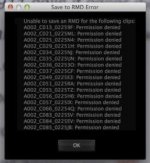
The strange thing is after I ensured that the root folder where the reels are located (on a Pegasus 2 raid) has read/write access, RCX still says that random files don't have permission to save RMD. The issue isn't with all the R3Ds in the folders, just some of them (see attachment).
 

Attachments

  • Screen Shot 2014-02-27 at 3.23.01 PM.jpg
    Screen Shot 2014-02-27 at 3.23.01 PM.jpg
    14.5 KB · Views: 0
I have been denied write access to the odd folder in a way that seems random many times over the years. Most often it is caused by improper shut downs, disconnecting volumes without first dismounting them or software crashes.

First do another permissions repair on the entire volume, then go to the folder at the root of the problem and change preferences to allow the access you need. Be sure to select "apply to enclosed items". It is in the drop down menu below the permissions pane in Mavericks.

9 out of 10 times this fixes the problem straight away. Sometimes I end up repeating the process a second time, but it should do the trick unless there is some other underlying problem.
 
I'm having the same problem. It wasn't working, then I updated the software and it started working. Then stopped working. Both on my Mac Pro and Macbook Pro to different external hard drives.
 
Back
Top